New Job Startup
14
3.2 Cleaning the Cutter
CAUTION! Mechanical Hazard. Use extreme caution when working in the
vicinity of the cutter blade.
1. After each layer of the model is printed, the cutter blade trims the build and support material
to the exact height specified by the print job parameters. The blade is extremely sharp. Do not
touch the cutter blade. The cutter may occasionally need cleaning to remove dust and debris
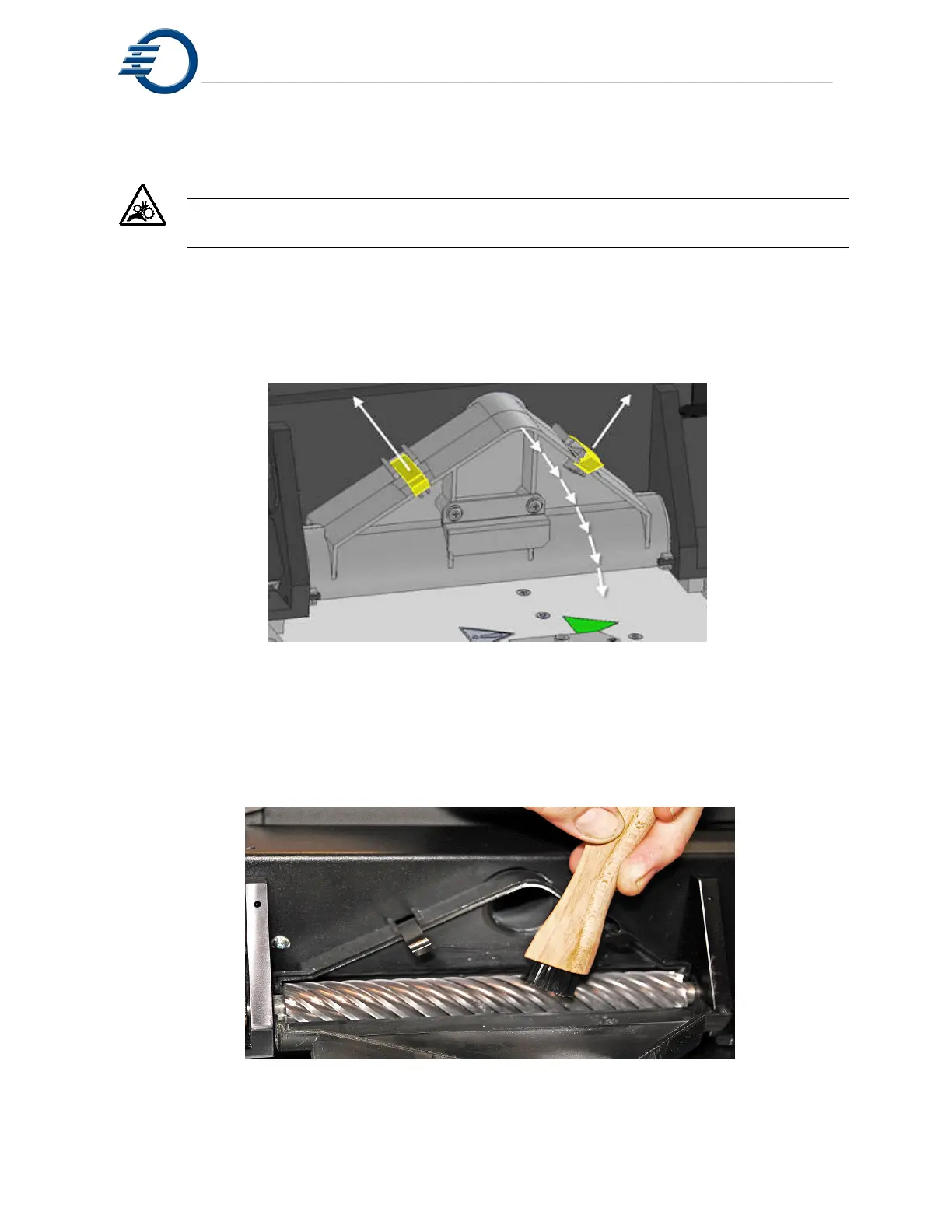
from the blade. To clean the cutter first, unlock the 2 locking clips and open the cutter shroud to
reveal the cutter blade. See Figure 3-4 Opening Cutter Shroud.
Figure 3-5 Opening Cutter Shroud
2. Carefully inspect each edge of the cutter blade along its entire length. Use the wooden
handled brush provided in the starter kit to rotate the blade for inspection. If there is dust and
material on the blade, use the brush and plastic putty knife to remove the debris.
See figure 3-6 Cleaning the Cutter Blade.
3. Close the cutter shroud and lock in place by pressing down on the clips.
Figure 3-6 Cleaning the Cutter Blade



 To Next Page