Power on Procedure
8
CAUTION: If the unit has been exposed to cold weather for an extended
period of time, i.e., below freezing temperatures for twelve hours
or longer, allow the unit to warm up to room temperature prior to
startup. A minimum warm up period of twelve hours is
recommended.
1. Turn on the vacuum power switch if it is not already set to the on position.
2. Close the 3Z Series unit side and top covers.
Note: Both covers must be closed or the interlock will prevent the system from
completing the start up sequence.
3. Turn on the 3Z Series system by pressing the ‘I’, side of the power switch on the left rear
corner of the unit.
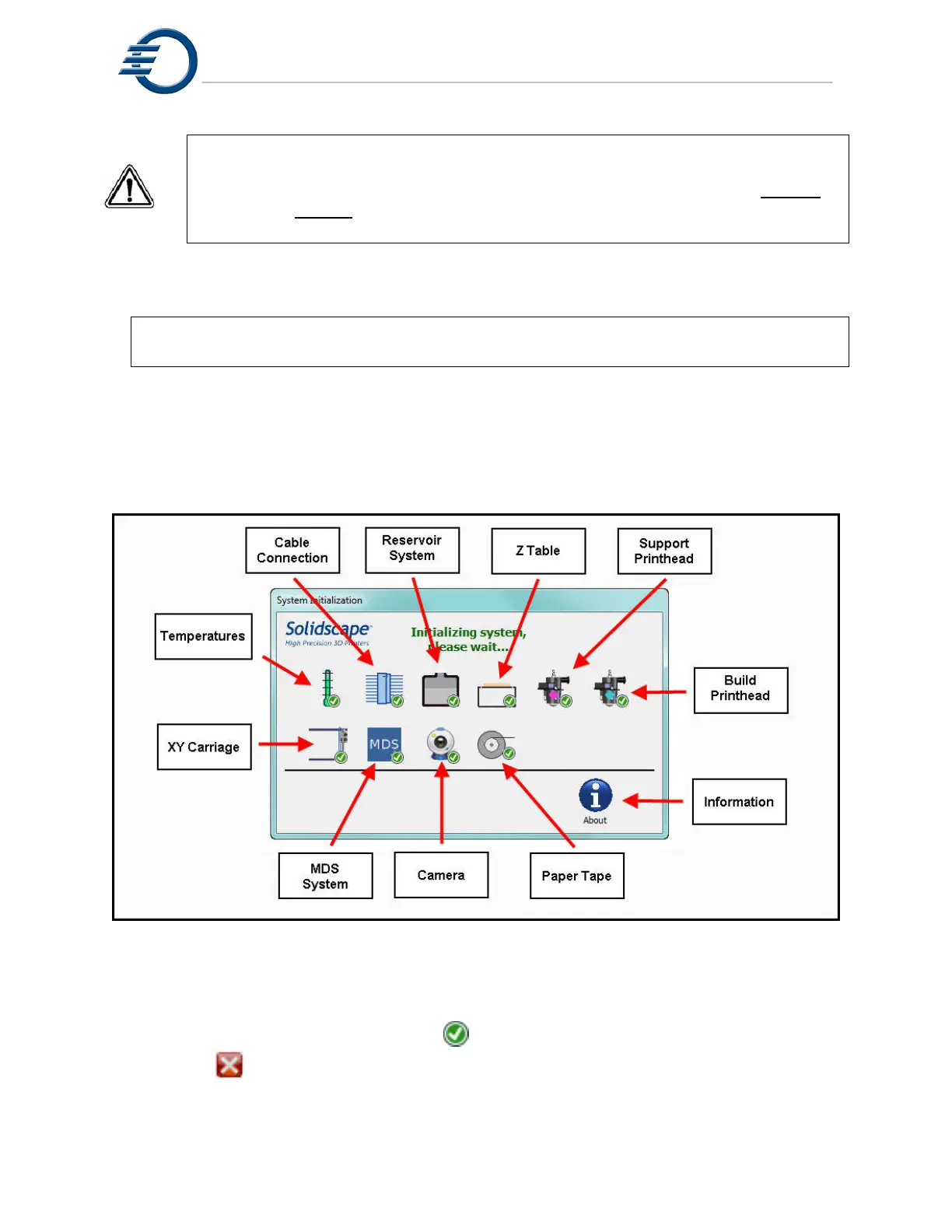
4. Observe the following start up screen, See Figure 2-1, as the system progresses through
the initialization stages. Be patient during power-on initialization. Note that it takes
approximately one minute to start up the system and during most of that time the unit
appears idle.
Figure 2-1 Initialization screen
5. All of the initialization screens are automatic and progress from one to the next without any
operator intervention required. The icon for each process will be grey during initialization.
The icon will display a green check mark upon successful completion
or a red if the process is incomplete or is failing. Figure 2-2. illustrates that the
camera did not initialize properly. If an initialization fails, touch the failing icon for a more
detailed explanation.



 To Next Page