New Job Startup
15
3.3 File transfer and removal
A job file must be transferred to the printer every time a new print job is run. The file type for the
3Z Series printers must have an extension of .3zp. for the 3Z Pro, 3zm for the 3Z Max and .3zs
for a 3Z Studio. An example for the 3Z Pro would be Customer job.3zp.
There are two methods used to transfer the file to the printer: Via Flash Drive, or via a network
connection.
3.3.1 File Transfer via Flash drive.
1. Open the top cover and right side cover of the printer.
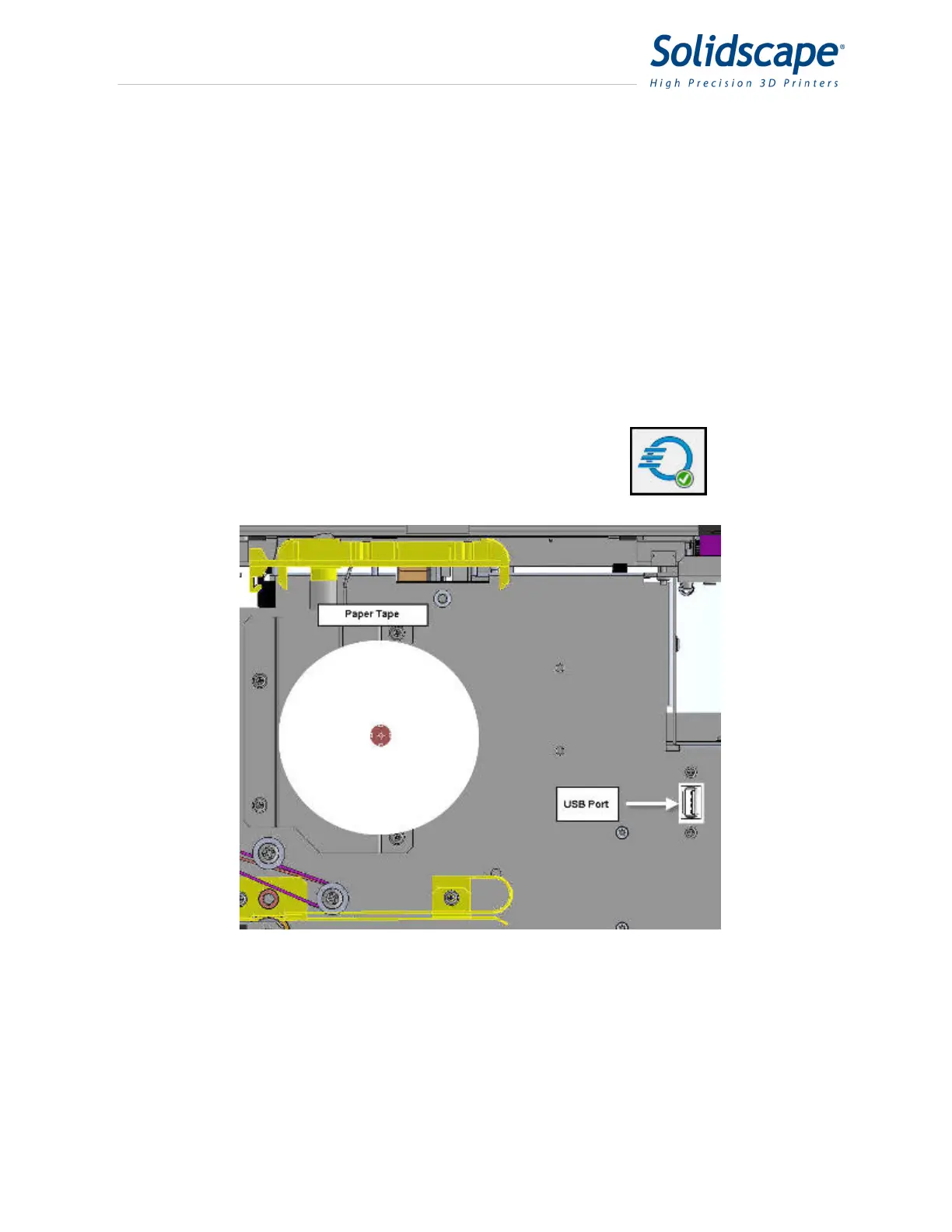
2. Insert the flash drive in the USB port. The USB port is located between the paper tape roll
and the vacuum hose. See Figure 3-7 USB Port Location
3. The printer will recognize and download the most recently created file automatically only if
there is no job already loaded.
4. The newly loaded file is then automatically checked for errors.
Upon successful completion of a file transfer, the file icon will
display a green check next to it.
Figure 3-7 USB Port Location
3.3.2 File Transfer via Network.
Transferring a file via a network connection can be processed from 3Z Works, 3Z Analyzer, or
the 3Z Printer driver. The printer must have an established network connection.
Refer to section 10.2 for instructions on network installation. The printer must be idle and have
no job loaded. For 3Z Works and 3Z Analyzer, use their respective Copy to commands. For the



 To Next Page