87
Settings and Adjustments
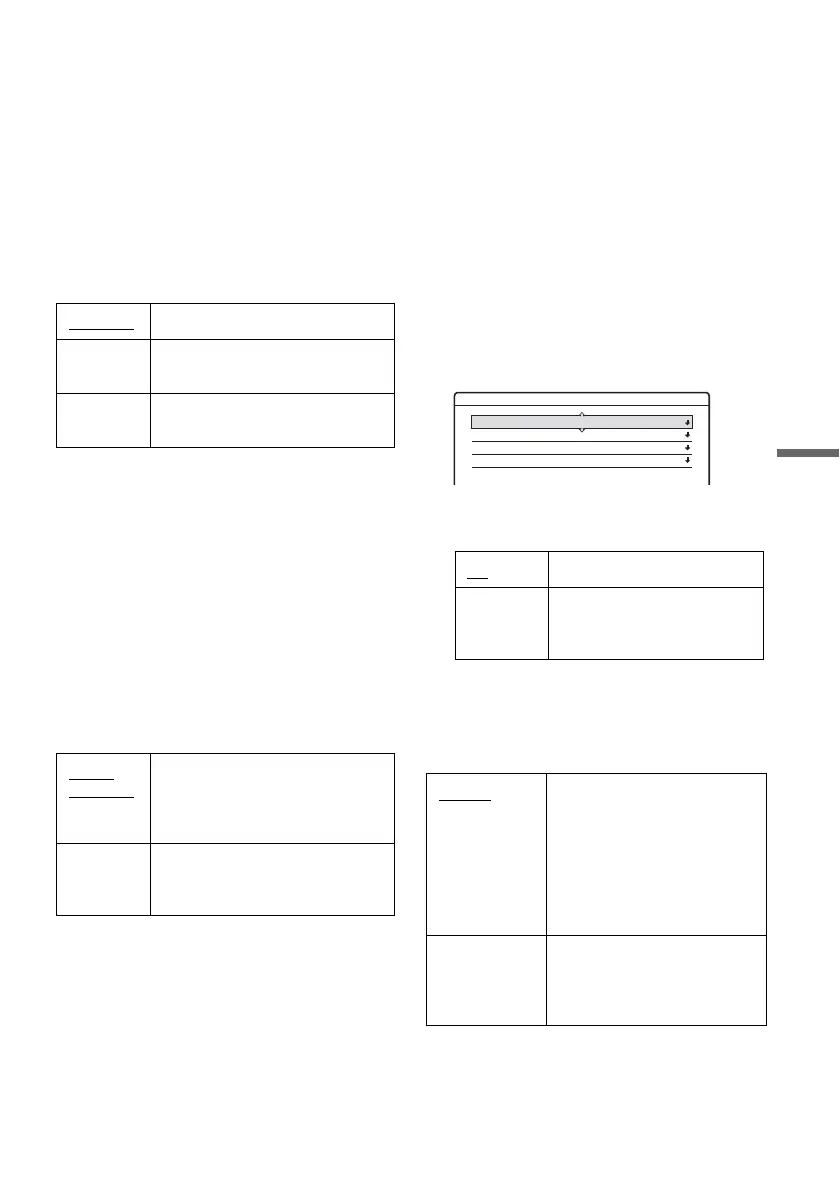
Audio DRC (Dynamic Range Control) (DVDs
(digital video disc) only)
Makes the sound clear when the volume is turned
down when playing a DVD (digital video disc)
that conforms to “Audio DRC.” This affects the
output from the following jacks:
– LINE OUT (line out) (R-AUDIO-L (right-
audio-left)) jacks
– DIGITAL OUT (digital out) (OPTICAL
(optical) or COAXIAL (coaxial)) jack only
when “Dolby Digital” is set to “D-PCM”
(page 87).
Downmix (DVDs (digital video disc) only)
Switches the method for mixing down to two
channels when you play a DVD (digital video
disc) which has rear sound elements (channels) or
is recorded in Dolby Digital format. For details on
the rear signal components, see “4. Displaying the
Playing Time and Play Information” on page 36.
This function affects the output of the following
jacks:
– LINE OUT (line out) (R-AUDIO-L (right-
audio-left)) jacks
– DIGITAL OUT (digital out) (OPTICAL
(optical) or COAXIAL (coaxial)) jack when
“Dolby Digital” is set to “D-PCM” (page 87).
Audio Connection
The following setup items switch the method of
outputting audio signals when you connect a
component such as an amplifier (receiver) with a
digital input jack.
For connection details, see “Step 4: Connecting
the Audio Cords” on page 20.
Select “Dolby Digital,” “DTS,” and “48kHz/
96kHz PCM” after setting “Digital Out” to “On.”
If you connect a component that does not accept
the selected audio signal, a loud noise (or no
sound) will come out from the speakers, and may
affect your ears or cause speaker damage.
1 Select “Audio Connection” in “Audio,” and
press ENTER (enter).
2 Select “Digital Out,” and press ENTER
(enter).
3 Select “On,” and press ENTER (enter).
4 Set the digital output signal.
• Dolby Digital (DVDs (digital video disc) only)
Selects the type of Dolby Digital signal.
Standard Normally select this position.
TV Mode Makes low sounds clear even if
you turn the volume down.
Wide
Range
Gives you the feeling of being at a
live performance.
Dolby
Surround
Normally select this position.
Multi-channel audio signals are
output to two channels for
enjoying surround sounds.
Normal Multi-channel audio signals are
downmixed to two channels for
use with your stereo.
On Normally select this position.
Off The influence of the digital
circuit upon the analogue
circuit is minimal.
D-PCM
(Downmix-
Pulse Code
Modulation)
Select this when the recorder
is connected to an audio
component lacking a built-in
Dolby Digital decoder. The
surround effects of output
signals are determined by the
“Downmix” setting item in
“Audio” setup.
Dolby Digital Select this when the recorder
is connected to an audio
component with a built-in
Dolby Digital decoder.
Audio - Audio Connection
Digital Out : On
DTS :
Dolby Digital :
Off
48kHz/96kHz PCM : 48kHz/16bit
D-PCM
,continued



 To Next Page