Version 5.2 Sourcefire 3D System Installation Guide 187
Hardware Specifications
Sourcefire 8000 Series Devices
Chapter 6
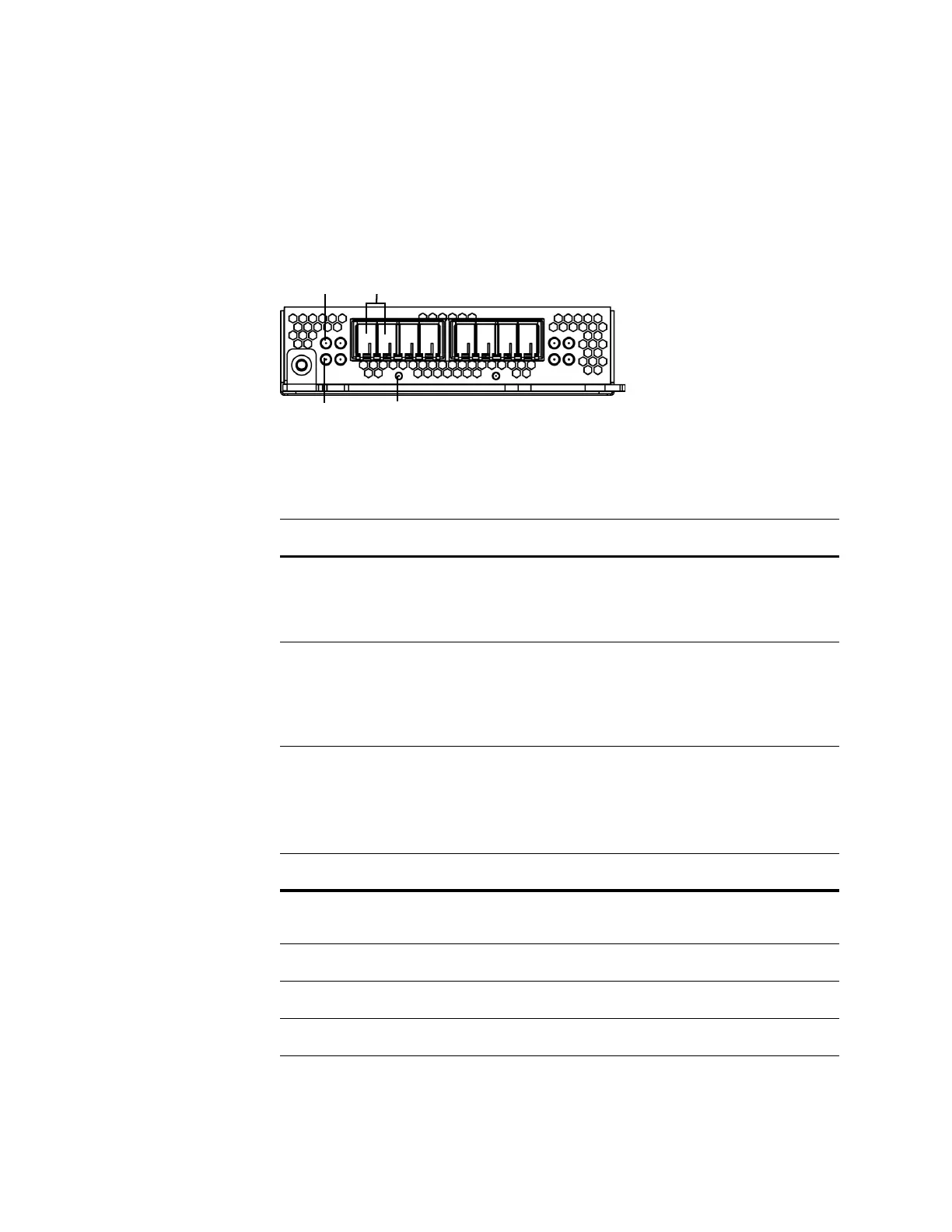
Quad-Port 1000BASE-SX Fiber Configurable Bypass NetMod
The quad-port 1000BASE-SX fiber configurable bypass NetMod contains four
fiber ports and link, activity, and bypass LEDs.
Use the Fiber Link/Activity LEDs table to understand link and activity LEDs of the
fiber interfaces.
Use the Fiber Bypass LEDs table to understand bypass LEDs on the fiber
interfaces.
Link LED Ports
Bypass LED
Activity LED
Fiber Link/Activity LEDs
STATUS DESCRIPTION
Top For an inline or passive interface:
• A blinking light indicates the interface has activity.
No light indicates there is no activity.
Bottom For an inline interface:
• A light indicates the interface has activity.
• No light indicates there is no activity.
For a passive interface, the light is always on.
Fiber Bypass LEDs
STATUS DESCRIPTION
Off The interface does not have link and is not in bypass
mode.
Steady green The interface has link and is passing traffic.
Steady amber The interface has been intentionally brought down.
Blinking amber The interface is in bypass mode; that is, it has failed open.



 To Next Page