11
>
>
© STULZ GmbH – all rights reserved EN/06.2019/G57
C7000 INSTRUCTIONS FOR A/C UNITS
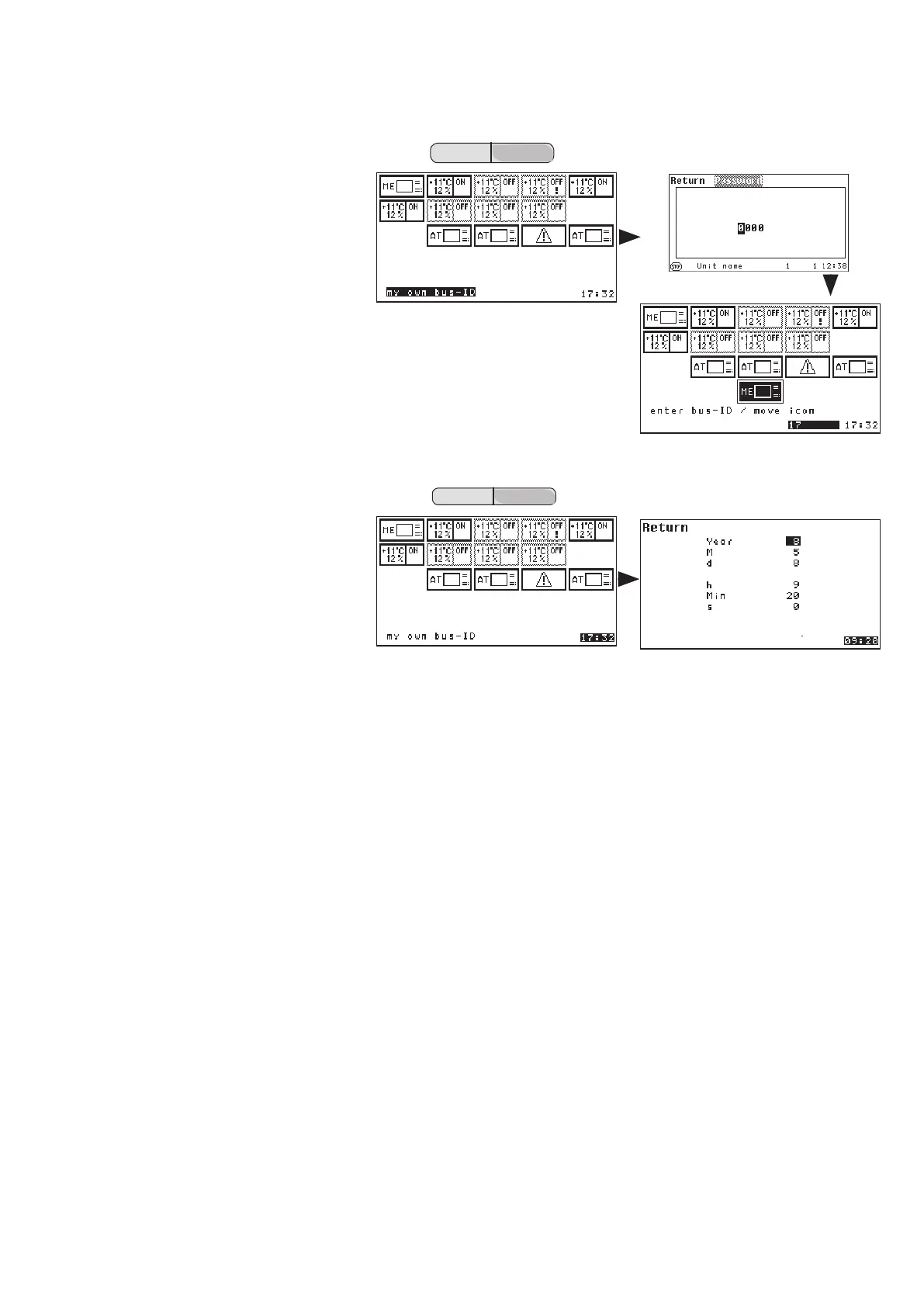
Placement view
By pressing the selector key ">"
you come to the following window
in which the box "my own bus-ID is
marked.
After the confirmation of this window
by "OK" followed by the AT-password
the placement view is displayed.
In this window you can shift the
C7000AT, from which you operate
the system (ME) to another position
with the selector key.
By this you modify the bus address.
(ME
old at position 0 and MEnew at
position 17)
Confirm the position by the
"OK-button".
Finally you can adjust the time and
date by selecting the clock in the
lower right corner.
The following items can be adjusted in sequence:
- Year, Month, Day, Hour, Minute, Second.
All active bus participants synchronize their time to this setting.
If a WIB8000, in which the time synchronization is enabled, is part of the Stulz bus, all connected C7000ATs and
C7000IOCs (by means of E-bus board) take over date and time of the WIB. This also applies to C7000ATs con-
nected via an IO bus with an C7000IOC, which is connected with the WIB by an E-bus board.



 To Next Page