159
ID glob.adr. dev.type reliab. cong.
0 - unknown 0% 0
1 - unknown 0% 0
2 - unknown 0% 0
3 - unknown 0% 0
4 - IO-Controller 100% 1
5 - IO-Controller 100% 1
6 - unknown 0% 1 error
7 - IO-Controller 100% 1
8 - unknown 0% 0
9 - unknown 0% 0
10 - unknown 0% 0
11 - unknown 0% 0
12 - unknown 0% 0
13 - unknown 0% 0
14 - unknown 0% 0
15 - unknown 0% 0
16 255 AdvancedTerminal 100% 1
17 255 AdvancedTerminal 100% 1
18 255 AdvancedTerminal 100% 1
19 255 AdvancedTerminal me 1
ERROR IN THE BUS CONFIGURATION DETECTED.
© STULZ GmbH – all rights reserved EN/06.2019/G57
C7000 INSTRUCTIONS fOR a/C UNITS
When the availability of a configured
unit is 0%, an error is indicated.
7.3.5 Bus overview
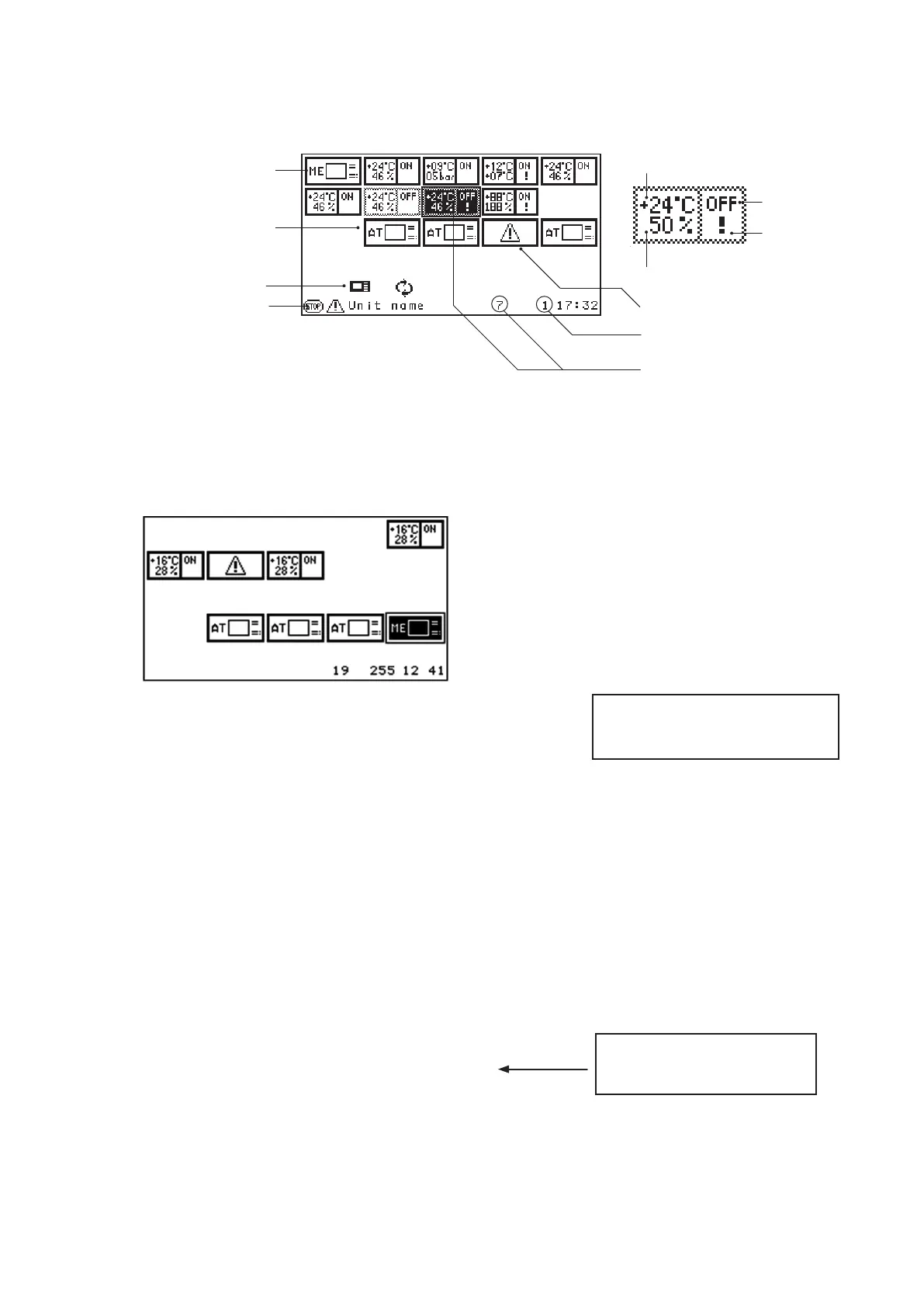
C7000AT "ME", on which
this content is displayed .
Symbol for a C7000AT
Operational state
of the control
At this unit an alarm
has occurred.
This unit cannot be reached.
Global address of the selected IOC
Selected C7000IOC + bus address
Operational state of the
control of a selected
C7000IOC
Stop cause
Example for a de-energized or disconnected (from the bus) IOC with data bus address 6
The AT with the bus address 19 edits the following configuration after the IOC 6 has been switched off :
The C7000AT 19 detects, that the IOC 6 has been available in the bus, but can not be reached anymore.
When the disconnected unit is switched on again, the bus error is automatically deleted at all bus participants.
A bus error can also be deleted by inputting the command "
iobusok" at a C7000IOC or a C7000AT.
Column "config" displays, which bus
addresses are expected as active bus
participants.
Symbol for a C7000IOC
Actual temperature
Actual humidity



 To Next Page