163
„state“
Unit:Running
- Runtime:169 h
- Stoptime:0 h
Cooling: DX active (169 h)
- Compressor 1:1 (<=100.00%)
- Pump 1:1
- Condenser fan 1:86 %
Alarms:
- envelope left C.2
© STULZ GmbH – all rights reserved EN/06.2019/G57
C7000 INSTRUCTIONS fOR a/C UNITS
8. Alarm treatment
8.1 Alarm display
An alarm tone proves the presence of an alarm.
Attention: The alarm tone can be disabled.
The alarm display in the command level (C7000IOC) is passi-
ve. This means that you have to type in the command "state"
to see the occurred alarms.
The alarm messages are displayed in the standard window of each unit
with C7000IOC.
At the same time the symbol
in the left bottom indicates that an
alarm has occurred.
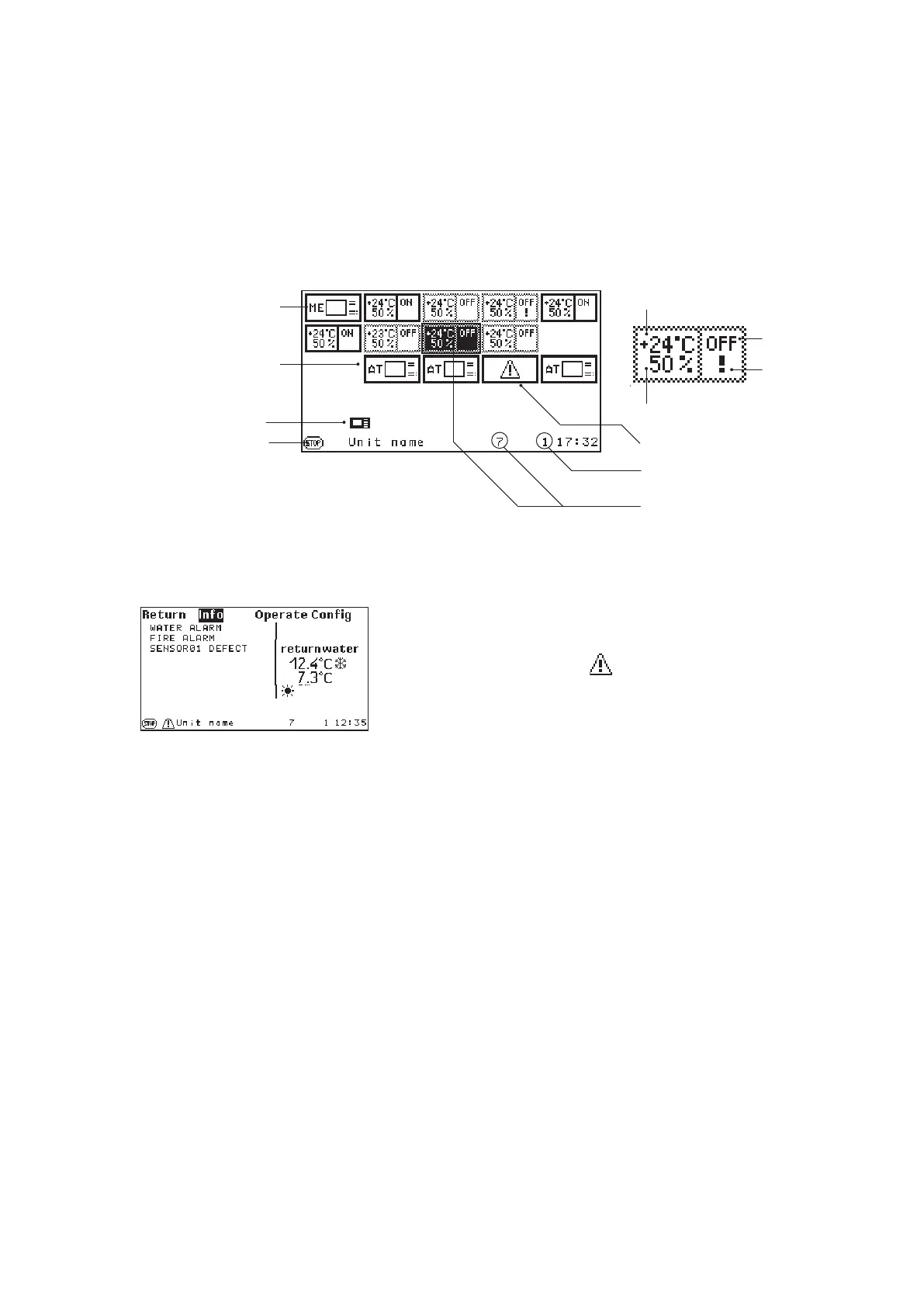
In the bus overview window an alarm is indicated by the sign "!". You obtain further information about the alarm,
if you select the unit, on which the alarm has occurred (in the example: unit with bus address 03), and press
the confirmation key.
You obtain this window if you select the unit with the alarm as described above.
8.2 Alarm Reset
C7000AT "ME", on which
this content is displayed .
Symbol for a C7000AT
Operational state
of the control
At this unit an alarm
has occurred.
This unit cannot be reached.
Global address of the selected IOC
Selected IOC + Bus address
Operational state of the
control of a selected
IOC
Stop cause
Symbol for a C7000IOC
Actual temperature
Actual humidity
C7000AT
Reset the alarms by pressing the RESET-key. Pressing it once mutes the alarm tone. Pressing it again resets
all alarms. However, if the alarm cause has not been eliminated, the alarm will appear again.
Alarms can either be reset in the standard window for each single unit or in the bus configuration overview by
marking all bus participants for all units.
C7000IOC
Reset the alarms for one unit with the command "
alarmreset" or "ar".



 To Next Page