12 EN/06.2019/G57 © STULZ GmbH – all rights reserved
C7000 INSTRUCTIONS FOR A/C UNITS
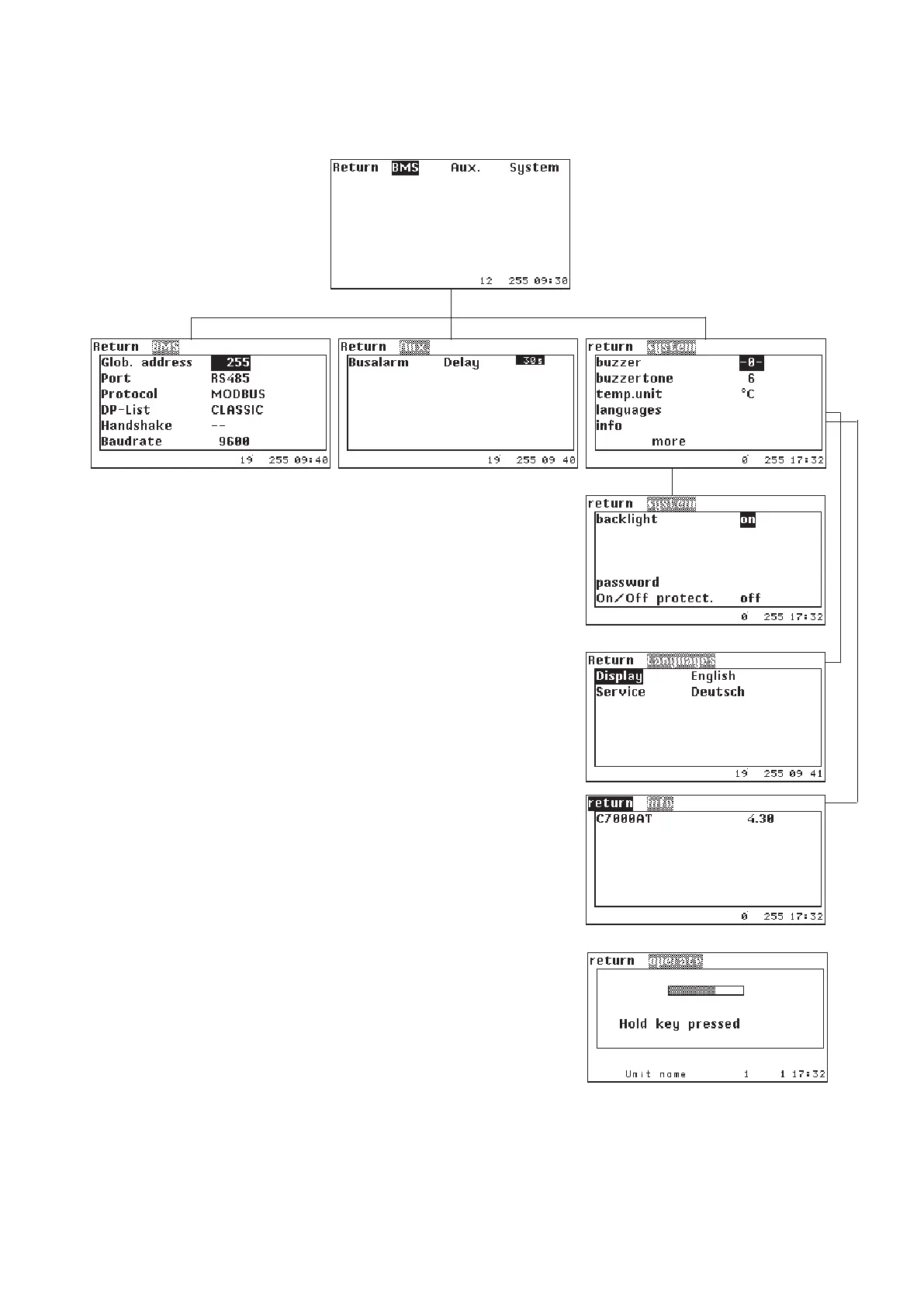
1. In the BMS menu you can adjust the global address of the
C7000AT, and an available interface on the C7000AT which can be
either RS232 or RS485 the same as the protocol and, if applicable,
one of several data point lists according to the BMS requirement.
You have further possibilities to adapt the system to the BMS by the
menu points „Handshake“ and „Baudrate“. For further information,
see BMS manual.
2. Here you can set the alarm delay for the bus alarm, which will be
generated when the bus is interrupted.
3. In the system menu you can switch on (-1-) or off the alarm buzzer.
Further you can adjust the buzzer pitch.
Menu item "Temp. unit" allows you to choose between degree Fahren-
heit or degree Celsius.
In the menu item languages you can adjust the operator language.
The info submenu simply displays the software version of the
C7000AT.
In menu item "backlight" you can choose between "on" (in this case
the light remains lit permanently) and "auto", here the light is switched
out automatically 10 minutes after the last key activation. With the
first key activation the light is switched on again.
In the menu item "Password" you can set the AT password.
For the menu item "On/Off protection exist three possibilities:
1. Off, 2. Delay, 3. Password.
If you select the C7000AT for
further adjustments and confirm
with OK you will receive after hav-
ing entered the AT password the
following display with the menu
ramification as shown below:
Main menu for a C7000AT
With the first setting (off) the control is instantly switched on/off by the on/off key of the controller.
With the second setting (delay) the window shown beside appears after the on/off key has been pressed. A grey
bar diminishes from right to left within 3 seconds. During this time the key must be kept pressed, otherwise the
switching operation will not be executed.



 To Next Page