15 © STULZ GmbH – all rights reserved EN/06.2019/G57
C7000 INSTRUCTIONS FOR A/C UNITS
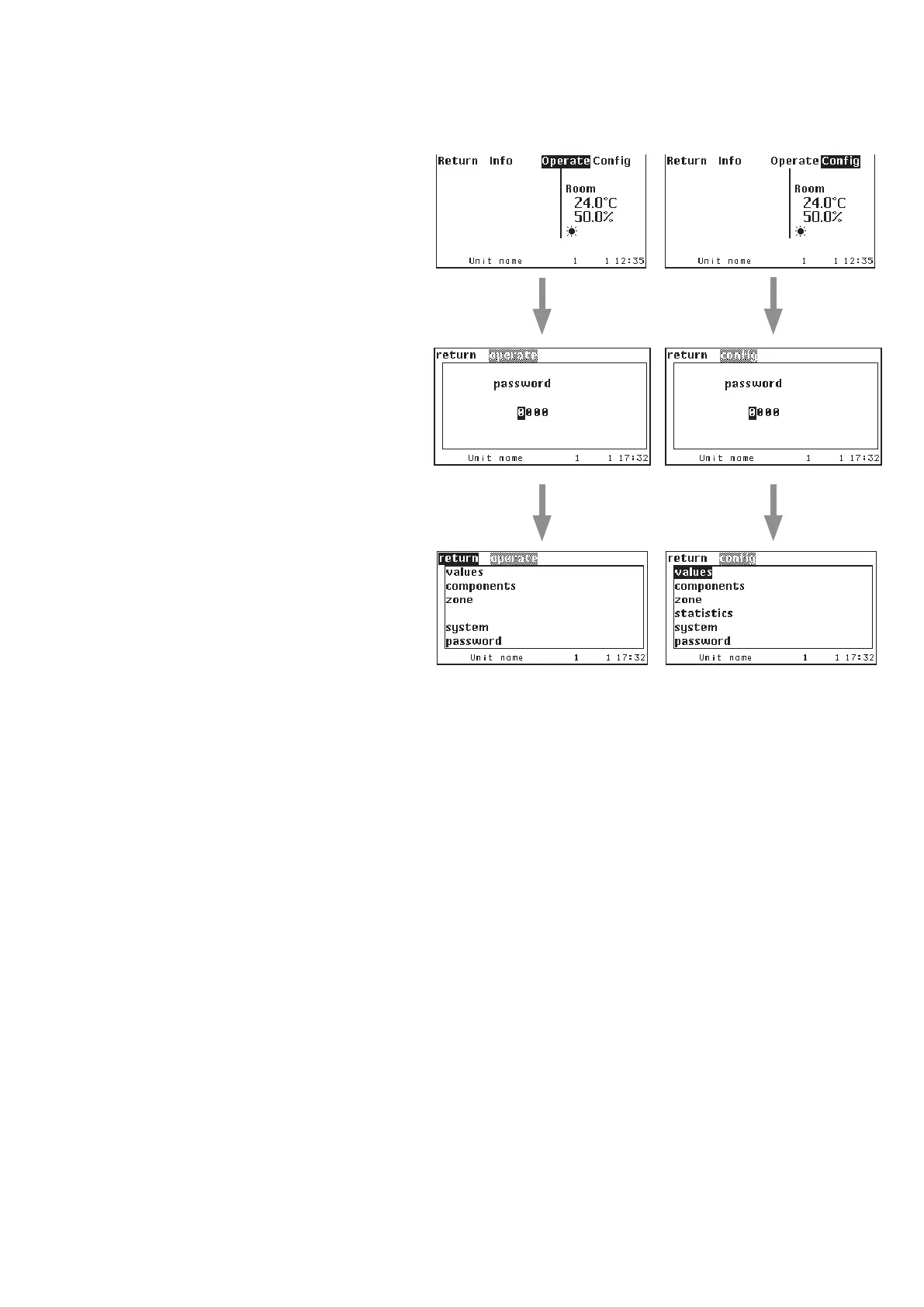
To access the Operate level, the Config level
and the C7000AT main menu a password is
required.
There are 3 passwords in total, a user-spe-
cific password for the Operate level, the
Config level and the C7000AT menu each.
The passwords can be modified and are set
"0000" at the delivery.
Entering the password
The digits can be modified by the selector
key, after you have pressed the confirmation
key. After the digit adjustment confirm with
the confirmation key and pass over to the
next digit with the selector key ">".
When you have reached the last digit at
the right, you access the main menu of the
Operate resp. Config level by activating the
selector key ">" (if the password was right).
There is no limitation for the number of
attempts.
Passwords
The passwords for the "operate" and "config" level are saved on the C7000IOC board. So it is possible for exam-
ple to adjust the "operate" password "1234" for a C7000IOC with bus address 3 and the "operate" password
"5678" for a C7000IOC with bus address 5.



 To Next Page