4.0 Hardware Descriptions and Specifications
- 31 -
4.3.1 SG-DRL5-IP configurations
The following product ordering codes are available for the different configurations of the line card model SG-DRL5-IP:
SG-DRL5-IP STD
Standard Build
l 512 Visual Verification accounts (SD card required)
l 512 supervised accounts
l 3072 unsupervised accounts
l Total accounts on each table 4096
l 1 table - With a valid license, 2 additional tables can be unlocked with the same table properties as table 1.
l Total accounts with all 3 tables is 12228
l 1GB DDR3 memory (installed)
l 4GB EMMC memory (installed)
SG-DRL5-IPF
Full Build
l 2560 Visual Verification accounts (SD card required)
l 2560 supervised accounts
l 15360 unsupervised accounts
l Total accounts on each table 20480
l Three tables
l Total accounts with all 3 tables is 61440
l 1GB DDR3 memory (installed)
l 4GB EMMC memory (installed)
SG-DRL5-IPE
CE Build
l 2560 Visual Verification accounts (SD card required)
l 2560 supervised accounts
l Total accounts on each table 5120
l 1 table - With a valid license, 2 additional tables can be unlocked with the same table properties as table 1.
l Total accounts with all 3 tables is 15360
l 1GB DDR3 memory (installed)
l 4GB EMMC memory (installed)
4.3.2 SG-DRL5-IP LED status indicators
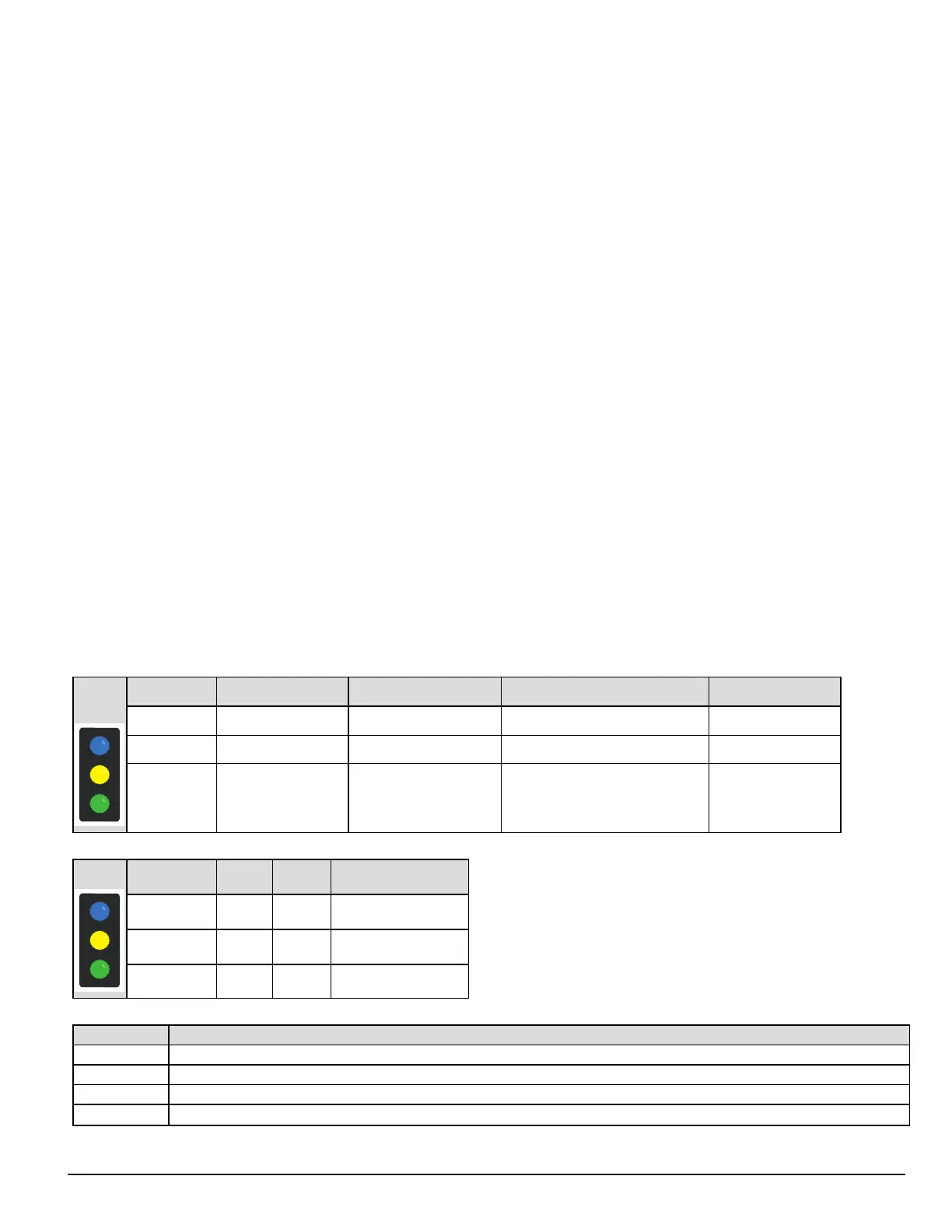
After start-up, the line card enters Standby mode and monitors the network connection and the SG-CPM5. Depending on the system's status, the fol-
lowing conditions are displayed for each line card:
Normal operation Trouble present Problem with card or rebooting Decomission mode
Watchdog Flashing - On or Off Flashing
Trouble Off Flashing (see trouble table) - Flashing red
Network Status
Blue – 1Gb/s
Green – 100Mb/s,
Orange – 10Mb/s,
Red – Network Absent
- - Flashing red
LEDs during bootup
Boot-up Boot fail Unqualified memory
Watchdog Flashing On Off
Trouble Off Off Off
Network Status Flashing On red On red
Trouble table
Flashes/Color Error
1/Yellow CPM absent
2/Yellow Line card busy out
3/Yellow Printer buffer full
4/Yellow Computer buffer full



 To Next Page