6.0 Options
- 79 -
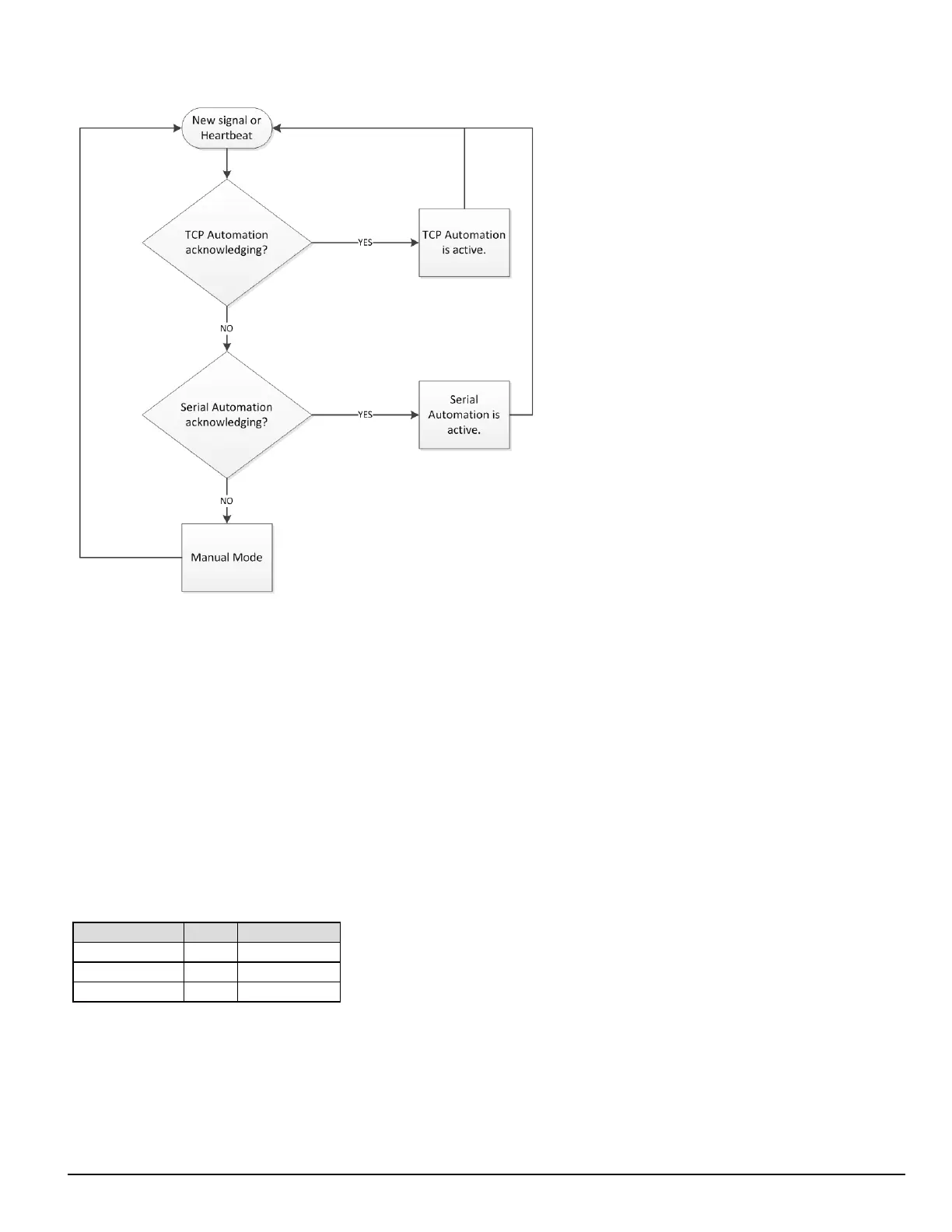
FIGURE 6-6: Flow diagram for Auto IP Fallback (4)
Option [402]: COM1 (Automation) Baud Rate
Default (9600)
Determines the baud rate at which the SG-CPM5 communicates to the automation software via serial automation port. Valid selections are: 1200, 2400,
4800, 9600, 19200, 38400, or 57600.
NOTE: The unit must be reset before parameter changes take effect.
Option [403]: COM1 Data Bits
Default (8)
Determines the number of data bits used to communicate to the automation software via serial automation port. Valid selections are: 7 or 8.
NOTE: The unit must be reset before parameter changes take effect.
Option [404]: COM1 Parity
Default (0) - None
Determines the parity of the automation serial port.
Numeric Setting Display Description
0 None no parity (default)
1 Odd odd parity
2 Even even parity
NOTE: The number of stop bits cannot be changed and is always 2.
NOTE: The unit must be reset before parameter changes take effect.
Option [408]: Receiver Number
Default (01)
This is used to identify the receiver when communicating to the TCP/IP automation, serial automation and the printer. To change the receiver number,
enter a hexadecimal number from "01" to "FE." Receiver Number applies to all traffic unless overridden by other options.



 To Next Page