Tutorial
8.
Press
0
for Voice.
The screen soon shows the DEFINE
MODEM FOR VOICE DIALING screen. (By defining the Voice
Dialing sequence, you can use the subfunction, PHONE.)
9.
To
change the Delay, press
iF7,
and type
5
IENTER).
10.
To
change the next line, press
0;
then type
**ODT
(ENTER).
11.
Move the cursor below RECEIVE:
X
and press
0
for Wait
for
No
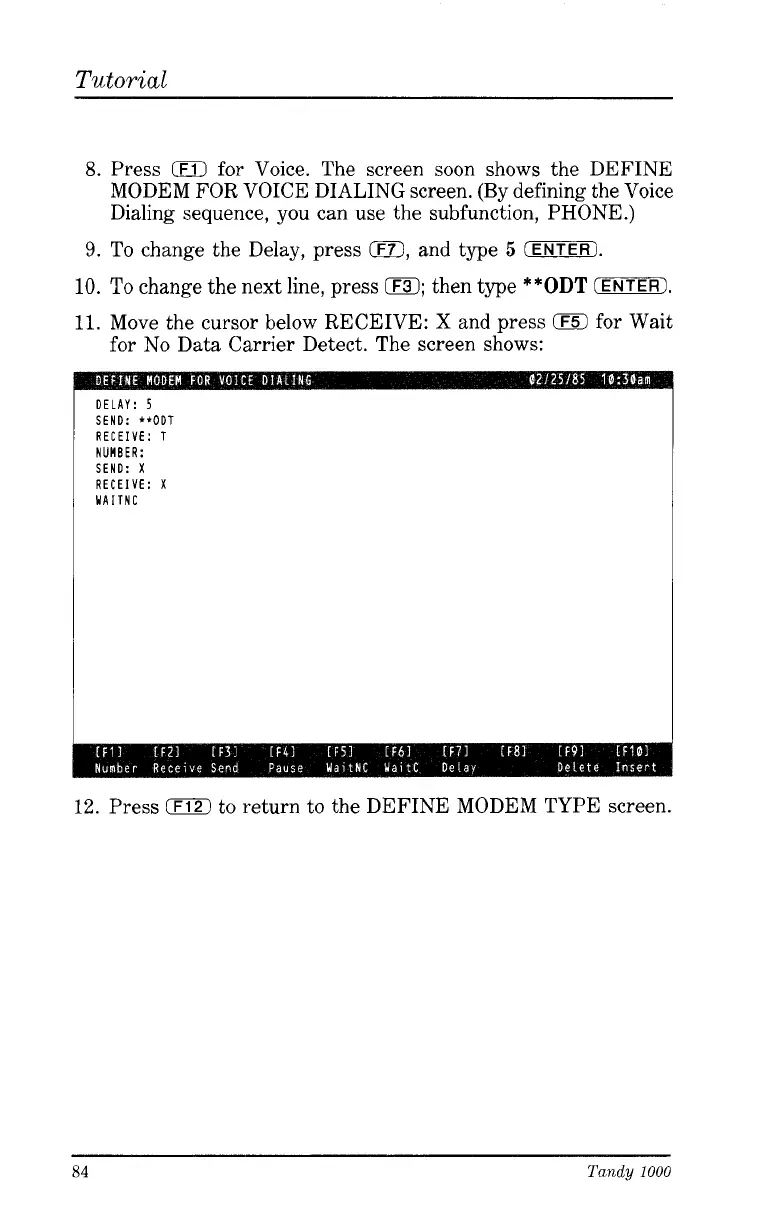
Data Carrier Detect. The screen shows:
DELAY:
5
SEND: **ODT
RECEIVE: T
NUMBER:
SEND:
X
RECEIVE:
X
WAITNC
12.
Press
0
to return to the DEFINE MODEM TYPE screen.
84
Tandy
1000





 To Next Page