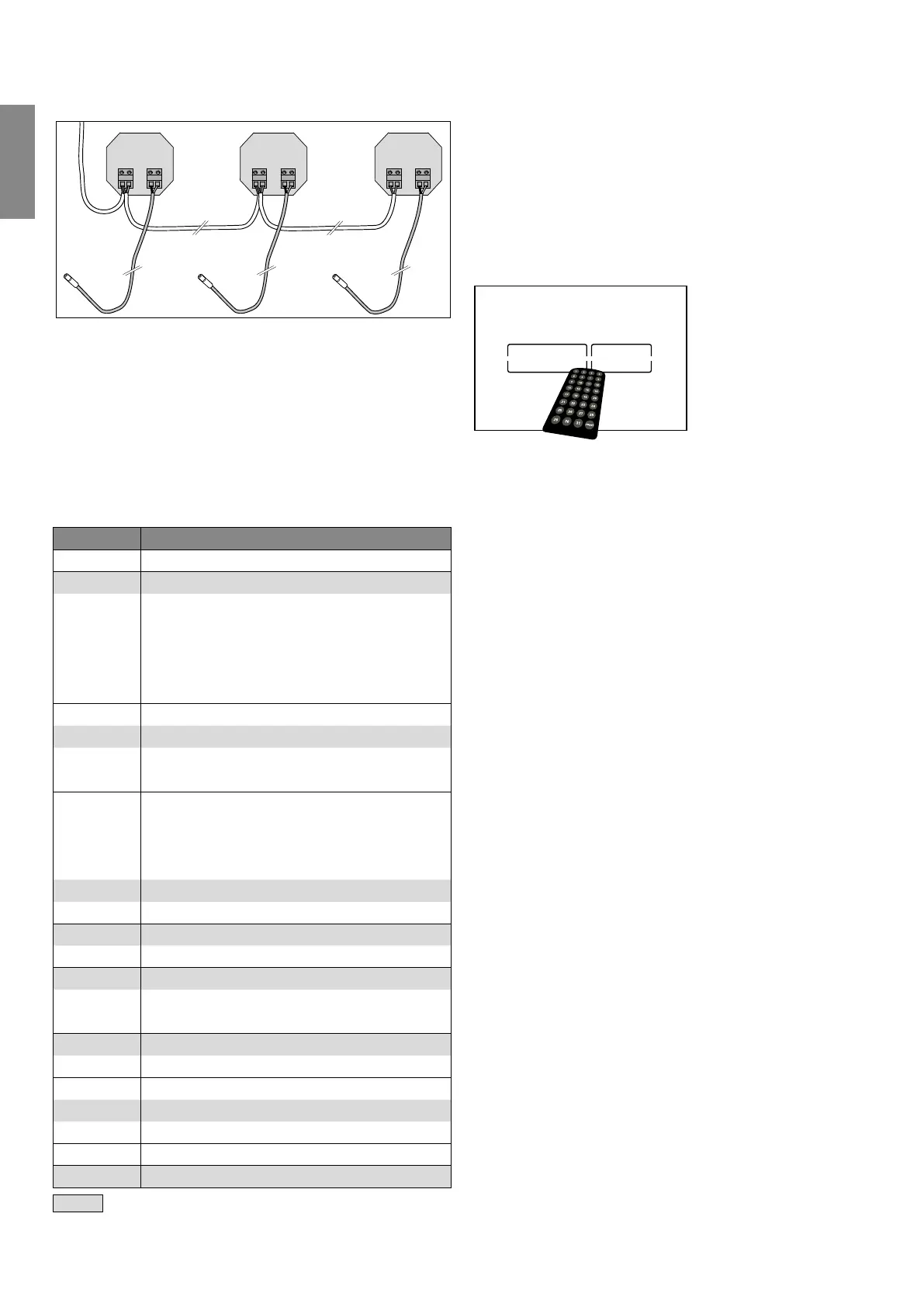
230 V ~ 12 V
N V+V-L
230 V ~ 12 V
N V+V-L
230 V ~ 12 V
N V+V-L
12 V
Programming the electronics
A remote control (order no. 9240971) is required to pro-
gram the TECElux Mini electronics. It is possible to pro-
gram the electronics (at any time) after the power supply
has been connected. In the event of a power failure, the
last settings saved are retained. Each configurable setting
is assigned a position on the remote control.
Software version 1.0
Position Function
1 Hygiene flush o
2 Hygiene flush 24 h
3 Hygiene flush 56 h
4 Hygiene flush 72 h
5 Hygiene flush 168 h
6 Hygiene flush 336 h
7 Illumination level 1 very bright
8 Illumination level 2 standard
9 Illumination level 3 dimmed
10 Illumination level 4 darker
11 Activate illumination 20 sec*
12 Activate illumination 2 mins
13 Activate illumination 3 mins
14 Activate illumination 4 mins
15 Activate illumination 5 mins
16 Activate illumination permanently*
17 Cleaning function o
18 Cleaning function on
19 Automatic flush o
20 Automatic flush 2 mins
21 Automatic flush 5 mins
22 Touchless operation
23 Touch operation
24 Identification long-distance
25 Identification standard
26 Identification short-distance
... ...
reset Factory setting
= factory setting
* function only for exhibitions
Programming the TECElux Mini electronics:
• Move closer to the electronics until the button illumina-
tion is activated.
• Point the remote control towards the middle of the
button area at a distance of – cm, then press the
desired button on the remote control.
• A visual signal indicates that the desired function has
been successfully configured: The button illumination
switches o and flashes twice.
Automatic flush:
• If the toiletflush is activated - and the toilet has not been
flushed after use - anautomatic flush is carried out or
minutes after the buttonlighting has switched o.
• When the automatic flush is activated, the “person pres-
ent” identification is automatically set to “Identification
short-distance”.
Manual flush:
• It is possible to flush the toilet without power – e.g. fol-
lowing a power failure: To do so, remove the flush plate
cover from the wall and press the red actuating rod.
Cleaning function:
• When the cleaning function is activated, both the touch
panel and the touchless operation are disabled for
seconds.
• Once this period has elapsed, the previously set func-
tions are automatically available again.
TECE flush plates– TECElux Mini
-
Flush plates


 To Next Page