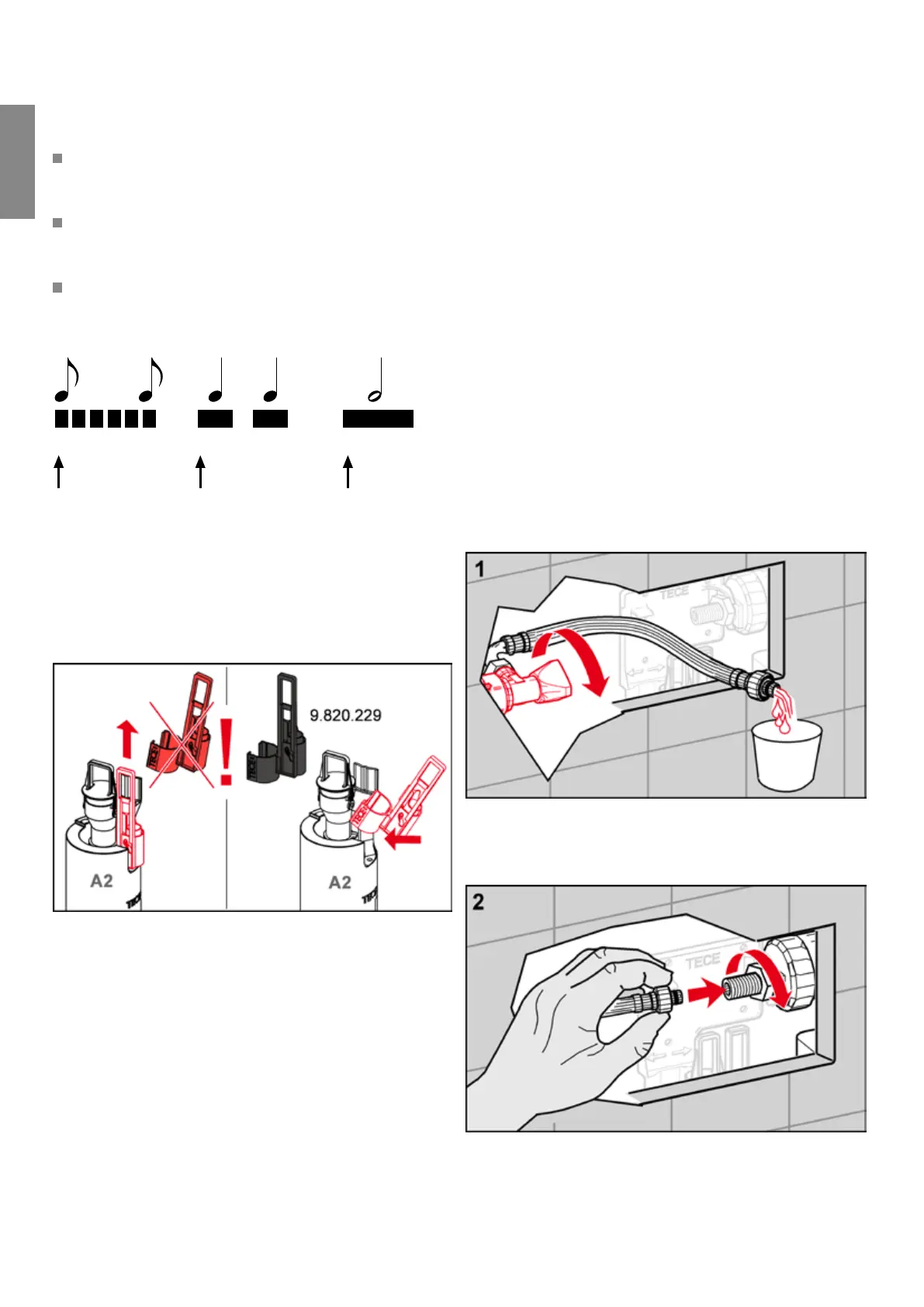
This is how to program the toilet infrared electronics:
Hold the programming key in front of the sensor window
(see figure). The programming mode starts with a quick
series of short beeps.
After the start-up phase, a sequence of the same beeps
can be heard. Count the beeps until you reach your de-
sired function.
Now remove the programming key. A long beep indicates
that the programming key has been removed.
Example: Setting the hygiene flush to 56 hours:
. . . .
Hold the programming key
in front of the sensor
Remove the key
Start 1 2 OK
Count the individual beeps
until the desired position is
reached
Adapting the cistern
When installing toilet electronics, the cistern's drain valve
must be adapted:
On cisterns installed after mid/end of and which
contain the drain valve (A) shown, the valve's red pull rod
must be replaced by a black one. This is supplied with the
toilet electronics motor or is available as a replacement part
(order no. ).
Toilet infrared electronics power options
• Mains variant:
The TECE transformer (order no. , order sepa-
rately) transforms V AC to V DC.
• Battery operation:
x Lithium CR – 6 V
Based on a service life of two years, the battery lasts for
• , flushes or
• approx. flushes/day.
Alternatively, the battery can also be operated by mono
cells (LR). This increases durability to , flushes or
flushes/day. For this, in addition to batteries, you also
require another battery housing (order no. ).
Installing the toilet infrared electronics, 6 V
battery
To install the battery version of the toilet electronics, pro-
ceed as follows:
First remove the splash guard with the flush plate – this will
no longer be required. Open the corner valve and su-
ciently flush out the pipe.
Turn the corner valve to close it again and connect the rein-
forced hose to the filling valve. If you wish to fill the cistern
with water (e.g. for the initial operation), you must open the
corner valve again.
TECE flush plates – TECEplanus infrared electronics
-
Flush plates


 To Next Page