How to program TECE electronics:
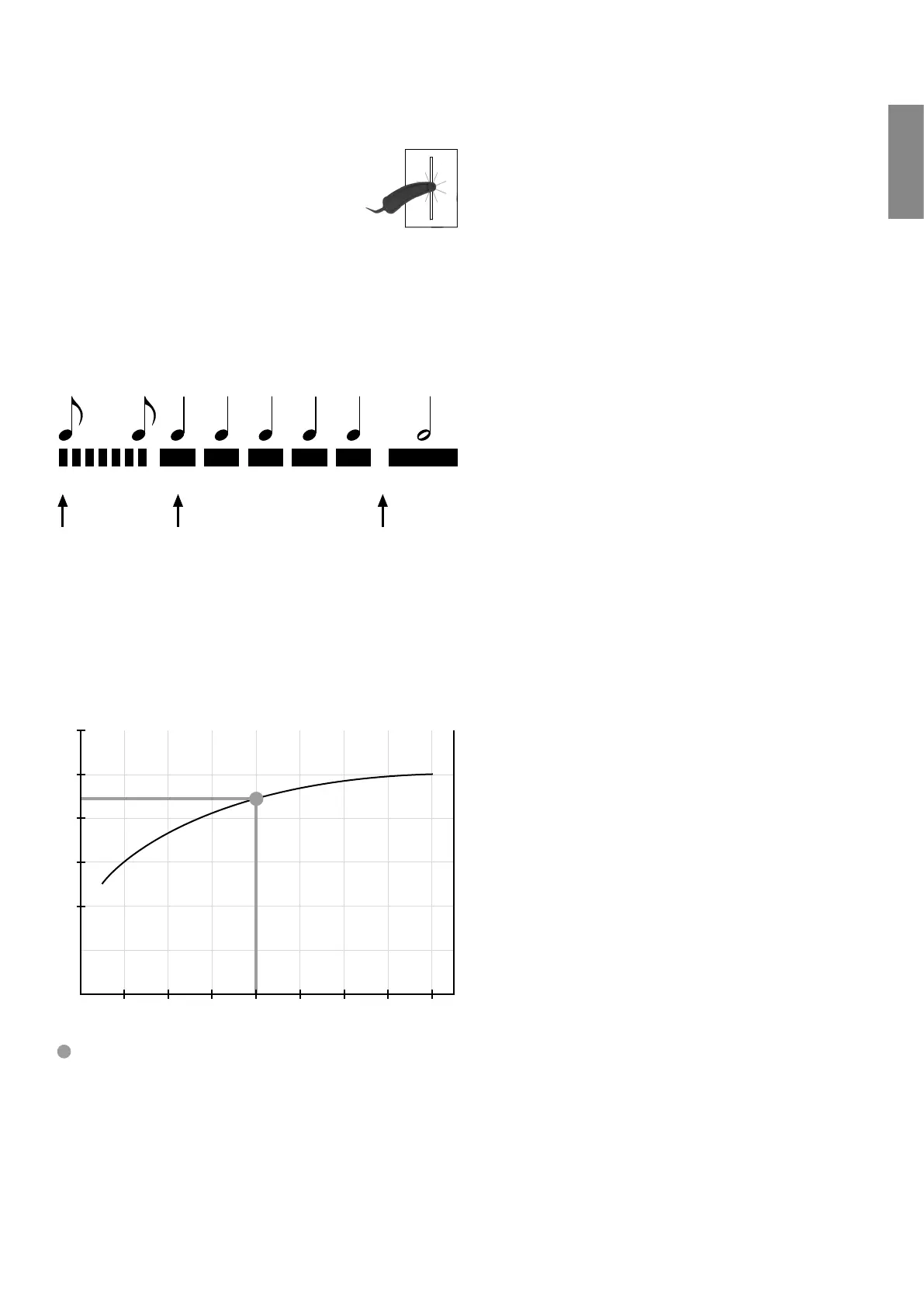
Hold the programming key in front of the
red diode (see figure). The programming
mode starts with a quick series of short
beeps.
After the start-up phase you will hear
a sequence of the same distinct beep.
Count the beeps until you reach your desired function.
Now remove the programming key. A long beep indicates
that the programming key has been removed.
Example: Setting the flush time to three seconds
. . . .
Hold the programming
key in front of the
sensor
Remove the program-
ming key
Start 1 2 3 4 5 OK
Count the individual beeps
until the desired position is
reached
Flow characteristic curve:
Using the flow characteristic curve, the TECEfilo flush vol-
ume flow rate can be read and set depending on the flow
pressure as well as the flushing time:
0,2
0,3
1 2 3 4 5 6 7 8
0,4
0,5
Flow pressure (bar)
Flow rate (l/s)
Example:
Mains pressure 4 bar → Flow rate 0.44 l/s → with 5 s flush-
ing time ≈ 2.2 l
Adjustable functions:
Pause function/stadium function
When the pause function is activated, the flushing time is
automatically reduced to one second following repeated
flushes in short succession (= less than two minutes). 45
minutes after the last economy flush, a standard flush is
activated.
Cleaning function
Activating the cleaning function stops the urinal from
flushing for ten minutes. After this time, a cleaning flush
is automatically triggered and it returns to the standard
operating mode.
Activating the cleaning function:
Hold the programming key briefly in front of the sensor
window until an acknowledgement beep sounds.
The cleaning function can only be activated in standard
mode, not during the programming phase.
Hygiene/interval flush
Automatic flush actuation, choose between 24, 72 or 168
hours after the last flush. The hygiene flush volume can be
set to small (5 s), medium (15 s) or large (30 s).
-
Flush plates


 To Next Page