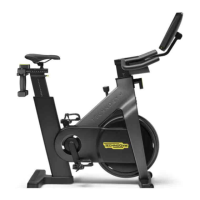
The Technogym Bike Live (Equipment Code: D93TNL) is a stationary exercise bike designed for home and facility use, offering a comprehensive and interactive workout experience. This technical service guide provides detailed information for qualified technical personnel regarding its operation, maintenance, and troubleshooting.
Function Description
The Technogym Bike Live is an indoor cycling equipment that simulates outdoor cycling. It incorporates a magnetic braking system that allows for resistance adjustments, controlled via a brake knob. The bike features an integrated display (either non-pivoting or pivoting, depending on the serial number) that provides real-time workout data, user interface, and multimedia capabilities. The core functionality relies on a Watt Sensor Board, an RPM Sensor Board, and a CPU Board within the display. The Watt Sensor Board calculates the watts developed by the user based on the brake magnetic field and speed signals from the RPM sensor. This data, along with the equipment's serial number, is transmitted to the display. The CPU Board manages the overall equipment operation, multimedia, and user interface, handling various connections like RS-232 serial line, LCD display, heart rate measurement signals, headphone jack, Bluetooth module, USB port, and network connection.
Important Technical Specifications
- Power Supply: 12V 5A
- Power Supply Unit: Input 100-240 Vac 50/60 Hz 2A, Output 12V 5A
- Noise Level: Less than 70 dB
- Protection Rating: IP 20
- Maximum User Weight: 160 Kg (353 lbs)
- Operating Temperature: From +5°C to +35°C (41°F - 95°C)
- Overall Dimensions (approx.): 1310 mm (length) x 590 mm (width) x 1533 mm (height)
- Weight of the Product: 67 Kg (148 lbs)
- Packaging Dimensions (CARTON_BOX): Length 110.80 cm, Height 94.50 cm, Width 25.80 cm
- Gross Weight (Packaging): About 77.00 Kg (D93TNLE), About 80.00 Kg (D93TNLH)
- Environmental Characteristics:
- Temperature: In operation (+10°C to +25°C), In storage (-10°C to 70°C)
- Humidity: In operation (20% to 90%), In storage (20% to 90%)
- Belt Tensioning:
- New Model (S0K001513AA): 120 ±5 Hz (replaced), 105 ± 5 Hz (loosened/removed/reassembled)
- Old Model (S0K000671AB): 115 ± 5 Hz (replaced), 105 ± 5 Hz (loosened/removed/reassembled)
Usage Features
The Technogym Bike Live offers an interactive user experience through its Unity interface.
- Turning On/Off: The product is turned on/off by pressing a switch underneath the display. The LED (T) indicates the display status: lit when off, off when in use, flashing when on but not in use. For complete isolation from mains voltage, the power plug must be removed.
- Movement: The bike has fixed front wheels for easy movement. To move, lift it slightly as shown in the manual and push it forwards or backwards. It is crucial to ensure the saddle is in the lowest and locked position before moving. The display or saddle should not be used as gripping points for lifting.
- Storage: The equipment should not be stored in a vertical position due to instability risks.
- Display Interface: The Unity interface allows users to access various menus and functions.
- Accessing Menus: In stand-by, press and hold the volume icon on the touch screen. Service menu (password: 2501) and customer menu (password: 2406) are available.
- Software Updates: The display software can be updated remotely via GeoCall (recommended) or locally using a USB flash drive.
- Connectivity:
- Bluetooth: Supports connection with Bluetooth heart rate monitors (e.g., Polar H7, H9, H10, OH1) and Bluetooth headphones/audio speakers. ANT+ heart rate monitors are not compatible.
- Chromecast: Allows smartphone connection via a Chromecast device (not supplied) to the HDMI port on the display's back, enabling viewing of compatible phone applications.
- Login: Users can log in via Mywellness APP (QR code) for B2B scenarios or E-Mail and Password for B2C scenarios. Up to 4 additional users can be added.
- Installation Wizard: Appears on first use, after a recovery procedure, or console replacement. It guides the user through language selection, measurement unit (metric or US standard), network configuration (Ethernet, Wi-Fi, or no connection), scenario configuration (Home or Facility), and date/time settings.
Maintenance Features
The manual outlines procedures for both routine maintenance and technical service interventions.
- General Regulations for Service Work: Emphasizes the importance of using original Technogym spare parts, recommended lubricants, and special tools. Technicians are advised to consult Technical Newsletters and News Flashes for updated information.
- Personal Protective Equipment: Refer to the Health&Safety After Sales procedure for details.
- Troubleshooting: Provides flowcharts and detailed steps for common issues.
- Replacing Components: Requires mechanical adjustments, greases, and tightening torques. Specific procedures are outlined for replacing the display, Watt Sensor Board, Hall Sensor/Brake Frame, and components interacting with the braking system (knob, brake caliper, flywheel).
- Brake Calibration: Essential after replacing braking system components, Watt Sensor Board, or if display levels don't change correctly. Involves mechanical regulation of brake position and soft calibration via the Service Menu (LOWKIT -> START LOWKIT CALIBRATION).
- "COM ERROR" Message: Indicates a communication problem between the Display board and Watt Sensor board. Troubleshooting involves checking LED status, power supply, and cable continuity.
- No/Wrong RPM Signal: Troubleshooting involves checking +5Vdc presence at the RPM sensor, RPM sensor function, cable connections, phonic wheel fixation, and belt tension.
- Display Not Turning On: Involves checking power supply, +12Vdc presence, and performing a recovery procedure with a USB key if necessary.
- Lack of Precision in Watt Values: Requires mechanical brake regulation, recording Watt values, soft calibration, and further testing.
- Heart Rate Monitor/Headphone Connection Issues: Focuses on Bluetooth compatibility and ensuring devices are not connected to other equipment.
- Random Issues (Touch Screen, Reboots, USB Key): Often related to power supply issues (low amperage), requiring power supply replacement.
- Disassembly and Reassembly Procedures: Detailed instructions are provided for various components, including brake casings, side casings, RPM Sensor Board, and display group (both non-pivoting and pivoting types). Specific tools and warnings are highlighted for each step.
- Tightening Torques, Greases, Adhesives & Sealants, Belt Tensioning, Adjustments:
- Levelling: Adjusting levelling feet to ensure stability.
- Belt Tension Regulation: Procedures for adjusting belt tension, with specific Hz values for new and old belt models.
- Play Regulation: Instructions for adjusting vertical and horizontal play for the seat and handlebar sliders.
- Pivoting Display Support: Involves applying white grease on friction rings and tightening screws to specific torques (16 Nm / 12 lbf-ft and 3.5 Nm / 2.6 lbf-ft).
- Pedal: Applying Loctite 2701 and tightening to 40 Nm [29.5 lbf-ft].
- Pedal Crank: Tightening screws to 47-54 Nm [34.7-39.8 lbf-ft]. If one pedal crank is replaced, the other must also be replaced.
- Handlebar's Vertical Slider: Applying medium strength threadlocker (Loctite 243) on screws and special nuts. Applying Molykote Complex 150 on bearings and pins.
- Pipe: Tightening screws to 3 Nm [2.21 lbf-ft].
- Flywheel: Applying medium strength threadlocker (Loctite 243) and tightening screws to 5 Nm [3.69 lbf-ft].
- Main Shaft: Applying medium strength threadlocker (Loctite 243) and tightening to 75 Nm. Tightening the ring nut to 35 Nm.
- Planned Maintenance: Routine maintenance can be performed by the owner or Technogym technicians during planned visits. No particular technical expertise is required for routine maintenance.
- Product Update: Information on the pivoting display introduced from serial number D93TNL022000783, with references to updated coding and disassembly procedures for this new feature.

 Need help?
 General










 To Next Page