5.2 UPDATE THE SW OF THE DISPLAY
You can update the sw of the display as shown below:
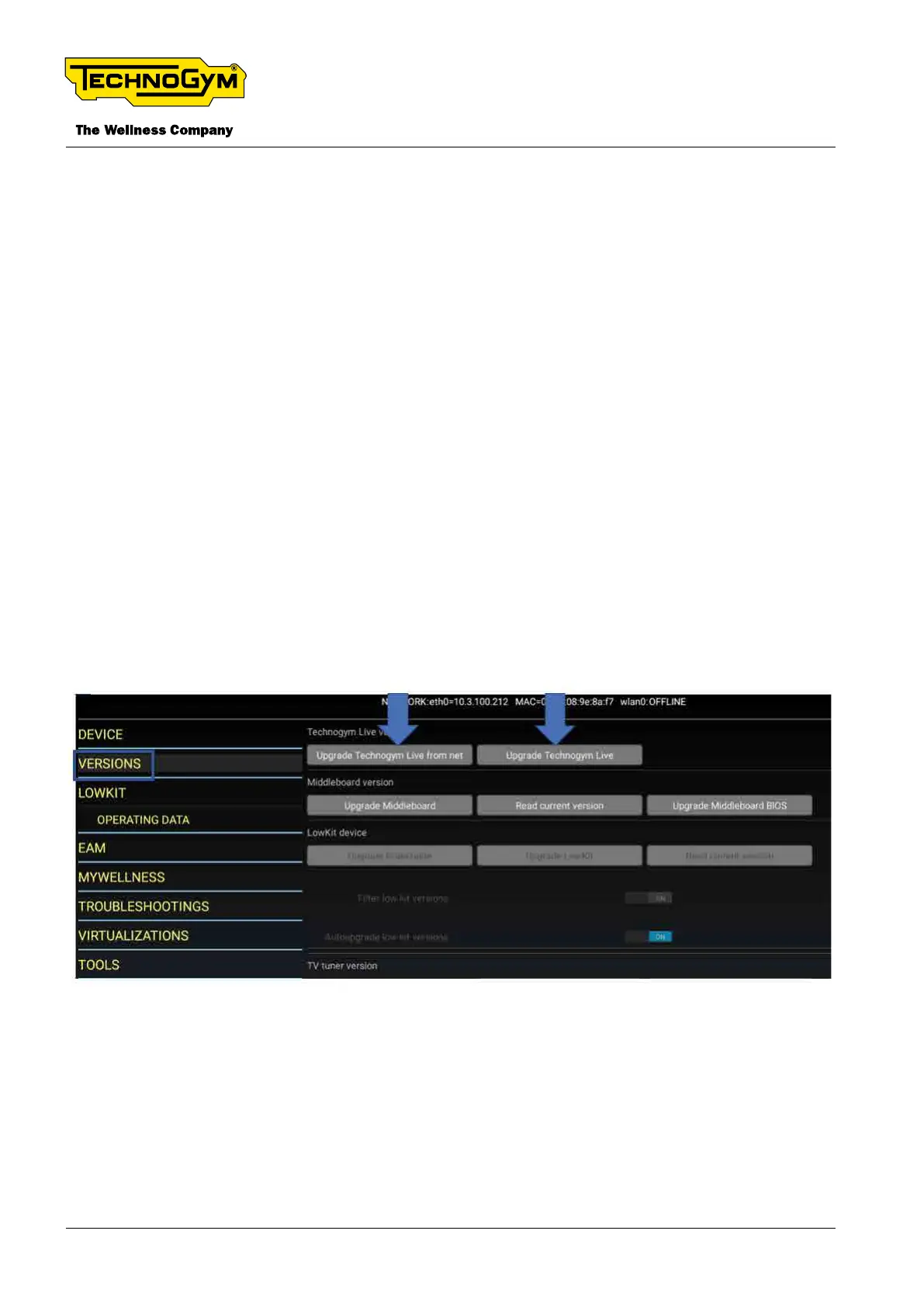
1_Upgrade Technogym Live, remotely via GeoCall; It’s strongly recommended to update the sw
remotely, via Geocall (https://asset.mywellness.com/geocall/).
2_Upgrade Technogym Live from net:
_Access the service menu 2501;
_Click on VERSIONS --> UPGRADE TECHNOGYM LIVE FROM NET; Wait until the up-
grade is successfully done;
3_Upgrade Technogym Live: If it’s necessary to upgrade locally the sw, proceed as follow:
_Insert the USB ash drive, just synchronized with PC Synch, in the USB Port of the display;
_Access the service menu 2501;
_Click on VERSIONS --> UPGRADE TECHNOGYM LIVE; Wait until the upgrade is suc-
cessfully done;
_Remove the USB ash drive from the machine.
Fig. 21
TECHNOGYM BIKE LIVE Technical Service Guide
Rev. 2.0
- 36 - TSG-00187-EN - Uncontrolled copy if printed












 To Next Page