Fire Panel IRIS - Installation Manual 29
3.4 Inputs
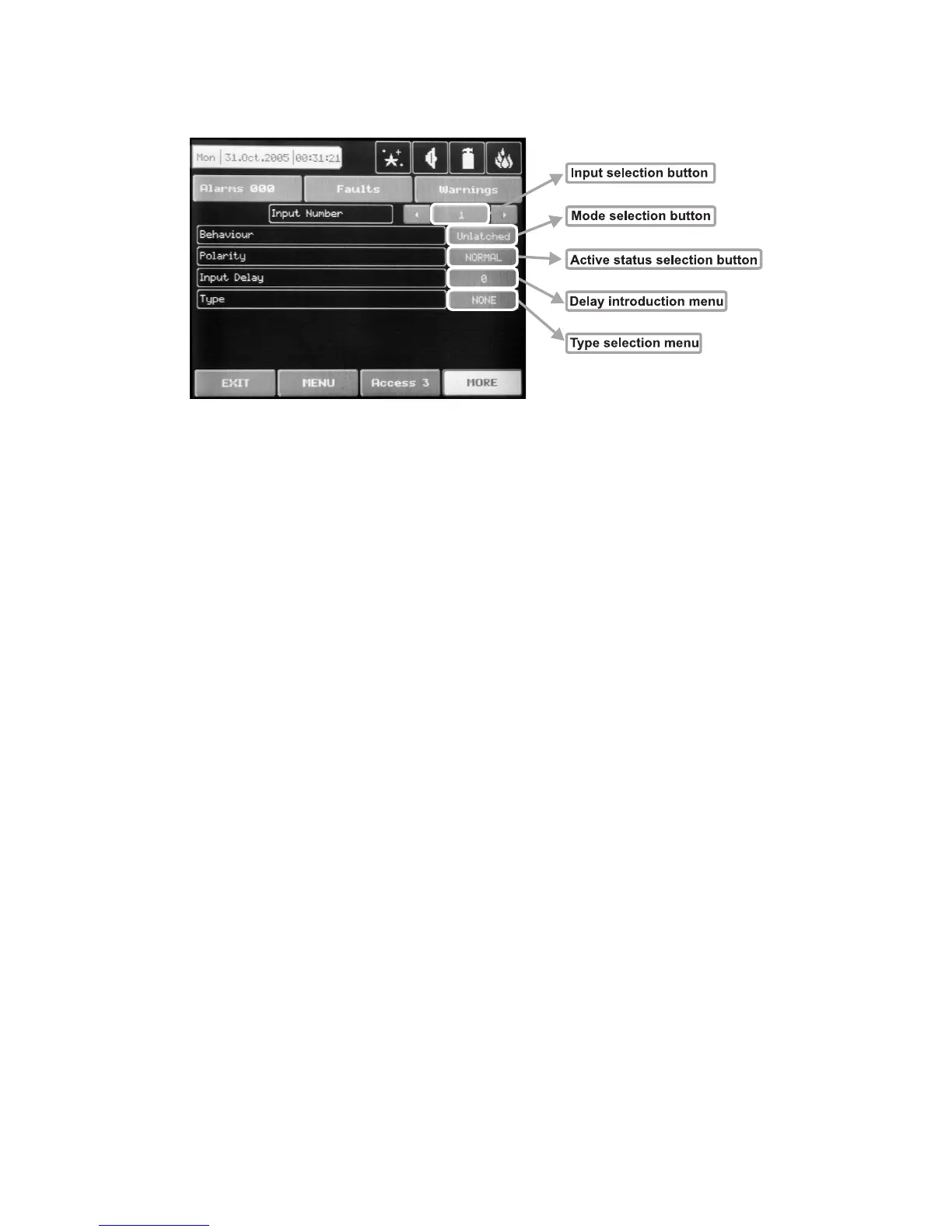
To enter the submenu for inputs configuration choose “Inputs” button from Programming menu – Fig. Screen
2. The general view of the menu for inputs configuration is shown on Fig. Screen 13.
Fig. Screen 13 – Menu for introducing input parameters.
3.4.1 Input delay
Delays can be within 0–600 sec.
3.4.2 Input Active Status (Polarity)
INVERTED – the output is set at ON, when the result of the logical function is OFF.
NORMAL – the output is set at ON, when the result of the logical function is ON.
3.4.3 Mode
LATCHED – deleted only after RESET.
UNLATCHED – monitors the status.
3.4.4 Type Selection Menu
The 1.0 version types are:
NONE
PERIPHERY_DEVICE
LOOP_DEVICE
ZONE
TIME
3.4.5 Parameter Selection Menu
Depending on the type of input, the parameters can be:
PERIPHERY_DEVICE
• Number of the periphery device and number of its input.
LOOP_DEVICE
• Number of the loop, device address and indication whether it is a module or detector. Only a de
vice with an input can be configured.
ZONE
• Number of zone and event for activation.
The possible events by zones are:
- FIRE
- FAULT
- DISABLED
- PREALARM
DATE
ACTION
GENERAL
NETWORK



 To Next Page