Fire Panel IRIS - Installation Manual 37
4.8 Disable introducing
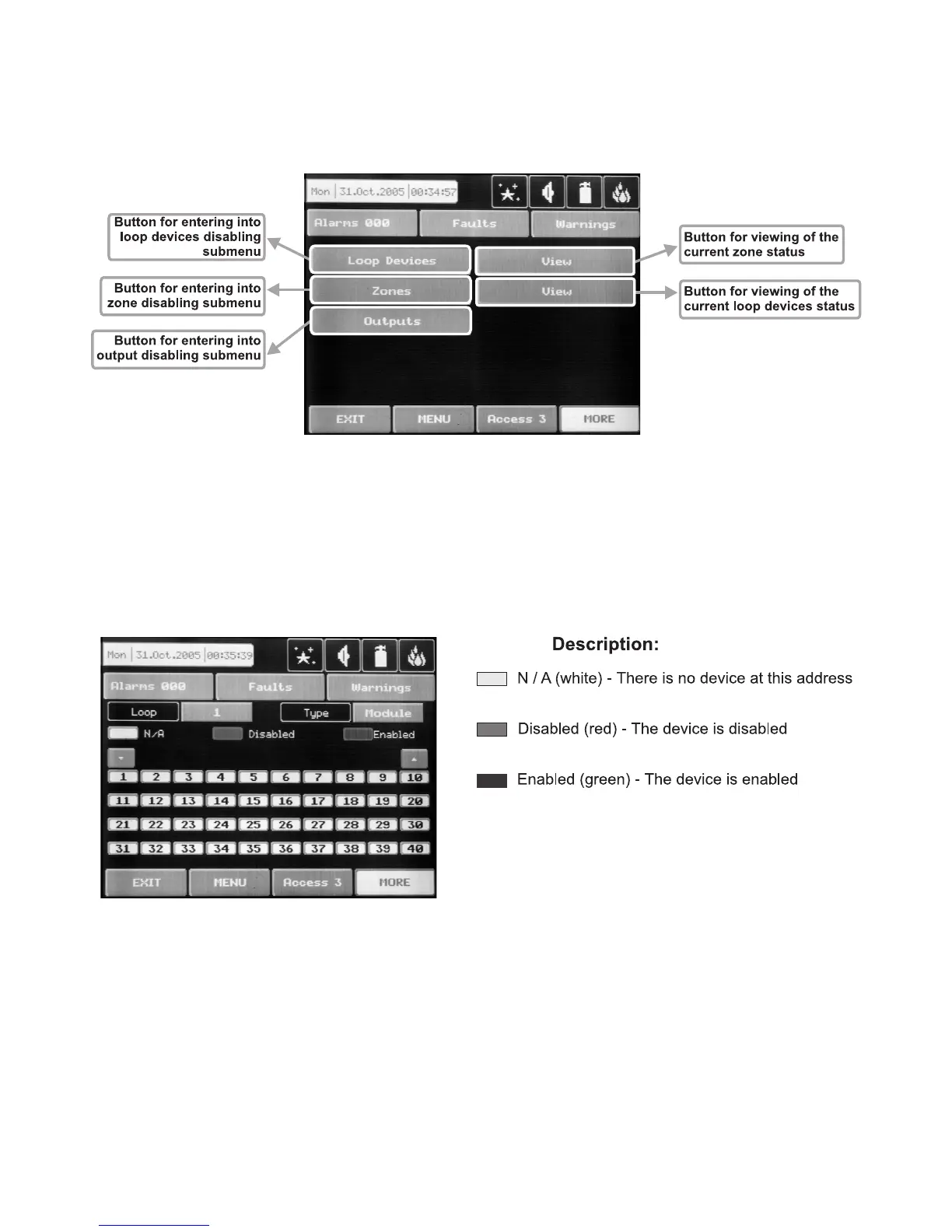
The user/installer can enable or disable the loop devices, zones and the outputs of the fire panel. To introduce
enabling or disabling a function you can directly choose the respective button and make corrections, or first
by pressing “View” button to look at the current status of the system and after that, if it is necessary, to enter
new data – Fig. Screen 26.
Fig. Screen 26.
4.8.1 Loop Devices Disabling
The user/installer could first look at the current status of the loop devices by choosing “View” button situated
next to the “Loop devices” button – see Fig. Screen 26. On the screen of the panel is displayed the current
status of the loop devices programmed earlier in the system (see part Programming, §3.2.2 Loop Devices)
– Fig. Screen 27.
Fig. Screen 27
From the screen for the current status of the loop devices the user/installer can introduce new settings as
choose the button with the number of the respective device 1,2,3…40. With the buttons ▼▲ is possible to
be viewed and the other loop devices in the configuration of the system, with number over 40. By choosing a
button with a device number the user/installer moves to menu for setting of the parameters of the respective
device – see Fig. Screen 8, part Programming.
Note: From the disabling menu you can directly enter in the loop devices configuration menu (Fig.
Screen 8) as choose “Loop Devices” button (Fig. Screen 26).



 To Next Page