Fire Panel IRIS - Installation Manual 43
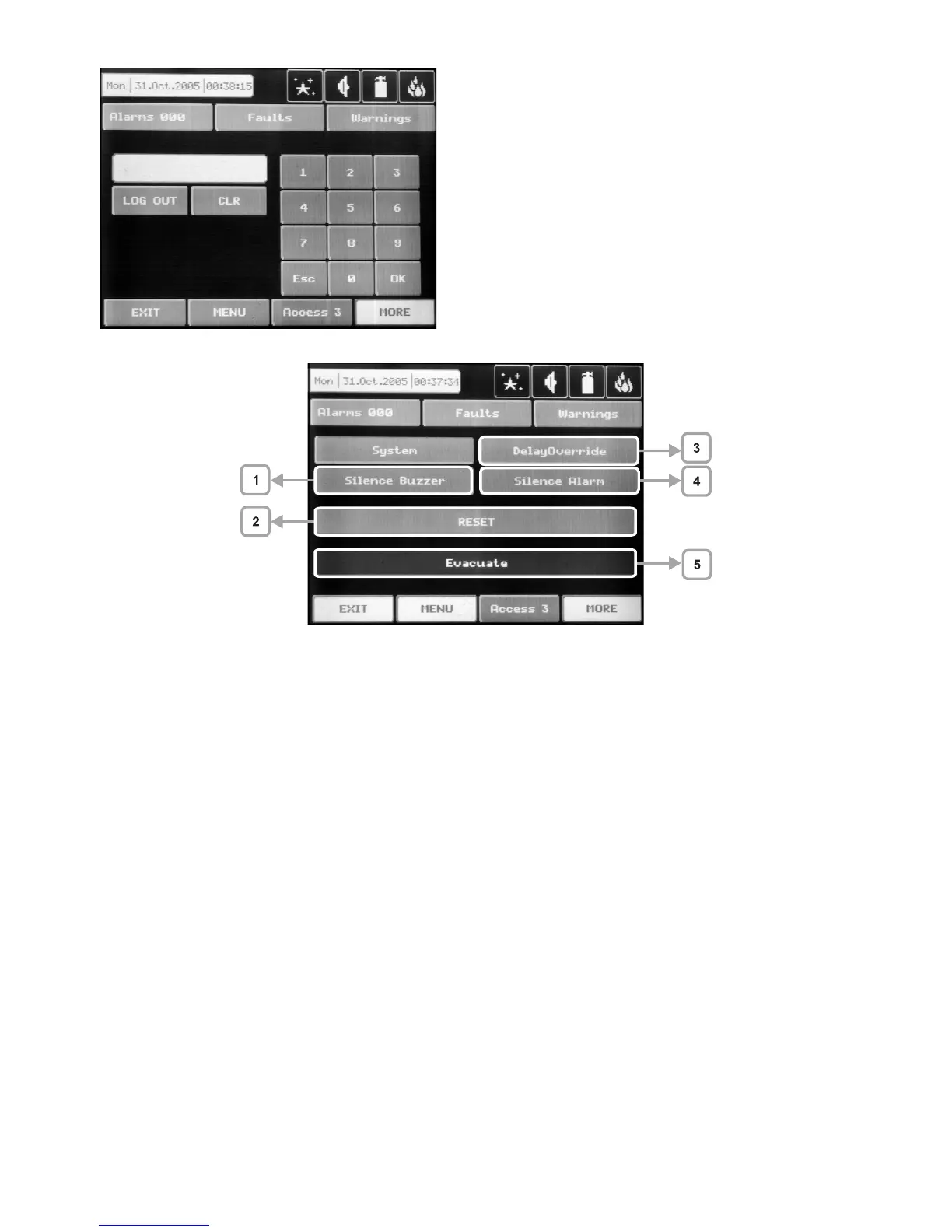
Fig. Screen 33
4 digits need to be introduced. A short buzzer sound
acknowledges every pressing of the button. In the
interest of security, “*” will be displayed in the field in
-
tended for the password instead of the figures which
have been introduced. Use “Log Out” to exit access
level 1.
Fig. Screen 34
5.5 Silence Buzzer (1)
The “Silence Buzzer” button deactivates the internal buzzer.
5.6 Reset (2)
The “Reset” button is activated only in access levels 2 and 3. Where this button is pressed all activated sta-
tuses shall be overruled and the panel shall be brought to a normal state.
5.7 Delay Override (3)
The “Delay Override” button is activated only in access level 1. After it is pressed, all currently active output
delays shall be overruled.
5.8 Silence Alarm (4)
The “Silence Alarm” button is active only at access levels 2 and 3. Pressing this button will overrule all active
sounders and the associated thereto delays. In the case of an alarm present in the panel, pressing this button
would cause the “System Silenced” LED to be activated.
5.9 Evacuate (5)
The “Evacuate” button is activated only in access levels 2 and 3. After it is pressed, the sounder and the pro-
grammable outputs will be activated, the “General Fire” LED lights up and a warning message is displayed.



 To Next Page