30 Fire Panel IRIS - Installation Manual
TIME
• Device input. activation time.
DATE
• Device input activation date.
ACTION
• Device input activation action.
The possible actions are as follows:
-
SILLENCE_BUZZER
- SILLENCE_SOUNDER
- RESET
- SOUNDER_ON
- FIRE_BRIGADE_ON
- FAULT_ROUTING_ON
- FIRE_PROTECTION_ON
GENERAL
• General status which will activate the input of the device.
The possible statuses can be:
- COMMON _FIRE
- COMMON_PREALARM
- COMMON_FAULT
- SYSTEM_FAULT
- DISABLED
- TEST
NETWORK
• Panel number and output number, to which the input shall be attached.
3.5 Outputs
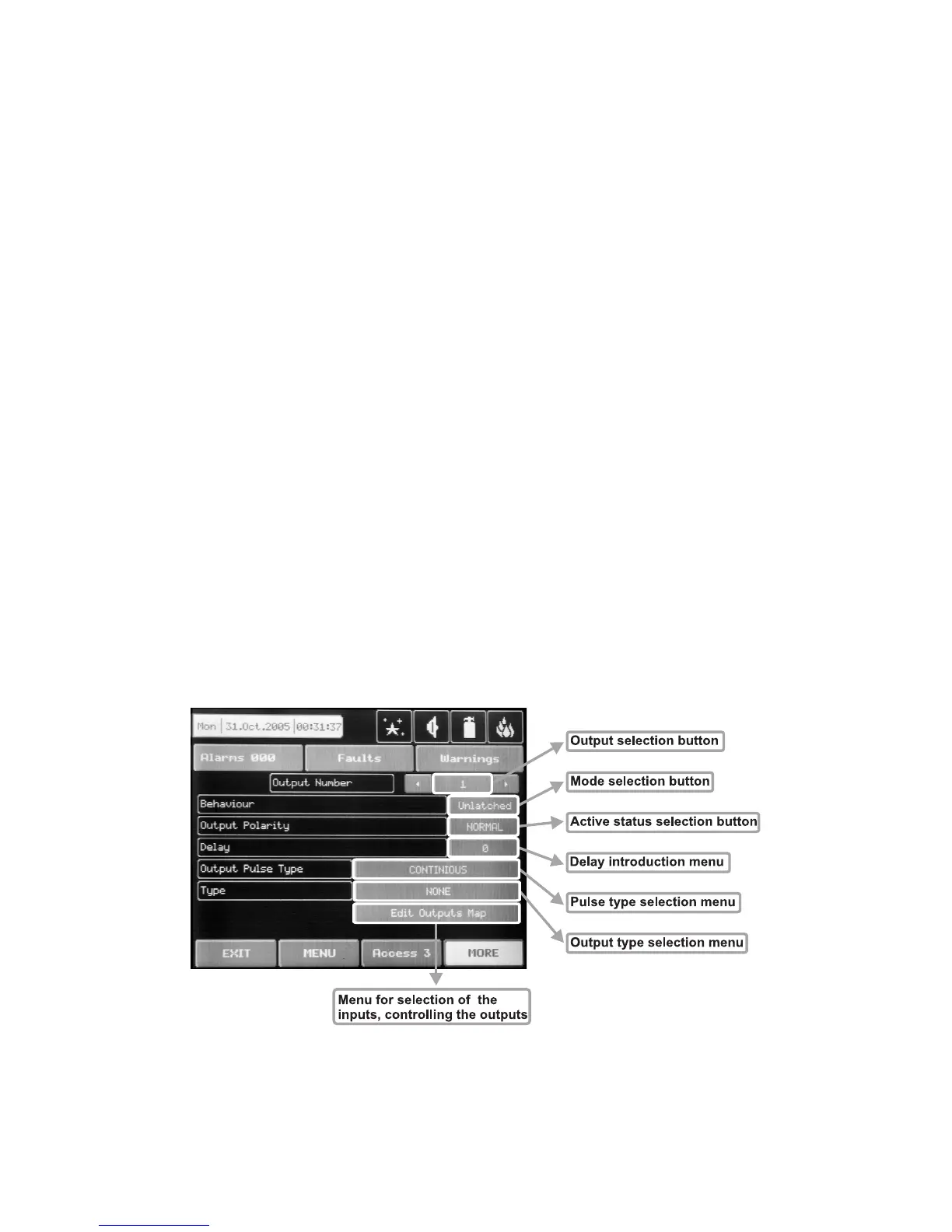
To enter the submenu for outputs configuration choose “Outputs” button from Programming menu – Fig.
Screen 2. The general view of the menu for inputs configuration is shown on Fig. Screen 14.
Fig. Screen 14 - Menu for introducing output parameters.



 To Next Page