topology feature to a PCoIP session between a client and a PCoIP host, you must have the
PCoIP host software installed on the host.
Note: Always change the display topology settings using this OSD Display Topology page.
Do not try to change these settings using the Windows Display Settings in a virtual machine
when using VMware View.
Note: If you are using the TERA2321 zero client device as your client, a dual monitor layout
displays on this page instead of the quad monitor layout.
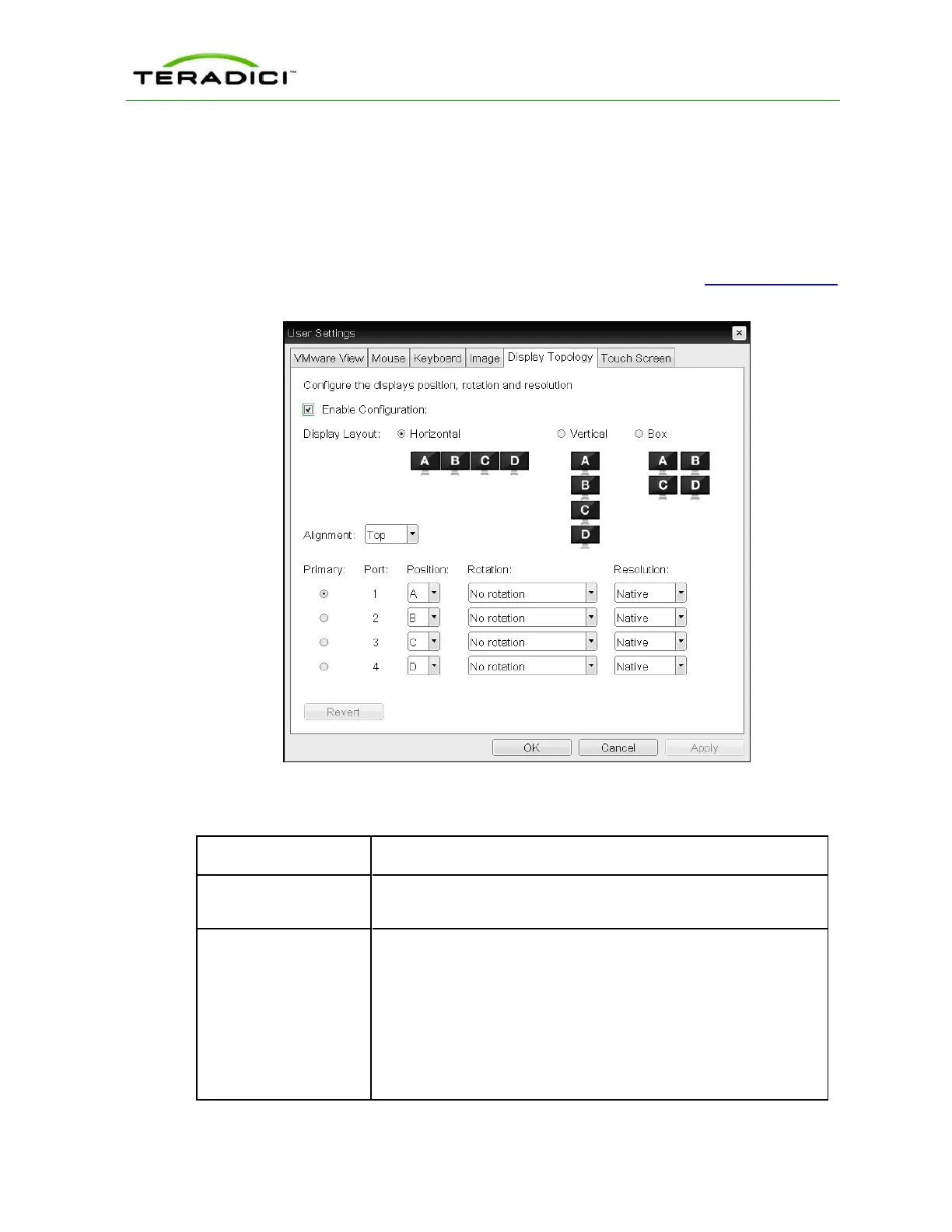
Figure 5-80: OSD Tera2 Display Topology Page
Table 5-77: OSD Tera2 Display Topology Page Parameters
Parameter Description
Enable Configuration Enable to configure a device that supports four displays per PCoIP
chipset.
Display Layout Select the layout for the displays (A, B, C, and D). This setting should
reflect the physical layout of the displays on the desk.
l Horizontal: Select to arrange displays horizontally, as indicated
in the diagram.
l Vertical: Select to arrange displays vertically, as indicated in the
diagram.
l Box: Select to arrange displays in a box formation, as indicated
in the diagram.
TER1206003 Issue 1 264
PCoIP Zero Client and Host Administrator Guide



 To Next Page