1-11
System Overview
Display Display
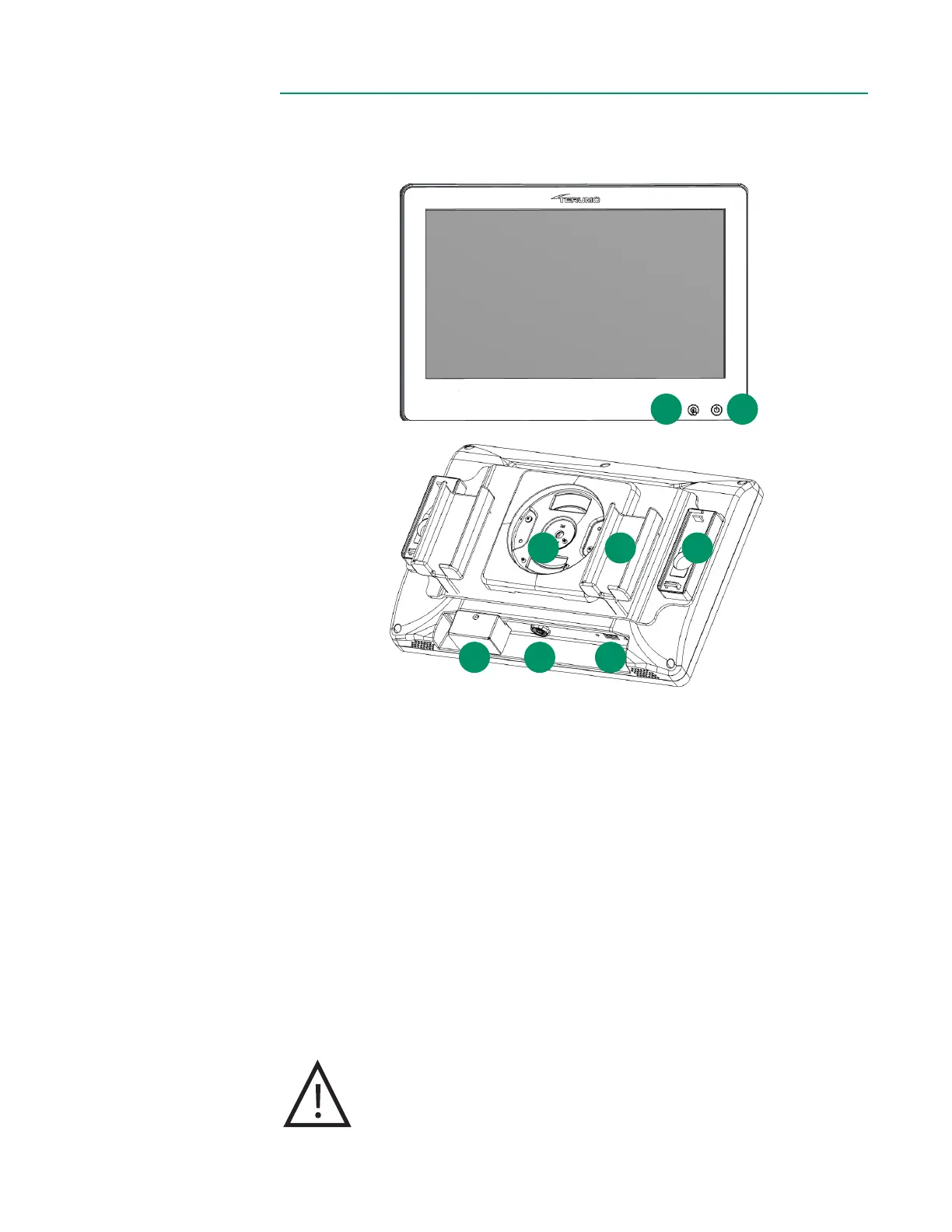
The Display is a congurable touchscreen that facilitates operation of the system, docks
the BPM and H/S Probe(s), and provides a USB port to connect a USB drive.
1. Touchscreen deactivation button: To disable the touchscreen for cleaning,
press and hold the button for one second. To reactivate the touchscreen, press
and hold the button for one second.
2. System power button: To switch the system on, press and hold the power
button for one second. To turn the system off, press and hold the power button
for two seconds. The light-emitting diode (LED) is steady white when the
system is off and power is connected, ashes green while starting up, is steady
green when ready for use, and ashes white while shutting down.
3. Display mount: Connects the Display to the bracket.
4. BPM holder x 2: Secures and protects the BPM(s) when not in use.
5. H/S Probe holder x 2: Secures and protects the H/S Probe(s) when not in use.
Incorporates a color chip for optical reference.
6. Barcode camera
7. Display Cable port: Connects the Display to the Core.
8. USB type A port: for data storage.
Caution
Do not use hard objects to operate the touchscreen.
The USB port should not be used to charge external devices.
1 2
Front
Back
8
3 4
6
5
7



 To Next Page