2-1
Initial Assembly and Admin Setup
This chapter details how to set up the hardware, establish module connections, start up
the system and congure administrative settings for the CDI OneView System.
System Hardware Assembly
The CDI OneView Display, Core, Calibrator and BPM each have brackets that attach to a
heart-lung machine. This section provides instructions on how to set up these brackets
and assemble the system hardware.
Core Setup Core Setup
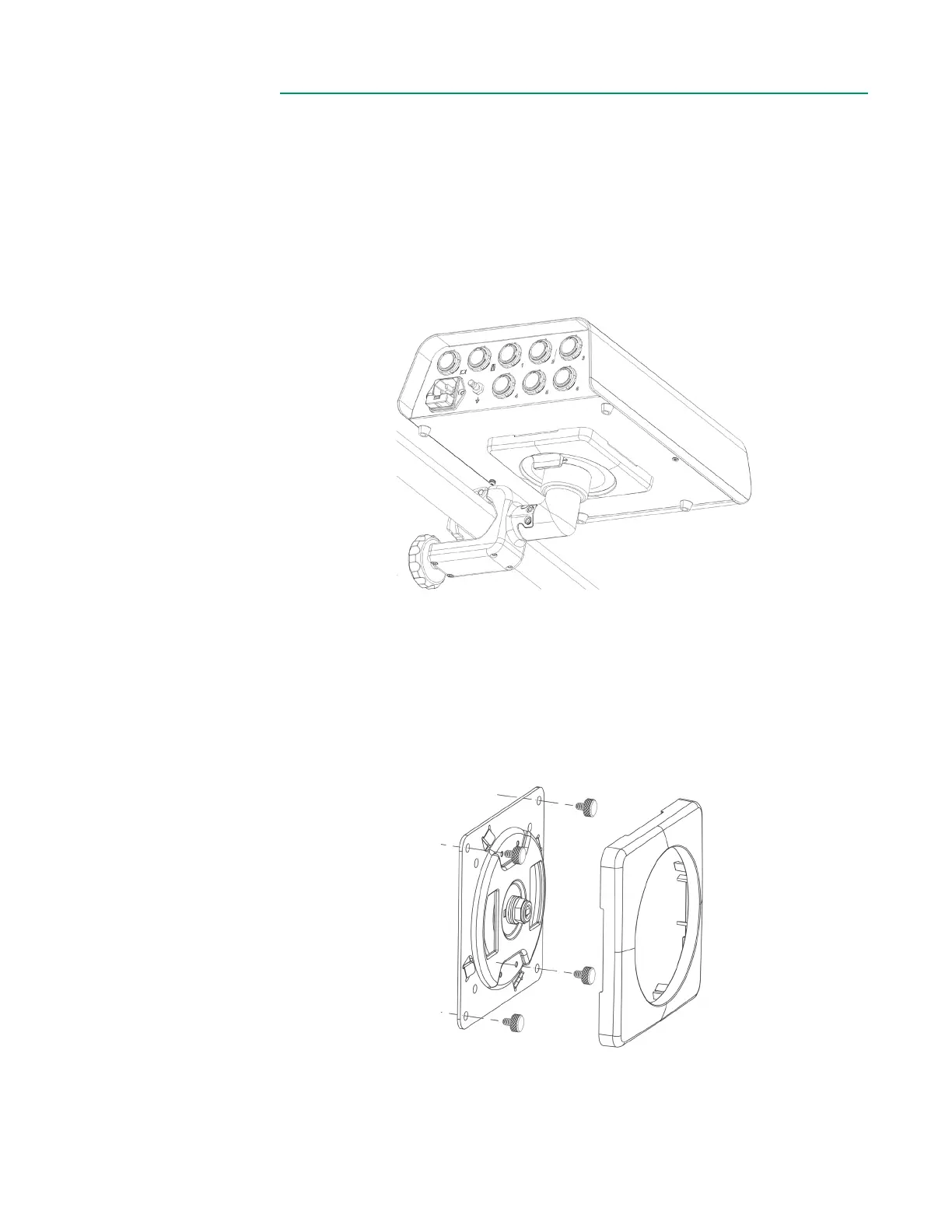
To assemble the Core, follow the steps below:
1. Depress the quick disconnect lever and remove the mounting plate and
mounting cover from the mounting disk.
2. Remove the mounting plate cover from the mounting plate.
3. Use the four included thumbscrews to attach the mounting plate to the Core
using the outermost holes.
4. Snap the mounting plate cover back onto the Core.
5. Close the pole clamp around an HLM pole, then tighten the knob clockwise.



 To Next Page