5-11
Running a Case
Caution
For the best comparison with your laboratory, press the store key
only after the circuit has been stabilized for approximately ve
minutes (when there have been no changes in temperature,
fraction of inspired oxygen in a gas mixture (FiO2), gas or blood
ows, other parameters or addition of medications that would
cause changes in displayed values). If the store button is pressed
and/or the recalibration blood sample is drawn during periods of
signicant temperature or gas change, the system may not meet
the system accuracy limits found in Appendix B.
Draw the blood sample as close as possible to when the store
button is pressed to ensure the blood parameter values are
calibrated as accurately as possible.
Ensure that the stored and recalled temperature mode are the
same as the laboratory sample to ensure proper calibration.
Recalibrating to different temperature modes will compromise
the system accuracy limits, as described in Appendix B.
Note: If the laboratory blood gas values are 37°C, the system must be in α-stat mode.
If the laboratory gas values are at patient temperature, the monitor must be in actual
(pH-stat) mode. The stored temperature mode can be switched in the recalibration
screen, however the temperature value used in the actual temperature mode cannot
be adjusted.
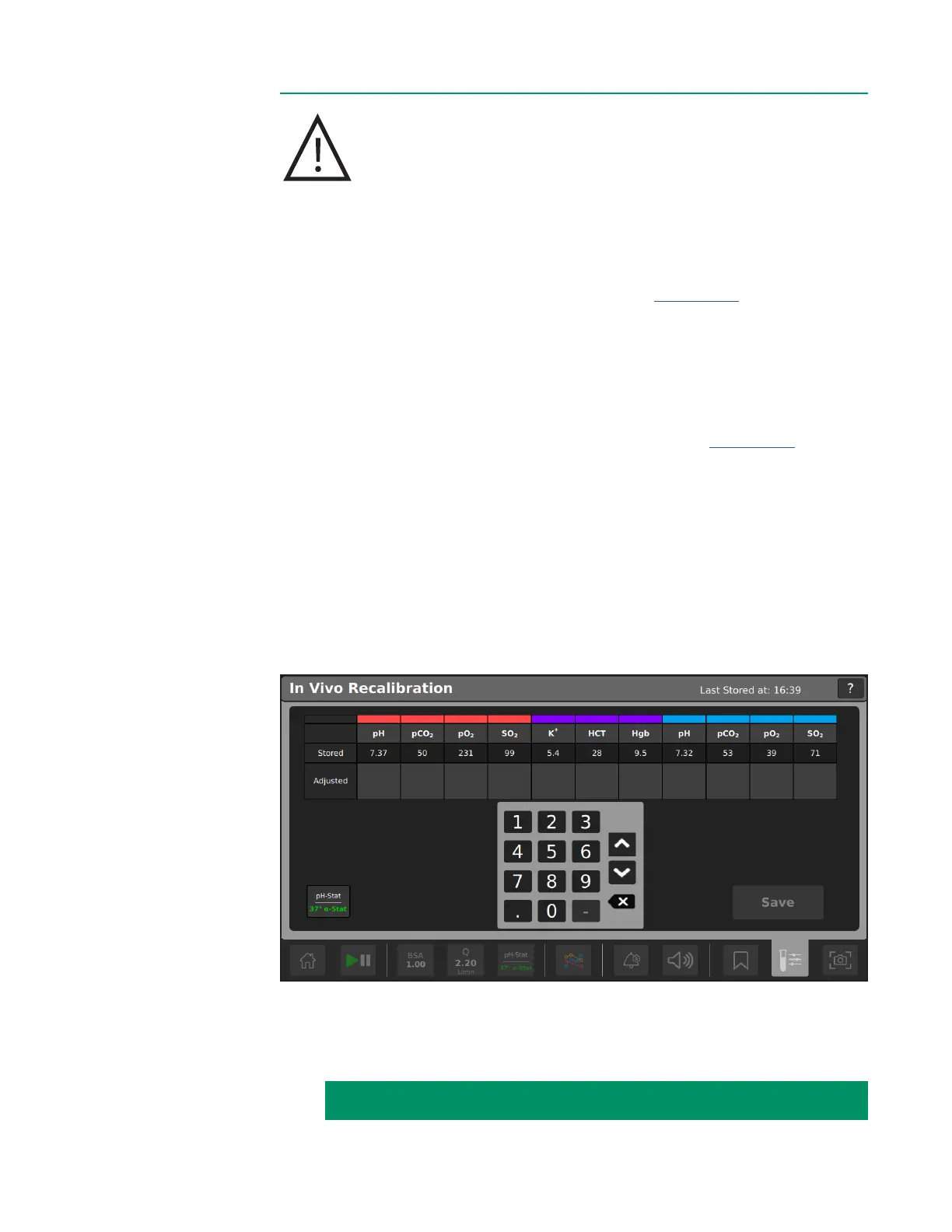
4. When the lab values are received, tap Recall. The In Vivo Recalibration screen
opens, as shown below.
IN VIVO RECALIBRATION INSTRUCTIONS CONTINUED ON NEXT PAGE:



 To Next Page