14
Chapter 3 Panel and Display Introduction
This chapter provides information including a tour of the front panel and display area
definition, which will help you to quickly learn how to operate the TH2816B. For more
information, please refer to chapter 4.
3.1 A Tour of the Front Panel
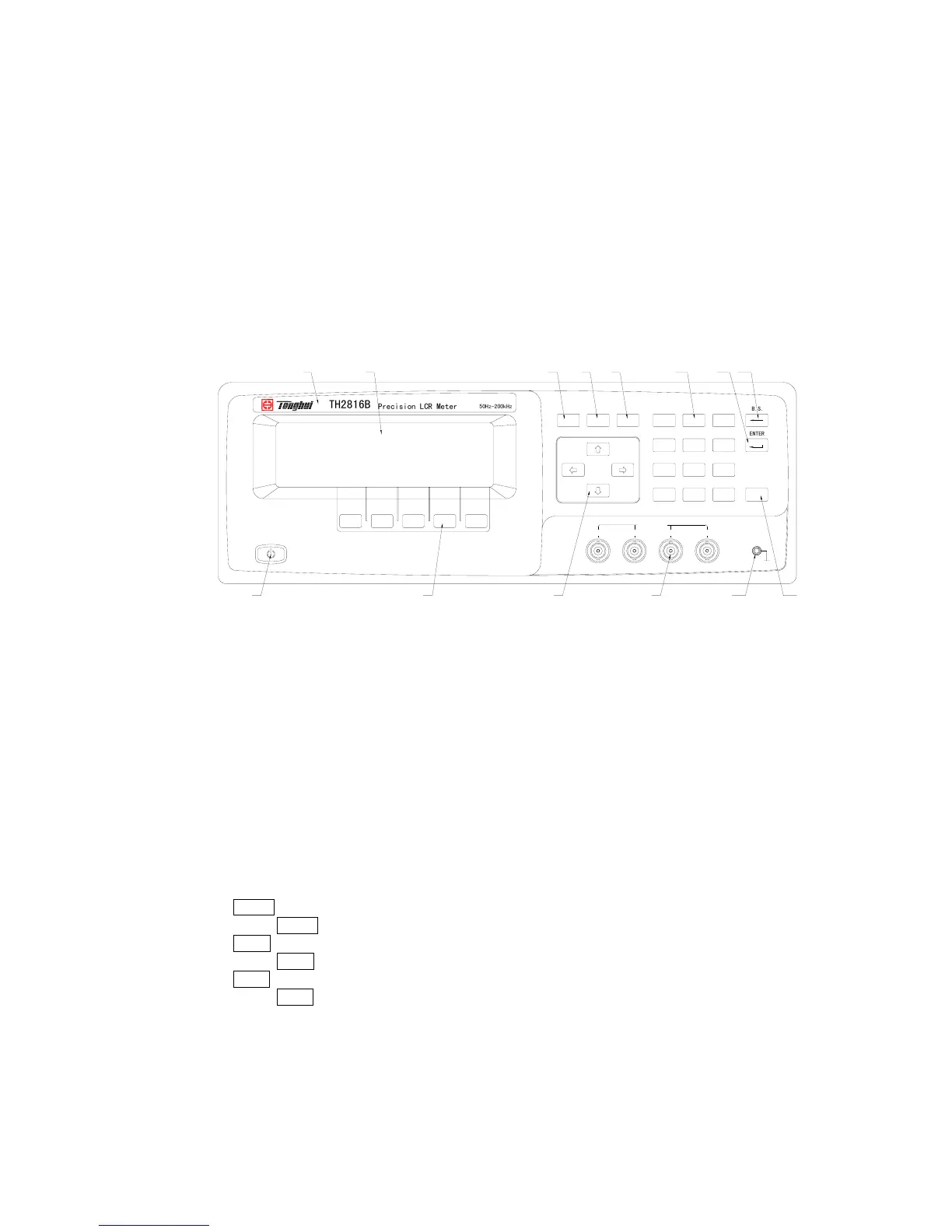
Figure 3-1 shows the brief description of key on the TH2816B’s front panel.
SYSTEMSETUPDISPLAY
B
.
S
.
E
N
T
E
R
TRIGGER
HCURHPOTLPOTLCUR
UNKNOWN
789
456
123
0
.
-
PQRS TUV WXYZ
GHI JKL MNO
ABC DEF
Cp:206.335
D :0.00012
5
0
H
z
-
2
0
0
k
H
z
P
r
e
c
i
s
i
o
n
L
C
R
M
e
t
e
r
T
H
2
8
1
6
B
1
2
3 5 6 7 11
8 9 10
12 13
4 14
Figure 3-1. Front panel overview
1) Brand and Model
The registered brand of our company and model of the instrument are printed.
2) Power on/off
Power on/off switch. In the “ON” position all operating voltages are applied to the
instrument. In the “OFF” position NO operating voltages are applied to the
instrument.
3) LCD
240×64 dot-matrix Liquid Crystal Display (LCD) displays measurement results,
test conditions, etc.
4) SOFTKEYs
The five keys’ functions are not fixed, they have different functions in different
menus. Five softkeys are used to select control and parameter functions. Current
function of each softkey is displayed in the softkey area at the bottom of LCD.
5)
HOME menu key
Press HOME menu key to enter the Meas Display page.
6) PREV menu key
Press PREV menu key to enter the Previous page.
7) NEXT menu key
Press NEXT menu key to enter the Next page.
8) Cursor keys
The CURSOR arrow keys are used to move the field select cursor from field to
field on the LCD display page. When the cursor is moved to a field the field
changes to an inverse video image of the original field.
9) Unknown terminals
These are the UNKNOWN Terminals used to connect a four-terminal pair test



 To Next Page