19
5. USING THE BATTERY
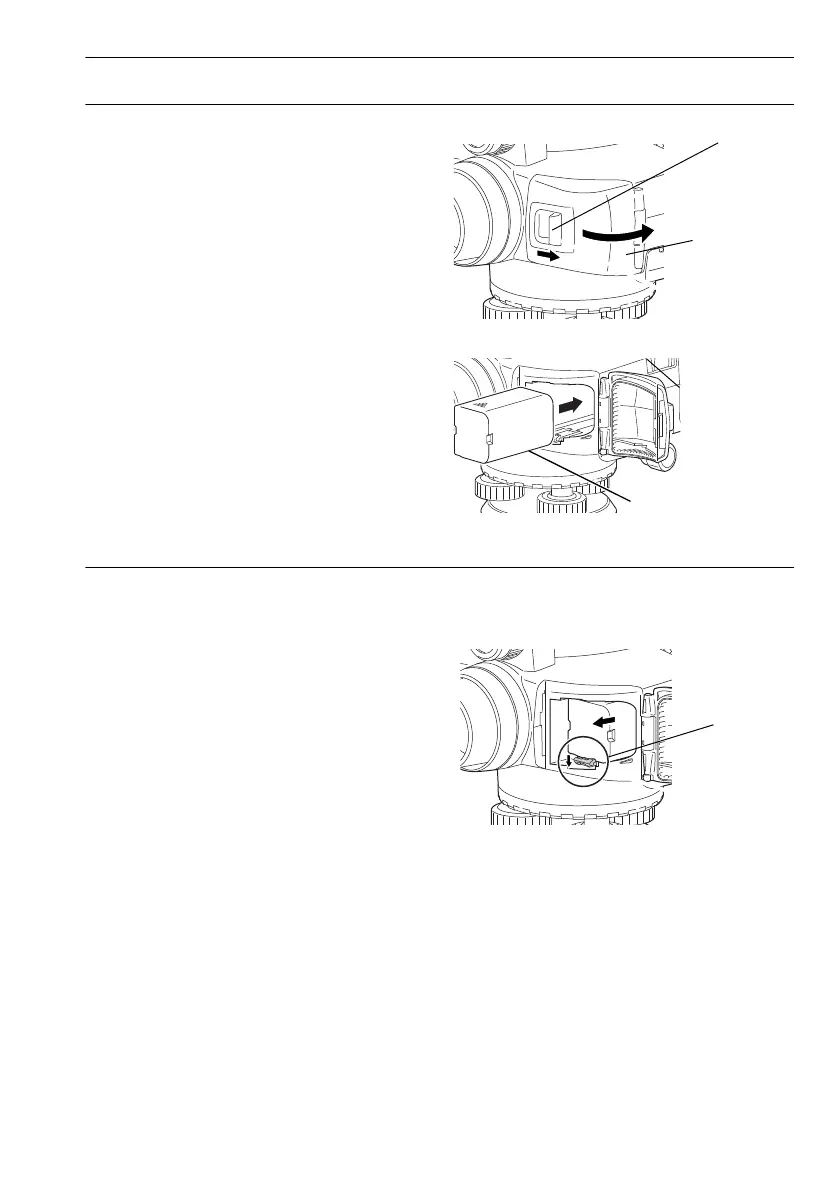
PROCEDURE Mounting the battery
1. Push the catch on the battery cover away from
the objective lens.
2. Insert the battery in the direction of the arrow
on the side of the battery.
3. Close the battery cover. A click is heard when
the cover is secure.
PROCEDURE Removing the battery
1. Push the catch on the battery cover away from
the objective lens.
2. Push the release lever down. Grip the battery
and slide out.
• If the release lever is not pushed down
completely when removing the BDC46C, the
battery adapter may jam against the release
lever. In this event, push the lever down fully
and remove, or re-insert the battery into the
instrument and try removing again.
3. Close the battery cover. A click is heard when
the cover is secure.
DL-501_E.book 19 ページ 2015年9月17日 木曜日 午後1時21分



 To Next Page