12. HEIGHT DIFFERENCE MEASUREMENT
50
PROCEDURE Measurement procedure BFFB
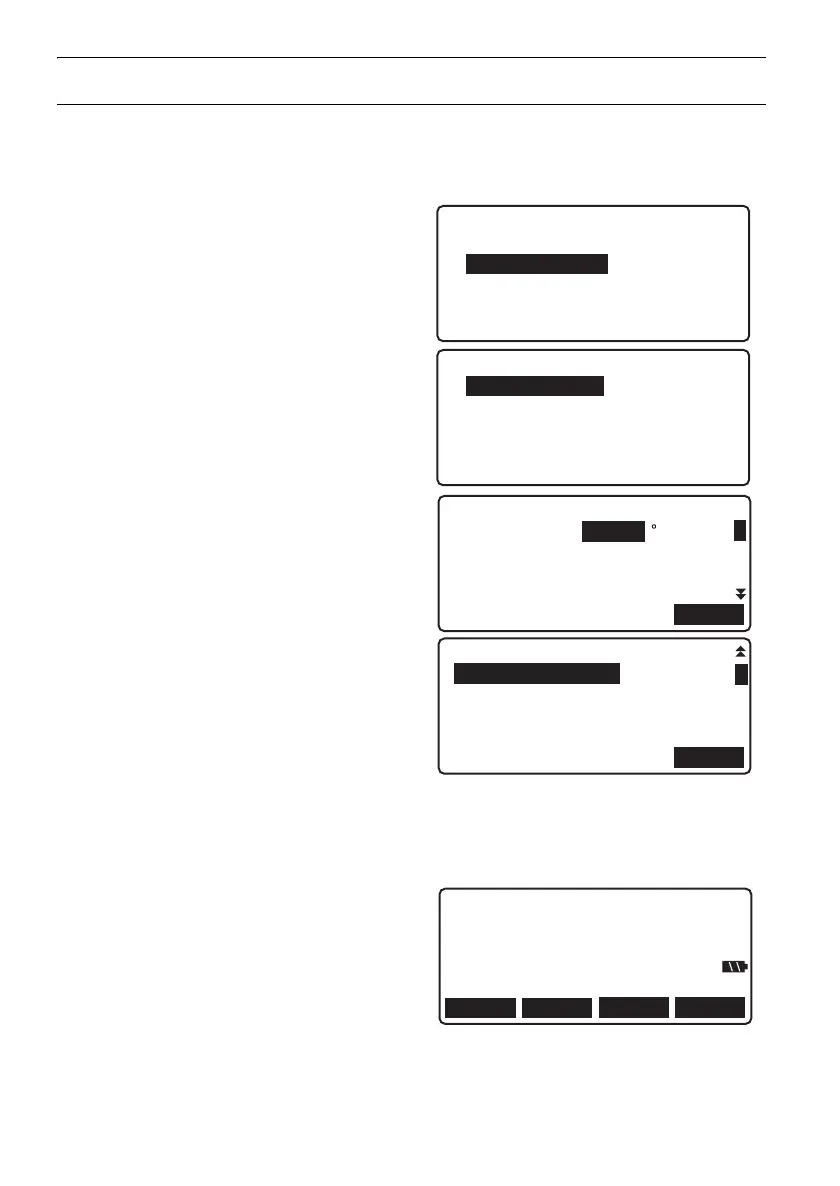
1. Select "Meas" in <Menu>.
2. Select "Height dif." in <Meas menu>.
3. Select "Measurement" in <Height dif. menu>.
4. Select "Start cond." in <Meas menu>.
• Select "Meas start" to skip Start cond. input
and proceed to step 7.
5. Set the following data items.
(1) Temperature
(2) Weather
(3) Wind strength
(4) Wind direction
(5) Observer name
(6) Memo
6. Press [OK] in the screen of step 5 when all
data items have been set.
7. Set up the DL in the center of the first section.
8. Press the Measure key to perform pre-
measurement and confirm that the distance to
the backsight is approximately the same as
the distance to the foresight.
Press [OK].
Height dif. menu
1.Route
2.Measurement
Height dif. meas menu
1.Start cond.
2.Meas start
3.View
OK
Feb/17/2009 10:03:28
Temp : 15.0 C
Weather :Fine
Wind :Calm
Wind dir :---
1
FOCUS
Pre.meas.
Rh 1.2345 m
Hd 34.567 m
OK
CNFGTILT
DL-501_E.book 50 ページ 2015年9月17日 木曜日 午後1時21分



 To Next Page