Home
Topcon
Measuring Instruments
HiPer+
Page 103
Topcon HiPer+ - Page 103
168 pages
Manual
Save Page as PDF
To Next Page
To Next Page
To Previous Page
To Previous Page
Loading...
Managing Receiver Options
P/N 7010-0736
5-7
3.
When finished, click
Exit
on the
Option Manager
dialog
box,
then click
File
Disconnect
to disconnect from PC-CDU (and
pre
vent conflicts with serial port
management).
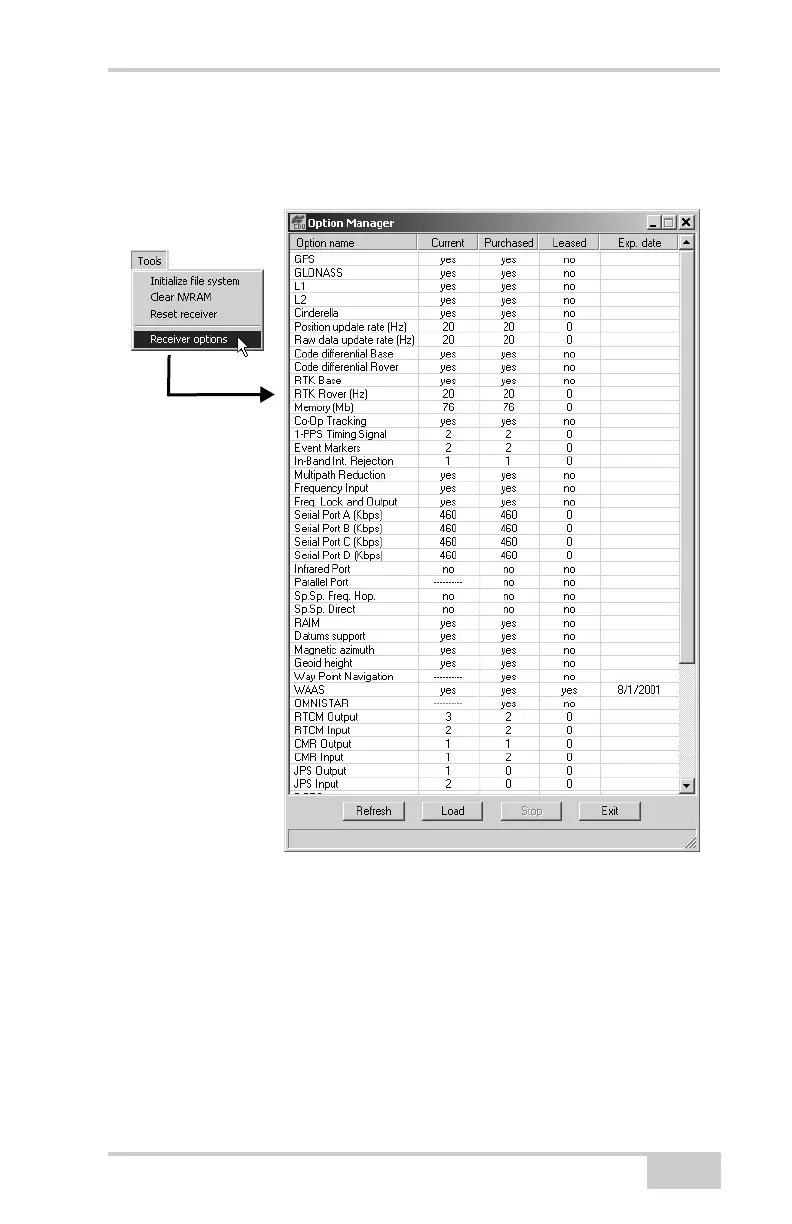
Figure 5-7. View Option Manager
102
104
Table of Contents
Main Page
default chapter
5
Table of Contents
5
Preface
9
Terms and Conditions
9
Manual Conventions
12
Chapter 1 Introduction
15
Principles of Operation
16
GNSS Overview
16
Calculating Absolute Positions
17
Calculating Differential Positions
18
Essential Components for Quality Surveying
19
Conclusion
19
Receiver Overview
20
Getting Acquainted
21
Minter
22
Data and Power Ports
26
External Radio Antenna Connector
27
Cables
28
Other Accessories
29
Option Authorization File (OAF)
30
Pre-Survey Preparation
31
Installing Software
32
Installing PC-CDU
32
Installing PDLCONF
34
Installing BTCONF
34
Installing Floader
36
Charging the Internal Batteries
37
Power Management
39
Powering the Receiver with an External Battery
42
Turning On/Off the Receiver
44
Connecting the Receiver and a Computer
44
Establishing an RS232 Cable Connection
45
Establishing a USB Connection
45
Establishing a Wireless Connection
45
Bluetooth Module Configuration
47
Collecting Almanacs and Ephemerides
51
Hiper+ Configuration
53
Configuring the Radio Modem
55
Configuring a UHF Radio Modem
56
Configuring a GSM Radio Modem
63
Configuring the Receiver
66
MINTER Configuration
78
Receiver Setup and Survey
85
Receiver Setup
85
Step 1: Set up the Receivers
85
Step 2: Measure Antenna Height
88
Step 3: Collect Data
90
MINTER Operation
91
Static Surveying for Base Stations
94
Kinematic (Stop & Go) Surveying for Rover Stations
95
Receiver and File Maintenance
97
Downloading Files to a Computer
97
Deleting Files from the Receiver
100
Managing Receiver Memory
101
Managing Receiver Options
102
Checking the Receiver's OAF
102
Loading an OAF
104
Clearing the NVRAM
105
Using the MINTER to Clear the NVRAM
105
Using PC-CDU to Clear the NVRAM
106
Changing Receiver Modes
106
Entering Sleep Mode
106
Entering Zero Power Mode
107
Entering Extended Information Mode
108
Loading New Firmware
109
Loading Receiver and Power Board Firmware
110
Loading Bluetooth Module Firmware
113
Chapter 6 Troubleshooting
115
Check this First
115
Troubleshooting Quick List
116
Powering Problems
117
Receiver Problems
118
Bluetooth Problems
124
RX LED Blink Pattern on Error Conditions
128
Obtaining Technical Support
129
Phone
129
E-Mail
129
Website
130
External Antenna Setup
131
Appendix B Creating Scripts
135
Appendix C Specifications
137
Hiper+ Specifications
137
Connector Specifications
145
Radio (Modem) RF Connector
145
Power Connector
145
Serial C-RS232 Connector
146
USB Connector
147
GPS External Antenna RF Connector
148
Appendix D Safety Warnings
149
General Warnings
149
Internal Battery Pack Warnings
150
Usage Warnings
151
Regulatory Information
153
UHF Radio Usage
153
FCC Compliance
154
Community of Europe Compliance
155
WEEE Directive
155
Appendix F Warranty Terms
157
Index
159
Related product manuals
Topcon RL-H4C
2 pages
Topcon RL-H3C
28 pages
Topcon RL-H5A
2 pages
Topcon RL-H5B
2 pages
Topcon RL-H1Sa
47 pages
Topcon RL-HV Series
55 pages
Topcon HiPer V
122 pages
Topcon HiPer VR
92 pages
Topcon HiPer SR
103 pages
Topcon HiPer Ga
162 pages
Topcon HiPER GD
172 pages
Topcon HiPer Plus
184 pages



 To Next Page