Receiver and File Maintenance
GR-3 Operator’s Manual
5-12
Entering Extended Information Mode
Extended Information Mode (EIM) is used for receiver testing
purposes. In this mode, the receiver continues to work as usual, but
the STAT LED indicates “extended” information using a delimiter.
The Delimiter is a distinguishable double-blink that shows the overall
status of tests performed in EIM. The STAT LED color for delimiter
is calculated from the colors of other LED blinks, and will be one of
the following colors when the tests complete:
• Orange – at least one blink is orange.
• Red – no orange blink and at least one red blink.
• Green – all other cases.
The delimiter double-blink is followed by six LED blinks
corresponding to six receiver tests, where each blink indicates the
following information:
Blink 1. Sufficient data for position computation.
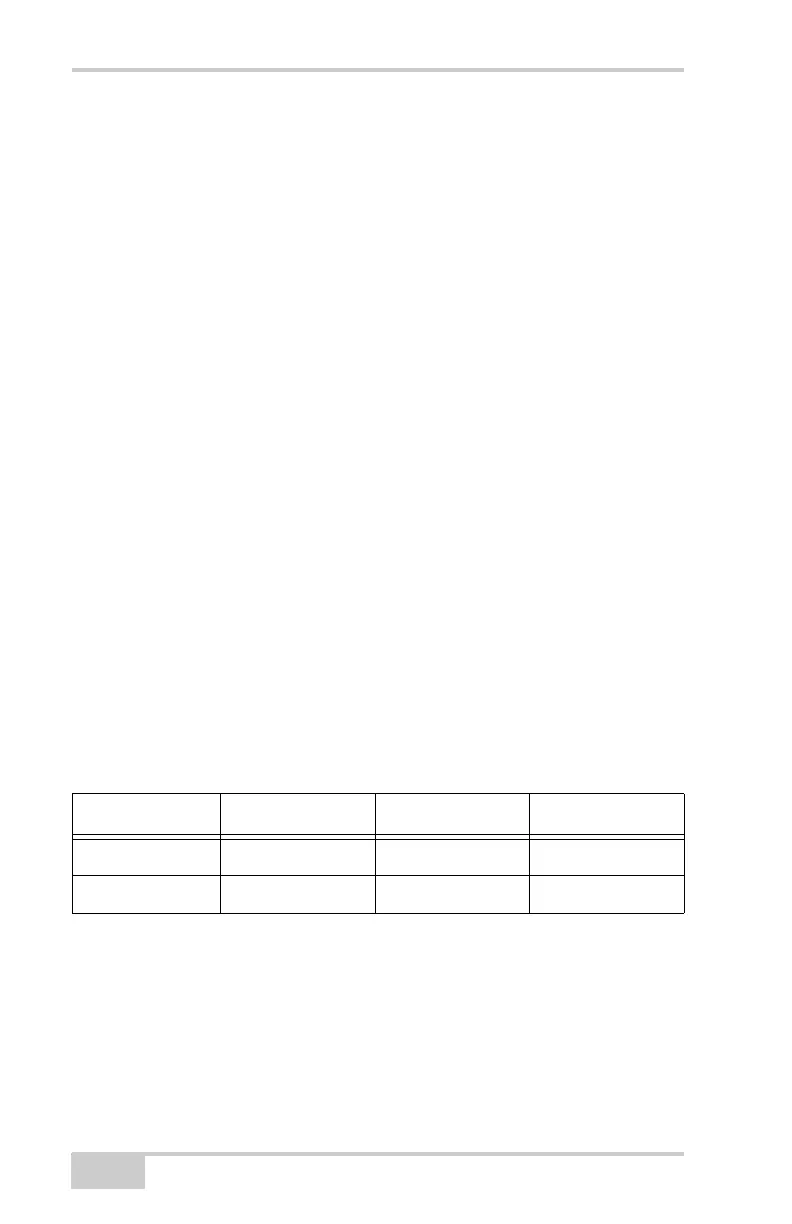
Blink 2. GPS S/N ratios are good (Table 5-1).
Blink 3. GLONASS S/N ratios are good (Table 5-1).
Blink 4. Oscillator’s frequency offset is less than three ppm (parts
per million).
Blink 5. Oscillator's Allan Variance is better than 2.7e-10.
Blink 6. Continuous tracking time is more than 15 minutes.
The color of the blink indicates that information for test is unavailable
(orange), the receiver passed the test (green), or the receiver failed the
test (red).
1. To switch to EIM, press and quickly release (within one second)
the FN key on the MINTER.
Table 5-1. Signal-to-Noise (S/N) “Good” Ratios
CA/L1 P/L1 P/L2
GPS513939
GLONASS 51 49 40



 To Next Page