Power Management
P/N 7010-0526
2-9
Power Management
Topcon’s PC-CDU software provides an interface for various
configuration, monitoring, and management functions for the
receiver.
For power management of the receiver, PC-CDU enables the power
source, enables the charging mode, enables the power output for
serial ports, and displays the current voltage for the batteries.
1. Connect your receiver and computer. See “Connecting the
Receiver and a Computer” on page 2-14 for this procedure.
2. Once connected, click ConfigurationReceiver.
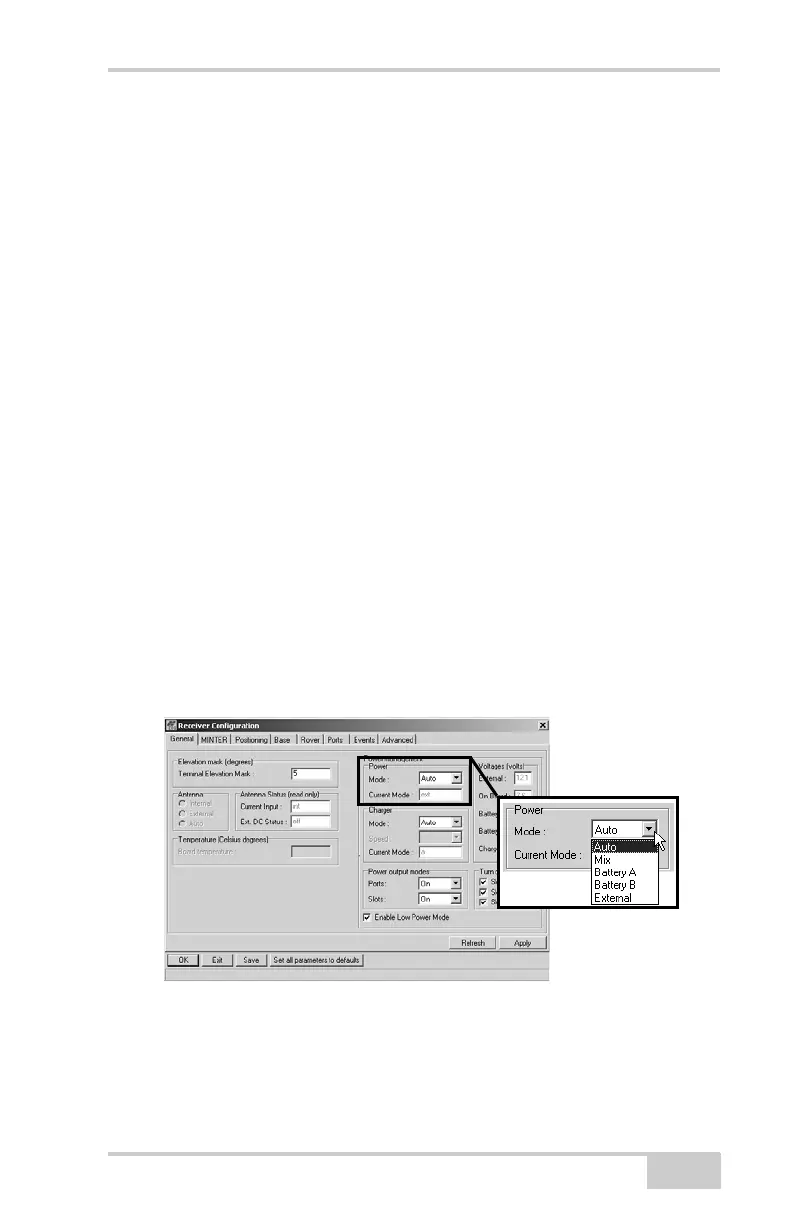
3. Select the Power Mode drop-down list to set the desired power
source (Figure 2-6). Current Mode displays the current power
source.
• Auto – receiver automatically selects the power source
• Mix – receiver automatically detects and consumes power
from the source with the largest voltage
• Battery A – receiver consumes power from battery A
• Battery B – receiver consumes power from battery B
• External – receiver uses an external power supply
Figure 2-6. Select Power Mode



 To Next Page