HiPer+ Configuration
HiPer+ Operator’s Manual
3-26
16. Continue with other configuration activities or click File
Disconnect, then FileExit to quit PC-CDU. Disconnecting
before exiting ensures proper port management.
MINTER Configuration
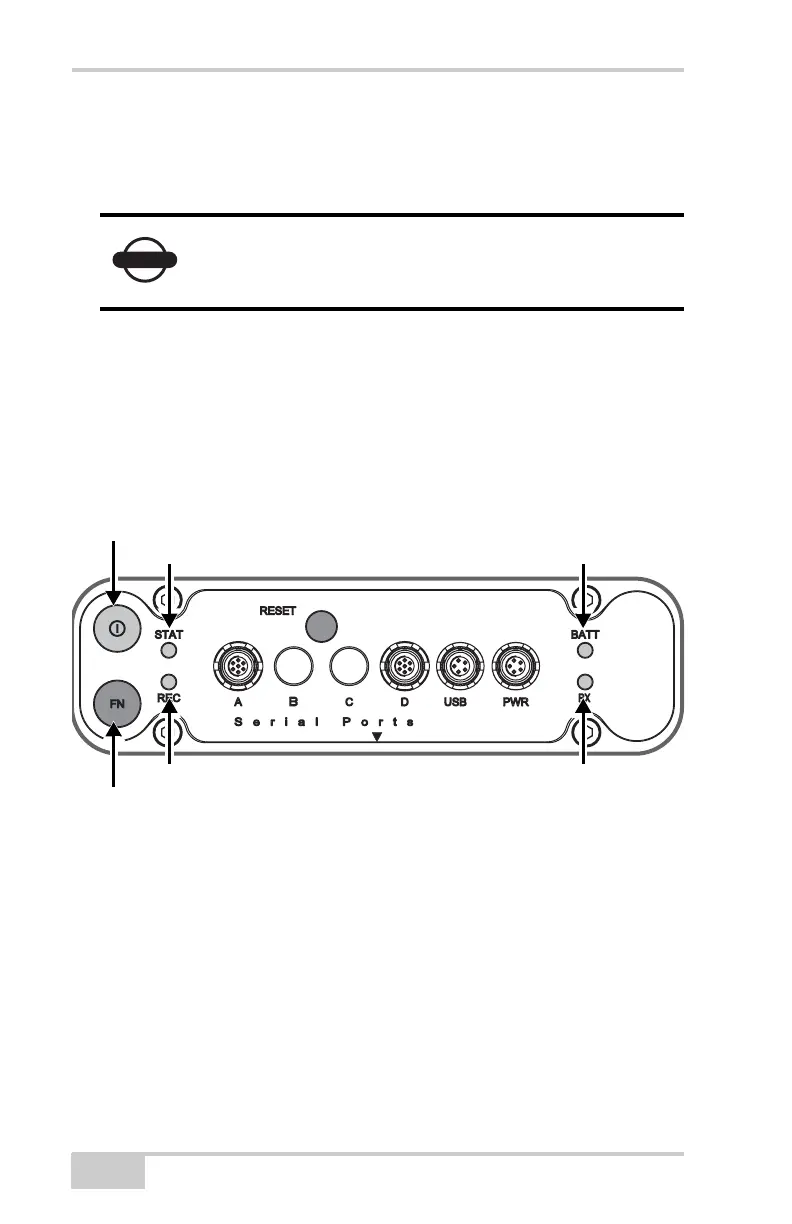
The Minimum INTERface (MINTER) consists of two keys (power
and FN) that control the receiver’s operation, four LEDs (STAT, REC,
BATT, and RX) that display the receiver’s operational status and
battery status (Figure 3-26).
Figure 3-26. MINTER
The MINTER performs the following functions. For more
information on using the MINTER, see “MINTER Operation” on
page 4-7.
• Turns the receiver on or off; puts it in either Sleep mode or Zero
power mode.
• Turns data recording on or off (FN button).
• Changes the receiver’s information mode.
• Shows the number of GPS (green) and GLONASS (orange)
satellites being tracked (STAT LED).
NOTICE
Disconnect the receiver from PC-CDU before
exiting to eliminate possible conflicts with the
management of the computer’s serial ports.
Power Button
Status LED Battery LED
FN Button
Record LED Modem Status LED



 To Next Page