Net-G3A Configuration and Setup
NET-G3A Operator’s Manual
3-6
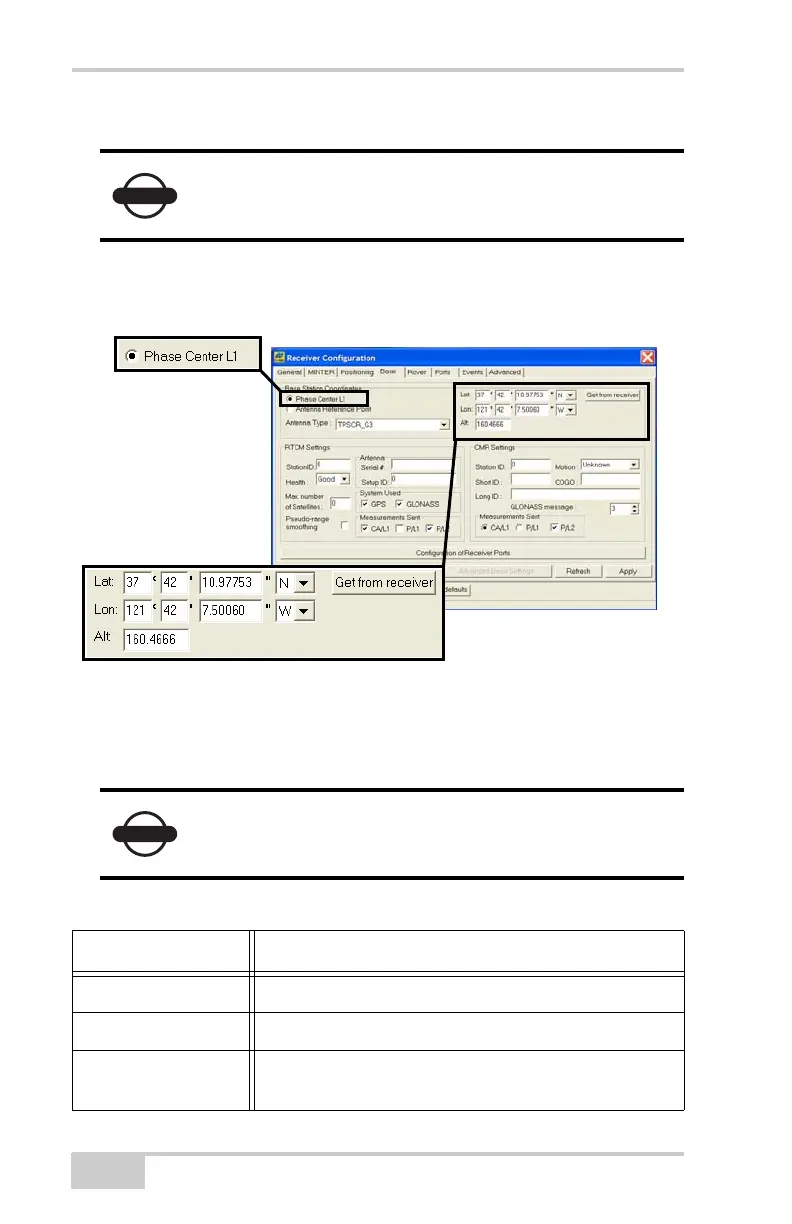
– Click Get from receiver.
8. Continue with step 8 on page 3-6 for RTK surveys or step 9 on
page 3-7 for other configurations.
Figure 3-5. Base Configuration
9. For RTK surveys, click the Ports tab, set the following port
parameters for the serial port (Table 3-2), and then click Apply
(Figure 3-6 on page 3-7).
The reference geodetic coordinates specified on this
tab relate to the antenna L1 phase center.
For post-processed surveys, keep the default values
for these parameters.
Table 3-2. Receiver Parameters for the Ports Tab
Parameter Base Receiver
Input n/a (Leave the default, “Command”.)
Output Select the type and format of differential corrections.
Period (sec) Enter the interval at which the receiver transmits
differential corrections.
Net-G3A_OM_Book.book Page 6 Thursday, May 14, 2009 8:49 AM



 To Next Page