E6582233
F-10
6
Setting of switching terminals
To switch to motor 2, assign the following functions to a terminal not being used. It is also possible to switch
to acceleration/deceleration 2 (AD2). Refer to section 6.17.1 for details.
It is possible to set 3 functions for terminal F and R, and 2 functions for terminal S1 and S2.
Input terminal function numbe
Parameters changed from applicable parameters and
default standards
24
AD2
28
VF2
32
OCS2
OFF OFF OFF
Standard default:
, , , , , ,
, ,
ON OFF OFF
→ , → , →
OFF ON OFF
→ V/F constant , → , → ,
→ , →
OFF OFF ON
→
Note 1: Each of the following numbers (25, 29, 33) are reverse signals.
Note 2: Switching from "V/F constant" to
= to cannot be done while running. Stop the motor before
changing.
Note 3: Integral value of motor electronic thermal is cleared, after the motor switching.
However, the setting that can memorize an integral value is possible.
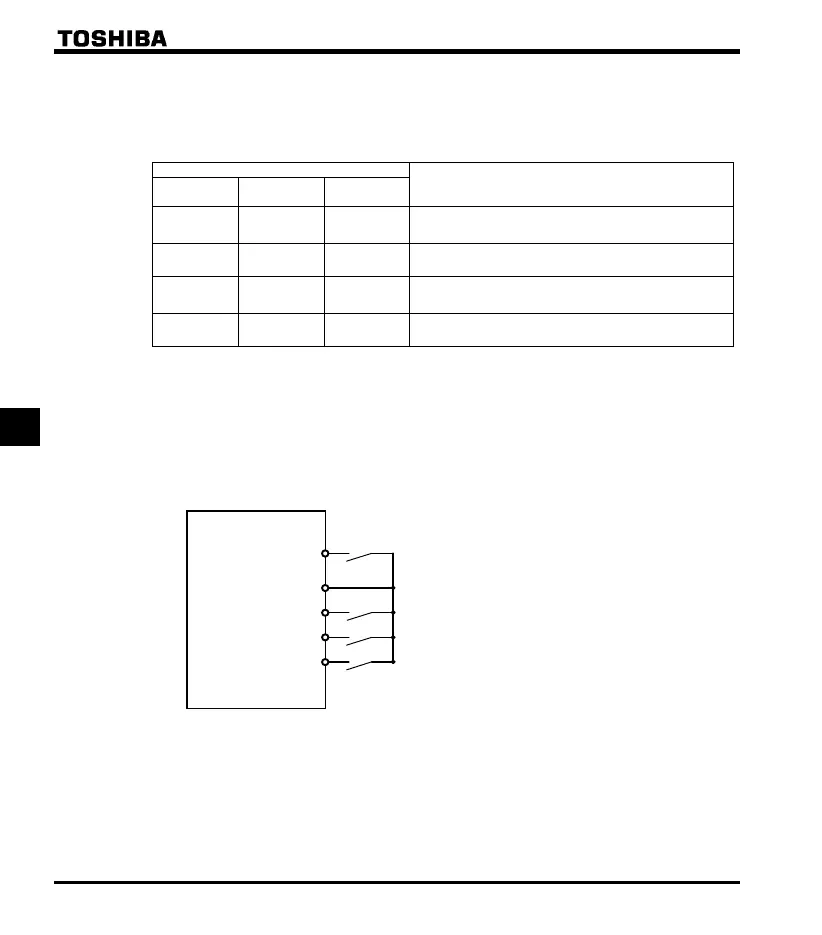
Example of setting a terminal for switching : Sink logic
F (F: Forward run)
CC
S2(VF2)
R(OCS2)
S1(AD2)
Forward run command
2nd acceleration/deceleration switch
2nd stall prevention operation switch
2nd V/F setting switch



 To Next Page
 Loading...







