24-Port Gigabit Layer 2 Switch w/ 4 Shared Mini-GBIC Slots
5-8
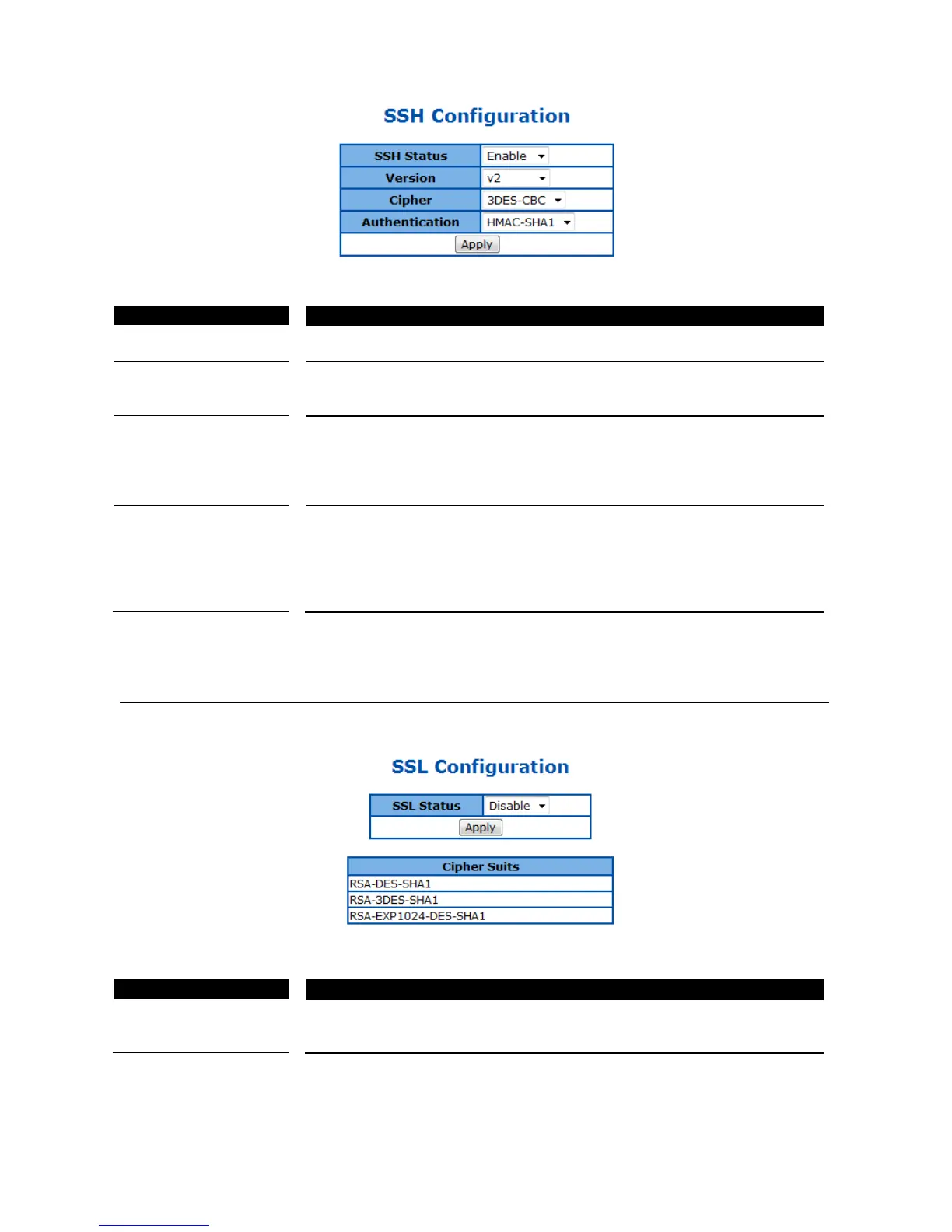
Figure 20 – System > SSH
SSH Status Select Enable or Disable to turn on or off the SSH server function. Default is
Specify the SSH version supported.
V2 – SSH v2 is supported. This is the default value.
V1 & V2 – Both SSH v1 and V2 are supported.
Cipher To specify SSH Cipher algorithm.
3DES-CBC - 3DES (Triple Data Encryption Standard) encryption algorithm in
CBC (Cipher Blocking Chain). This is the default value.
DES-CBC - DES (Data Encryption Standard) in CBC (Cipher Blocking Chain).
Both – Both 3DES-CBC and DES-CBC are supported.
Authentication To specify authentication encryption algorithm.
HMAC-SHA1 – Hash-based Message Authentication Codes (HMAC) and
SHA1 (Secure Hash Algorithm).
HMAC-MD5 – Hash-based Message Authentication Codes (HMAC) and MD5
(Message-Digest algorithm 5).
Both – Both HMAC-SHA1 and HMAC-MD5 are supported.
Click Apply to submit the changes.
SSL Configuration
This page is to configure the SSL server function on the device.
Figure 21 – System > SSL
to turn on or off the SSH server function. Default is
disabled. The cipher suite includes RSA-DES-SHA1, RSA-3DES-SHA1, and
RSA-EXP1024-DES-SHA1 cipher algorithm.
Click Apply to submit the changes.


 To Next Page