158 Connecting to a TriStation PC
Trident Planning and Installation Guide
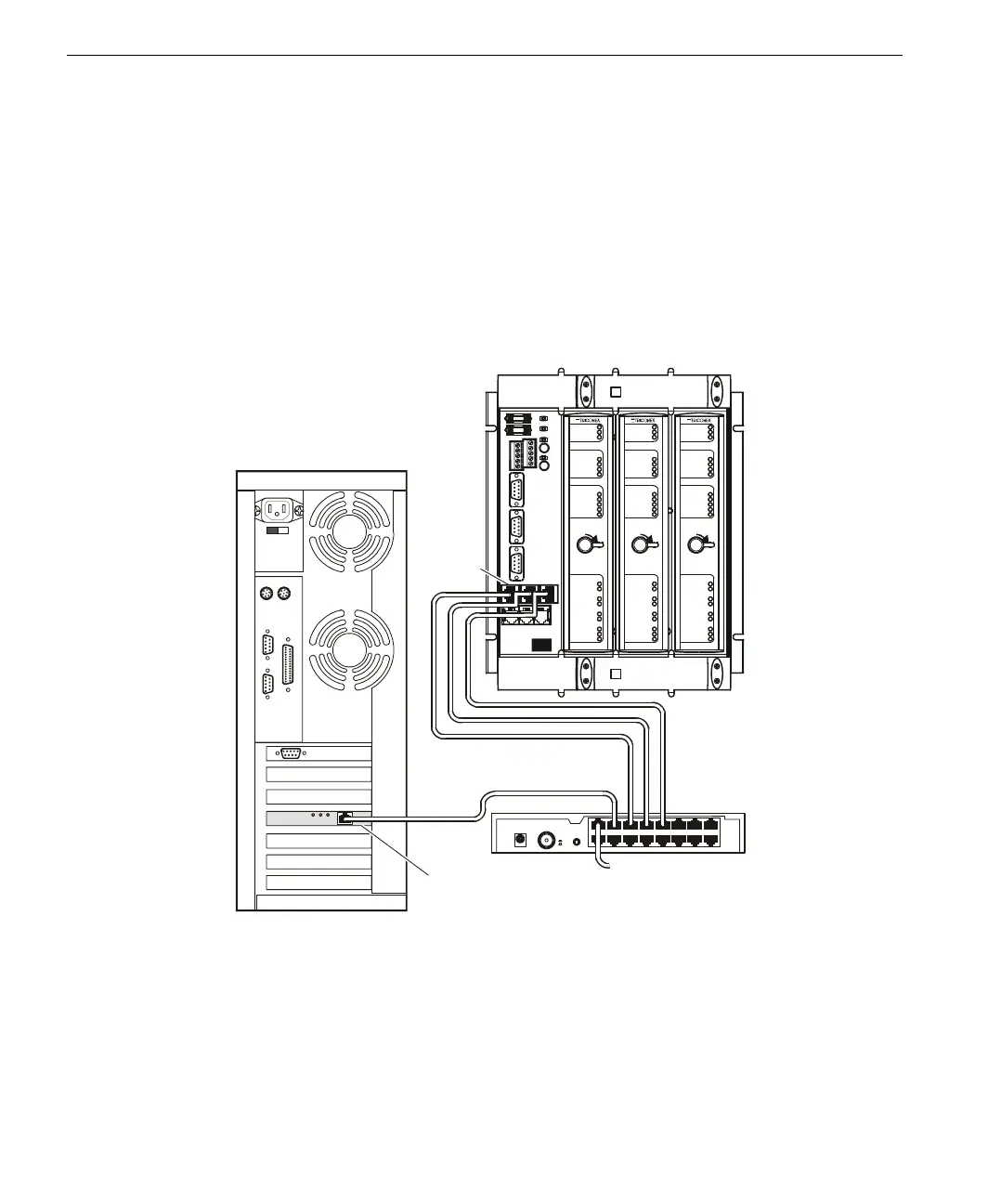
▼ To connect a TriStation PC to an MP port using an Ethernet hub:
1
Attach at least one 10BaseT straight-through cable from an RJ-45 connector on
the MP Baseplate to the hub, as shown in the figure below.
Using more than one cable provides redundancy for your TriStation connection.
If you use only one cable during live operation, you have to unplug it and move
it to another RJ-45 connector if the original connection fails.
2 Attach the network adapter card in the TriStation PC to the hub using another
10BaseT straight-through cable.
Connecting an MP
Using a Network
Hub
T
X
MP Baseplate with Modules
C
h
a
n
n
e
l
A
C
h
a
n
n
e
l
B
C
h
a
n
n
e
l
C
1X
9X
8X
16
10BASE-T
POWER
COAX
MDI
MDIX
External Ethernet Network
Hub
LOCK
REMOTE
RUN
PROGRAM
HALT
TX
RX
TX
PS1
RX
SYST EM A LA RM
TX
PROGRAM ALARM
RX
OVE R TEM PERAT URE
LINK
TX
RX
PS2
PASS
FAULT
ACTIVE
3101
MP
MODE
STATUS
COMMUNICATIONS
IO BUS
COMM BUS
SERIAL
TRISTATION
LOCK
REMOTE
RUN
PROGRAM
HALT
TX
RX
TX
PS1
RX
SYSTEM ALARM
TX
PROGRAM ALARM
RX
OVER TEMPERATURE
LINK
TX
RX
PS2
PA S S
FAULT
ACT I VE
3101
MP
MODE
STATUS
COMMUNICATIONS
IO BUS
COMM BUS
SERIAL
TRISTATION
LOCK
REMOTE
RUN
PROGRAM
HALT
TX
RX
TX
PS1
RX
SYST EM A LA RM
TX
PROGRAM ALARM
RX
OVER TEMPERATURE
LINK
TX
RX
PS2
PASS
FAULT
ACTIVE
3101
MP
MODE
STATUS
COMMUNICATIONS
IO BUS
COMM BUS
SERIAL
TRISTATION
+
–
VSP1
VSP2
ALARM1
ALARM2
1
TriStation PC, Rear View
RJ-45
Connector
Straight-Through Cables
Network Adapter Card



 To Next Page