95
95
Set
km/h
60
oc
Coolant Temp
30
km
Range
30
rpm
6700
5
km/h
URBAN
05:30
PM
Timelapse
Videos
Photos
999
MENU
SET
SET
Mode select
- Using ‘Up’ or ‘Down’ arrow, select the
required option and press the ‘ENT’ button.
- In ‘Photos’ mode press the ‘Return‘ (D4)
button to capture photo.
- In ‘Videos’ and ‘Timelapse’ mode press the
‘Return’ button to start and stop the video /
timelapse.
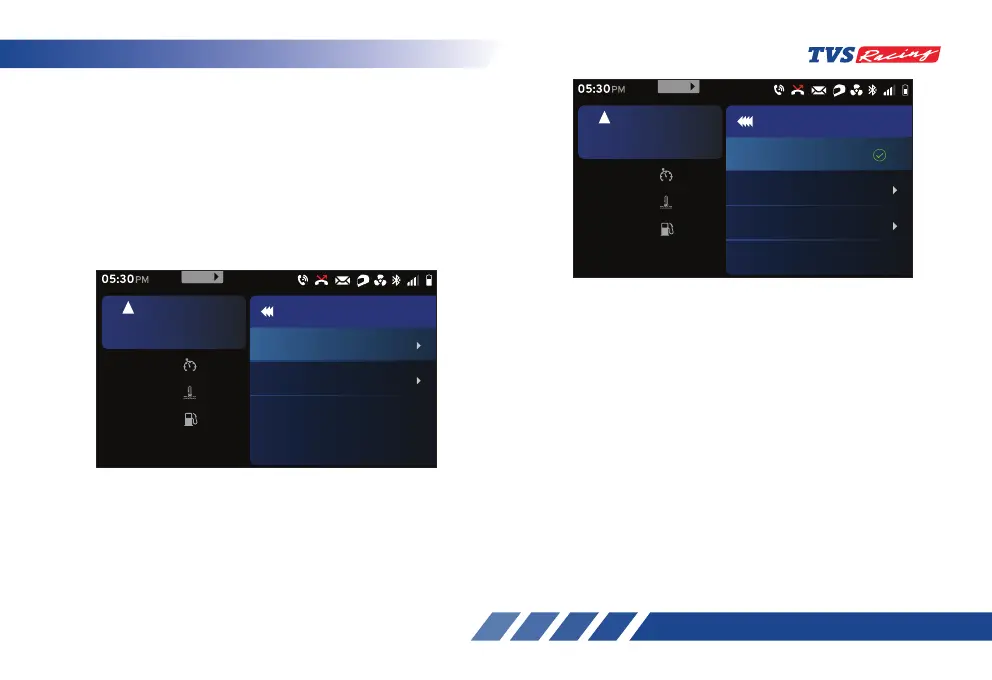
• Inside the ‘Go pro list’ option, the list paired
device will be displayed.
- Using ‘Up’ or ‘Down’ arrow, select the
required paired device and press the ‘ENT’
button start.
d10. Go pro
With the Go pro feature, you can connect your Go pro
via Bluetooth by configuring the MAC ID of camera.
- After entering the ‘Preferences’ menu, select
the ‘Go pro’ option using ‘Up’ (D2) or ‘Down’
(D3) arrow (ref. Fig. 24).
- Once the ‘Go pro’ option is selected, press
the ‘ENT’ (D1) button.
Set
km/h
60
oc
Coolant Temp
30
km
Range
30
rpm
6700
5
km/h
URBAN
05:30
PM
Go pro
Go pro list
Mode select
999
MENU
• You will be having two options to select the
‘Mode’ and to add Go pro.
- Inside ‘Mode select’ option, you have options
to choose between ‘Photos’, ‘Videos’ and
‘Timelapse’.













 To Next Page