46
A) Menu function
TVS Apache RTR 310’s connected instrument cluster
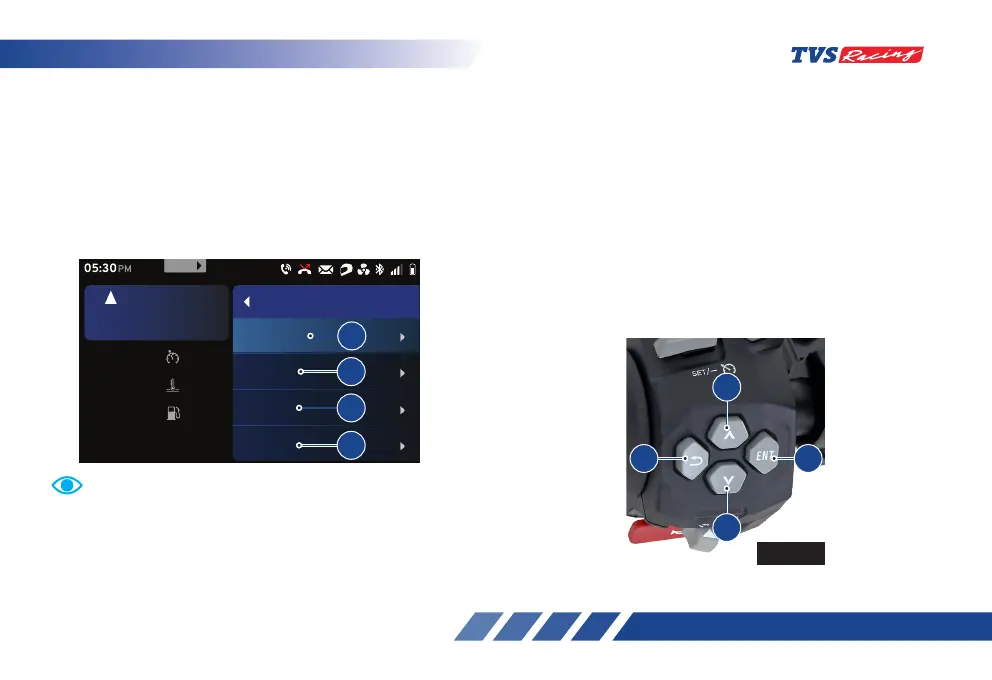
offers you different menus to choose. Sequence
of the menu, their selection and their working are
explained in the following pages. Following are the
main menus available under the menu function
a) Ride mode b) Trip details
c) My vehicle d) Preferences
For your safety, it is not allowed to navigate through the
menu which is not of high importance while riding the
bike. Once your vehicle reaches above 5 km/h speed,
the menu functions ‘My vehicle’ and ‘Preference’ gets
locked.
Set km/h60
oc
30Coolant Temp
km
Range 30
rpm
6700
5
km/h
URBAN
PM
Menu
Trip details
My vehicle
Preference
Ride mode
999
a
b
c
d
To select the required menu:
- Keep the vehicle stationary and switch ‘ON’
the ignition. After the self-check of instrument
cluster, press the ‘ENT’ (D1) button to enter
menu function (ref Fig. 24).
- Navigate using ‘Up’ (D2) and ‘Down’ (D3)
arrow.
- Press the ‘ENT’ button again after selecting
the required menu.
- Press the ‘Return’ button (D4) to come out of
menu selection window.
D2
Fig. 24
D4 D1
D3
D2













 To Next Page