103
103
First time Bluetooth paring
To pair your Android smart phone or iPhone with your
TVS Apache RTR 310’s connected instrument cluster,
via Bluetooth, for the first time.
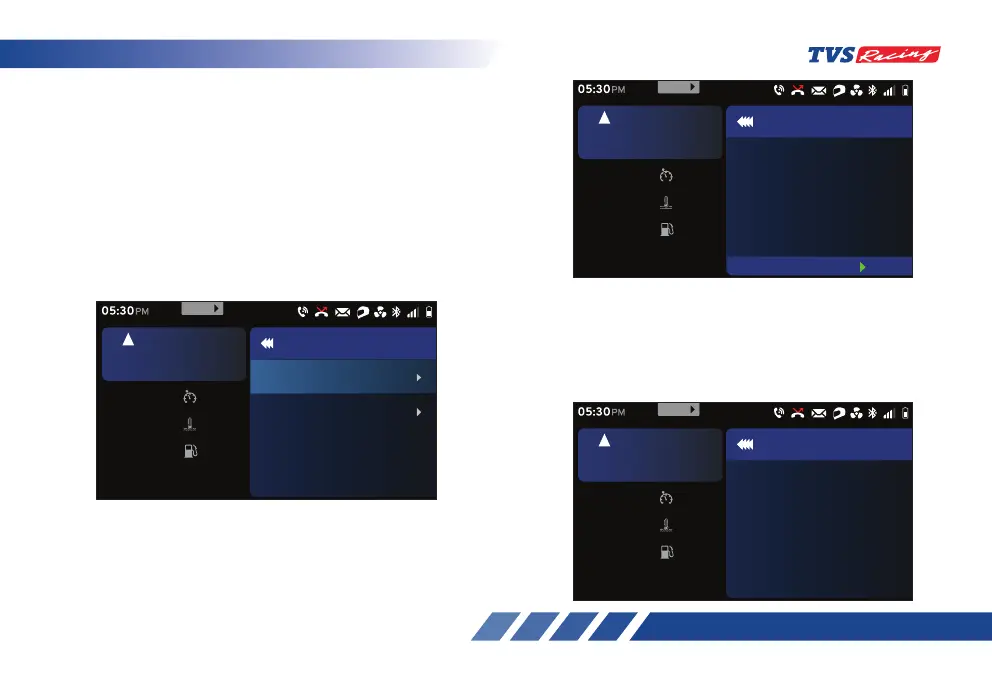
• Select the ‘Preferences’ from ‘Menu’ option
of the connected instrument TFT cluster and
navigate to the ‘Connectivity’ option.
• After selecting the ‘Connectivity’ option drill
down to ‘Paired device’ option. Refer page 76
for details.
• The Bluetooth name (ID) of the instrument cluster
will be displayed as shown after entering the new
device pairing option.
- Ensure to switch ‘ON’ Bluetooth of your
mobile device while pairing.
Set
km/h
60
oc
Coolant Temp
30
km
Range
30
rpm
6700
5
km/h
URBAN
05:30
PM
Connectivity
Display call
Paired Devices
999
MENU
• Press the ‘Down’ (D2) arrow of the control
switches (ref. Fig. 24) and press the ‘ENT’ (D1)
button after selecting the to ‘Pair a new device’
option.
Set
km/h
60
oc
Coolant Temp
30
km
Range
30
rpm
6700
5
km/h
URBAN
05:30
PM
Paired Devices
Currently there is no paired
devices
999
MENU
Pair new device
Set
km/h
60
oc
Coolant Temp
30
km
Range
30
rpm
6700
5
km/h
URBAN
05:30
PM
Pairing Devices
TVSRTR310DDA0318
Device name
999
MENU













 To Next Page