17.0 VLAN Scan
Scan is only available in single port mode. To change the operation mode, go to the home menu, then navigate to Setup >
Operation Mode > Single Port.
VLAN Scan scans up to 4096 VLAN IDs for switch configuration and displays VLAN ID bandwidth rates, useful for identifying top
bandwidth users based on VLAN ID. Monitor mode monitors up to eight live traffic streams (in terminate mode) and filters them
based on VLAN ID configuration, providing key traffic metrics such as frame type, rates, and errors and alarms.
VLAN Scan
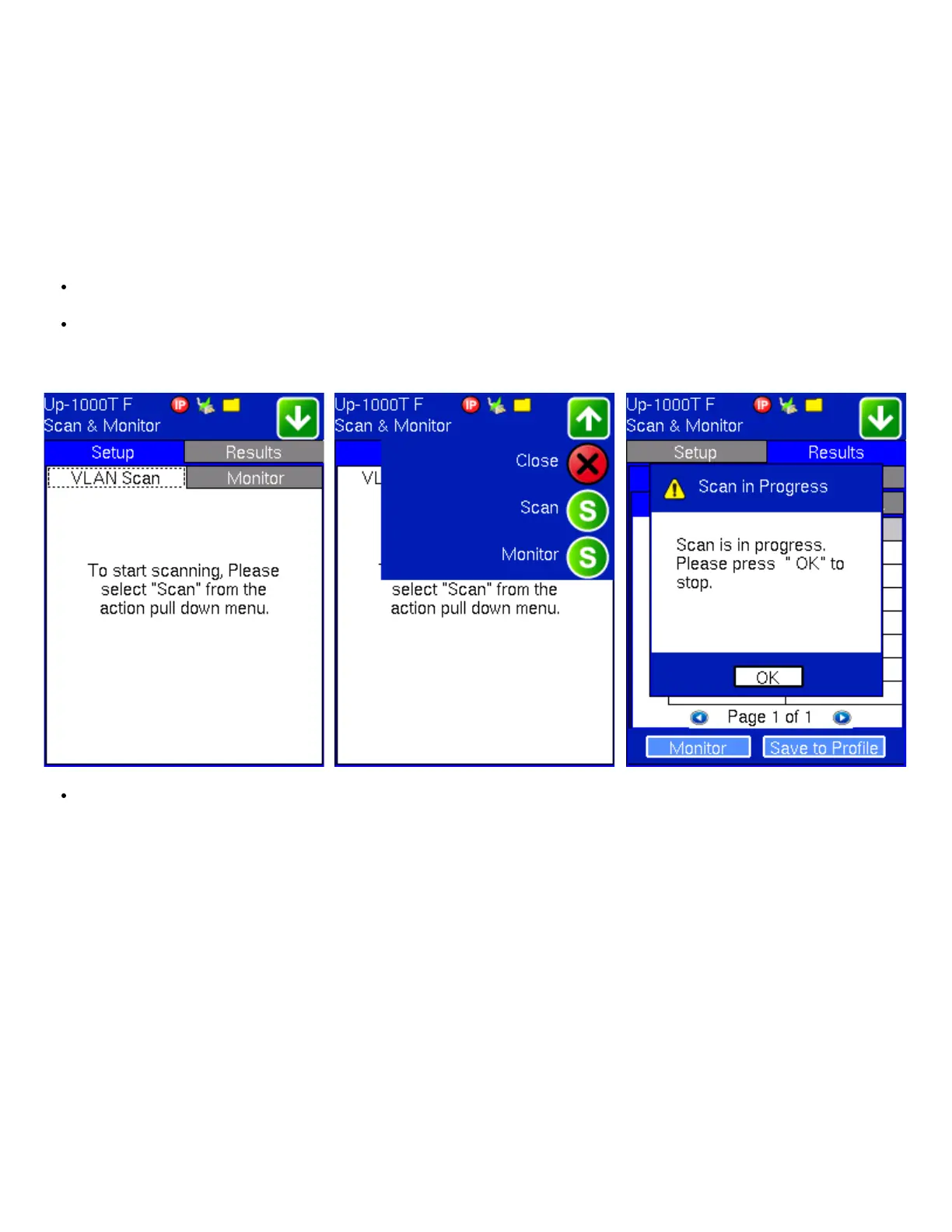
While traffic is being received, press Scan. The Results tab displays a list of detected VLAN IDs and the percentage of
traffic marked with those IDs. Check up to 8 streams to monitor.
To store VLAN IDs from the scan, place a check next to the desired VLAN ID(s) and press Save to Profile. Use the touch
screen keypad to name the profile. The saved profile can now be accessed from the Setup Monitor tab.
VLAN Scan Scan and Monitor Buttons Scan in Progress Message
The VLAN Stack tab displays detected SP and CE VLAN tags (if stack VLAN tags are used).
VLAN ID VLAN Stack
TX130M+_e-manual_D07-00-051P_RevD00


 To Next Page