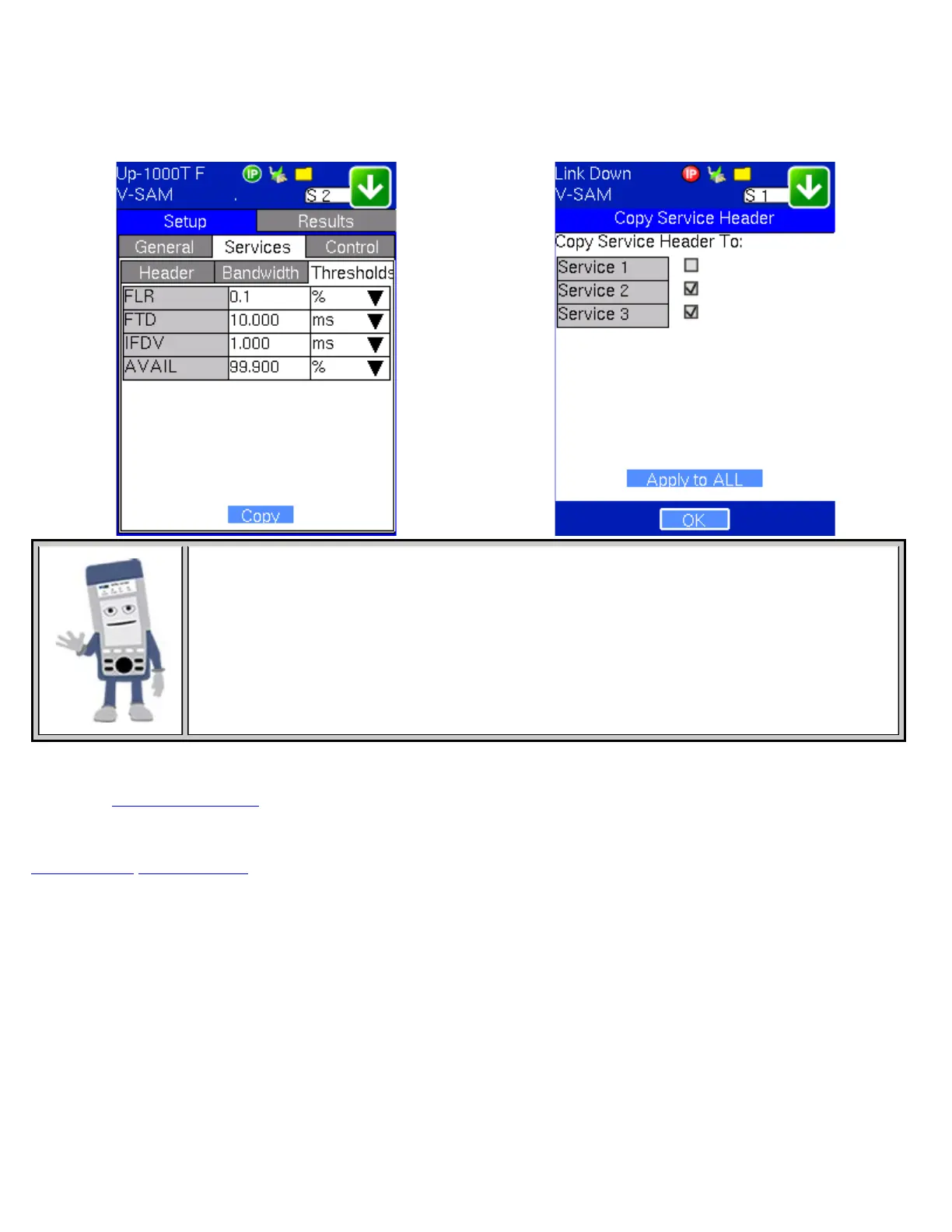
for traffic conforming to the CIR. Enter a percentage from 0-100. The user can also choose to Disable the AVAIL
threshold evaluation. AVAIL will be measured regardless, but the value will not contribute toward passing or failing the
service.
V-SAM Services - Thresholds
Copying Frame Configurations
Between Services
Copying Services
Tap on the Copy button on the bottom of any of the Services tabs (Header, Bandwidth,
Threshold) to copy frame parameters specific to that tab to other services. For example, pressing
Copy on the Header tab will only transfer header parameters to other services.
Control Settings
Please see
7.1.4 Control Settings for information on setting up a remote connection with another unit.
Note: Asymmetric Mode, mentioned in that section, is unavailable for V-SAM Control settings.
Go back to top Go back to ToC
16.2 Results
Configuration Test
Note: To run the test, make sure that traffic is being looped back at the far end of the network under test.
The Summary tab displays the status of each service and test as Pass, Failed, Pending, or Disabled. Tapping on Services
displays live values for FLR, FTD, and FDV as the test is running. If any measured values do not meet the service test
parameters set in the Bandwidth and Threshold tabs, the test fails. The zoom function on the bottom right side of the screen
displays detailed results for each stream.
Conf. Test - Summary Tab Conf. Test - Services Tab
TX130M+_e-manual_D07-00-051P_RevD00



 To Next Page