Go back to top Go back to ToC
8.1.3 Threshold Settings
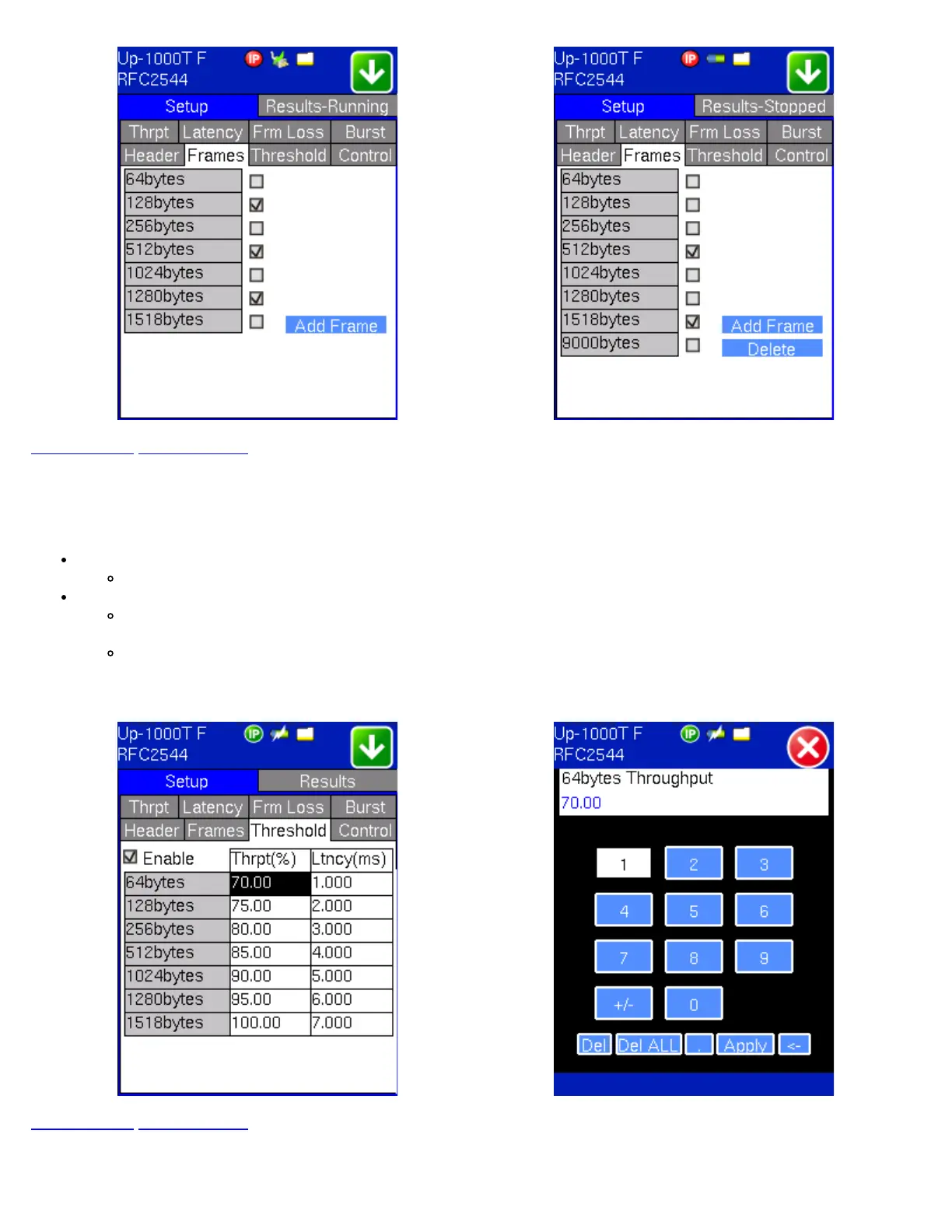
Threshold tab:
User enables or disables threshold settings for the throughput and latency tests.
When enabled, threshold settings can be configured for all of the test frames selected in the frame settings tab.
A Pass/Fail criteria will be applied when the threshold settings are enabled.
For example - If the throughput threshold value for a 64 byte frame is configured for 80%, then a Pass criteria is
assigned if the throughput rate is 80% or better
The threshold values for Throughput and Latency can be customized per user requirements. Tap on the selected
value to edit.
RFC 2544 Setup - Thresholds RFC 2544 Threshold Editing
Go back to top Go back to ToC
8.1.4 Throughput, Latency, Frame Loss, and Burst Settings
TX130M+_e-manual_D07-00-051P_RevD00



 To Next Page