5.0 Home Menus
Ethernet and PDH/DSn Menus
Action Menu (Menu B only)
Go back to top Go back to ToC
5.1 Ethernet and PDH/DSn Home Menus
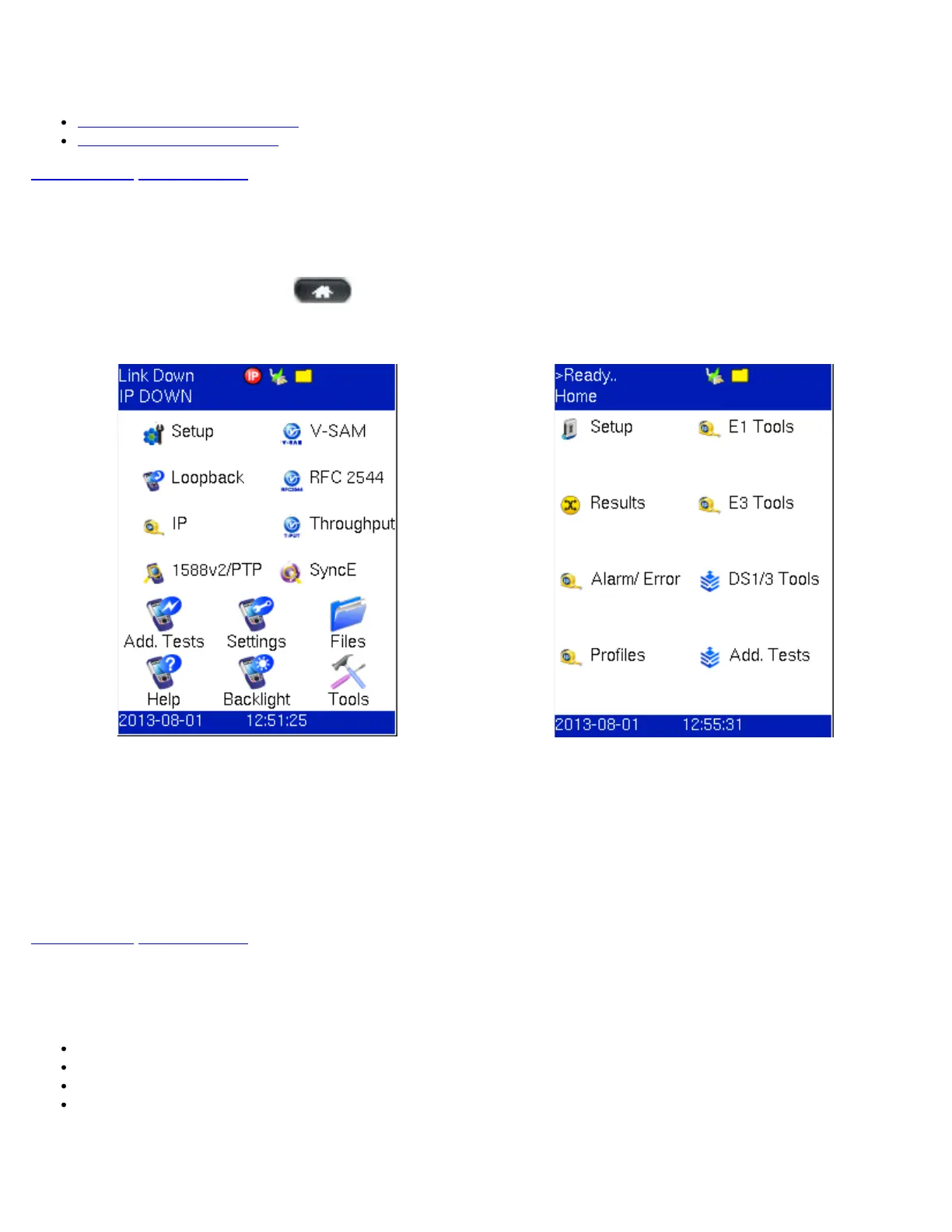
The TX130M+ is able to record Ethernet and PDH/DSn measurements. The two modes are featured on separate home menus.
To toggle between Ethernet and PDH/DSn modes, press the MODE key. Either home menu can be accessed at any time during
operation by pressing the Home key (
) on the rubber keypad.
Menu A - Ethernet, SyncE, 1588v2, and Common
Functions
Menu B - PDH and DSn
Menu A features Ethernet, SyncE, 1588v2, and Common Functions.
The upper part of Menu A contains items specific to the test application of the handheld test set, while the lower part of the menu
contains items common to all VeEX VePAL handheld test sets.
Menu B features PDH and DSn test functions.
Some items are optional, and require the purchase of a software option in order to be activated. Some items have not been
released, and will become available in future software releases.
Go back to top Go back to ToC
5.2 Action Menu (Menu B only)
In Menu B, tapping the green arrow access the Action Menu, which displays the following menu selections:
Close: Closes the Action menu
Start: Starts measurements and brings up the Results screen.
Stop: Stops measurements
Error/Alarm Injection
Action Menu
TX130M+_e-manual_D07-00-051P_RevD00



 To Next Page