VIDEONICS TITLEMAKER 3000 PAGE 11
A
B
2
C
B
3
AC
B
1
Chapter 3 • Connections
ConnectionsOverallConcept
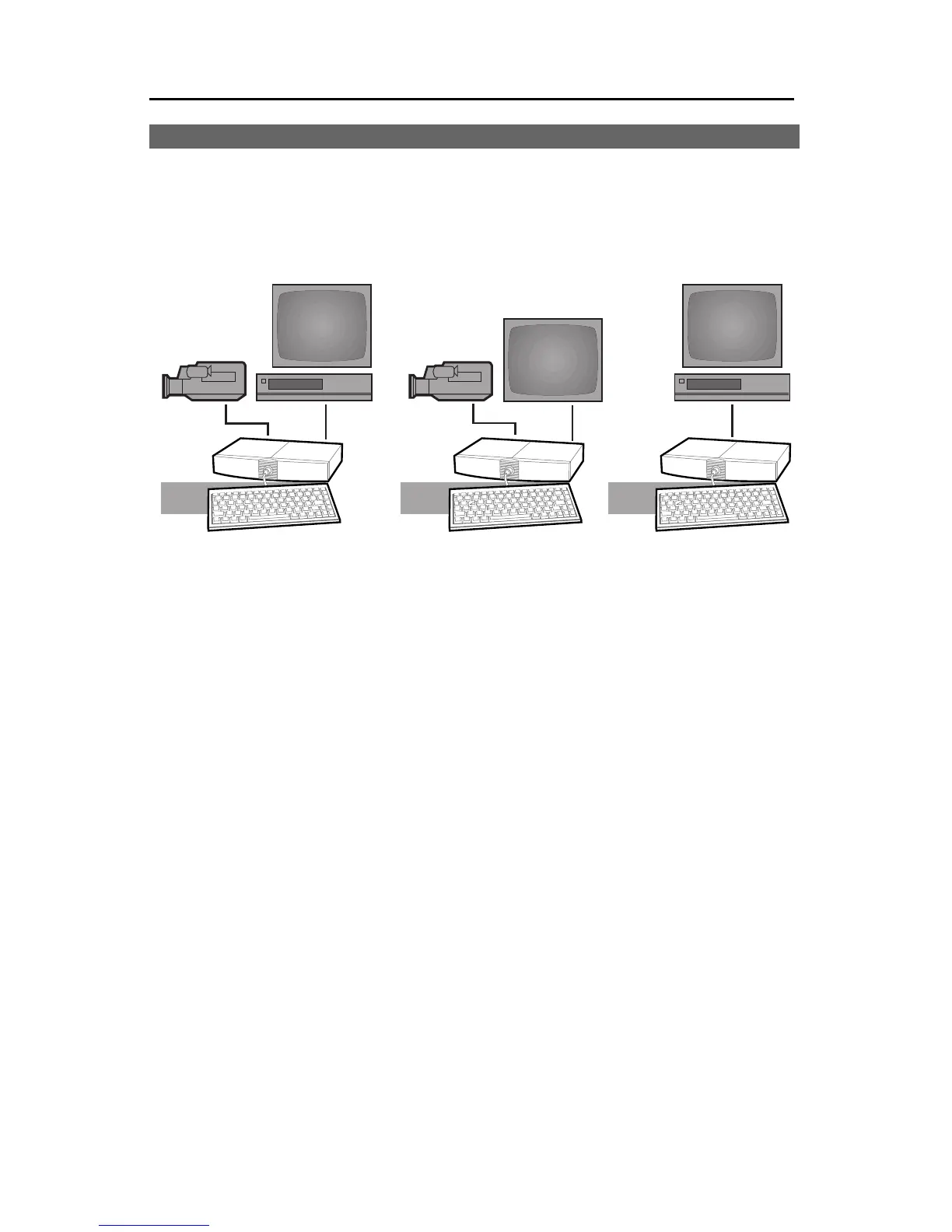
The first diagram (1) shows a typical video production setup. TitleMaker
3000is connectedbetween a videosource (A),whichplays thepicture towhich
you will add titles, and a recorder (C), which will record the results. Some
common variations:
1 The diagram shows a camcorder (A) as the video source. Other sources,
suchas a VCR orcamera, can besubstituted.
Hint:Youcanleavetheunitpermanentlyconnected.Whenthepowersupplyis
pluggedin,justleavethepowerswitch(locatedontherearpanel)intheonposi-
tionandturnpoweroffatthekeyboard.Theinputsignalispassedthroughtothe
outputandnotitlesareadded.
2 The output can be connected directly to a monitor (B), instead of going
through a VCR, if you plan to display titles without recording them.
3 The source is optional — TitleMaker 3000 can operate without a source,
generating titles on its own backgrounds and outputting them to a moni-
tor or recording VCR.
This chapter describes how to connect the inputs, outputs, and monitors.
Chapter 4, “Connecting Editing Equipment” goes further, explaining how to
attach editing equipment, such as an edit controller, video mixer, video pro-
cessor, or effects unit.



 To Next Page