PAGE 4 VIDEONICS TITLEMAKER 3000
L
AB
C
D
VIDEO
IN
AUDIO
IN
VIDEO
OUT
AUDIO
OUT
Chapter 2 • QuickStart
Whetheryou’reavideoexpertlookingforjustthebasicstepsora
beginnerwhowantsinstantgratification,thischapterwillhaveyou
titling in minutes!
This chapter describes just the basics. Many features and applications are
skipped or mentioned only briefly. For more information, or if you encounter
problems, refer to the table of contents or the index to locate a more complete
discussion elsewhere in the manual.
Connections
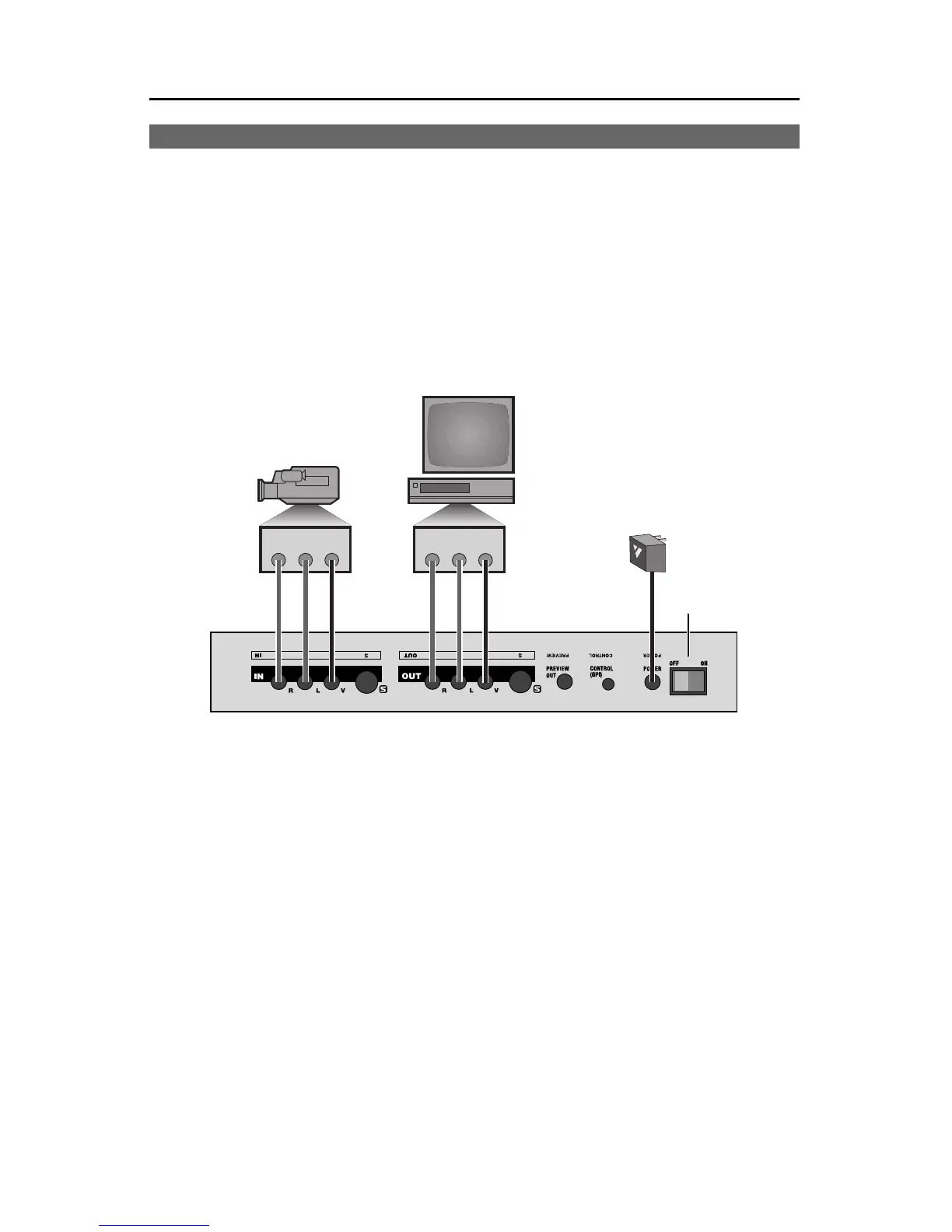
Rear Panel: Connect the power supply ( C) to a working wall outlet and connect the other
end to TitleMaker 3000’s POWER jack.
Connect TitleMaker 3000’s OUT jacks to the VIDEO and AUDIO IN jacks of a VCR (B).
Connect a television or monitor to the VCR in the normal fashion, so you can see the VCR’s
output. Leave the PREVIEW OUT jack unconnected unless you are using a PREVIEW monitor
(Chapter 22). Turn the television and VCR on.
Connect a camcorder, VCR or other source ( A) to TitleMaker 3000’s video and audio IN
jacks if you plan to superimpose titles over video. Turn on the video source and start the
tape rolling.
Note: The illustration shows the use of composite (RCA-style) jacks for the video connections.
You can use S-video (Y/C) jacks instead. It is important to use the same type of jacks for the
input and the output. In other words, if your input is connected via the S-video jack, the output
should also use S-video; if it uses the composite jack, the output should use composite too. An
on-screen warning will alert you if you attempt to use the S-video output and composite input.
Note: The audio connections are for convenience only — the audio signals are not affected by
the unit.
Keyboard: Connect the keyboard to the jack on TitleMaker 3000’s front panel.
TypicalTitleMaker3000connection



 To Next Page