PAGE 60 VIDEONICS TITLEMAKER 3000
Chapter 17 •
Effects, Scrolls, and Crawls
Effectsprovideinterestingtransitionsbetweenpagesoftitles.They
includesimplecuts,fades,wipes,slides,scrolls,andcrawls.
TitleMaker 3000 includes a variety of transition effects. You can use one
transition effect to introduce a page of titles and a separate transition effect to
end the page. Each can be set to any of eight speeds. You can set a duration
for each page to determine how long it will be displayed before the out-effect
removes it. You can set an infinite duration to display a page until you press
PLAY again.You can superimpose the dateor time onto a page. Youcan also
use scrolls and crawls, at any of eight speeds and in four directions, to make
your titles marchacross the screen.
PageSymbols
The Editing Screen in-
cludesasetofpagesymbolsat
the start of each page. Page
symbols identify the project,
page number, and vertical
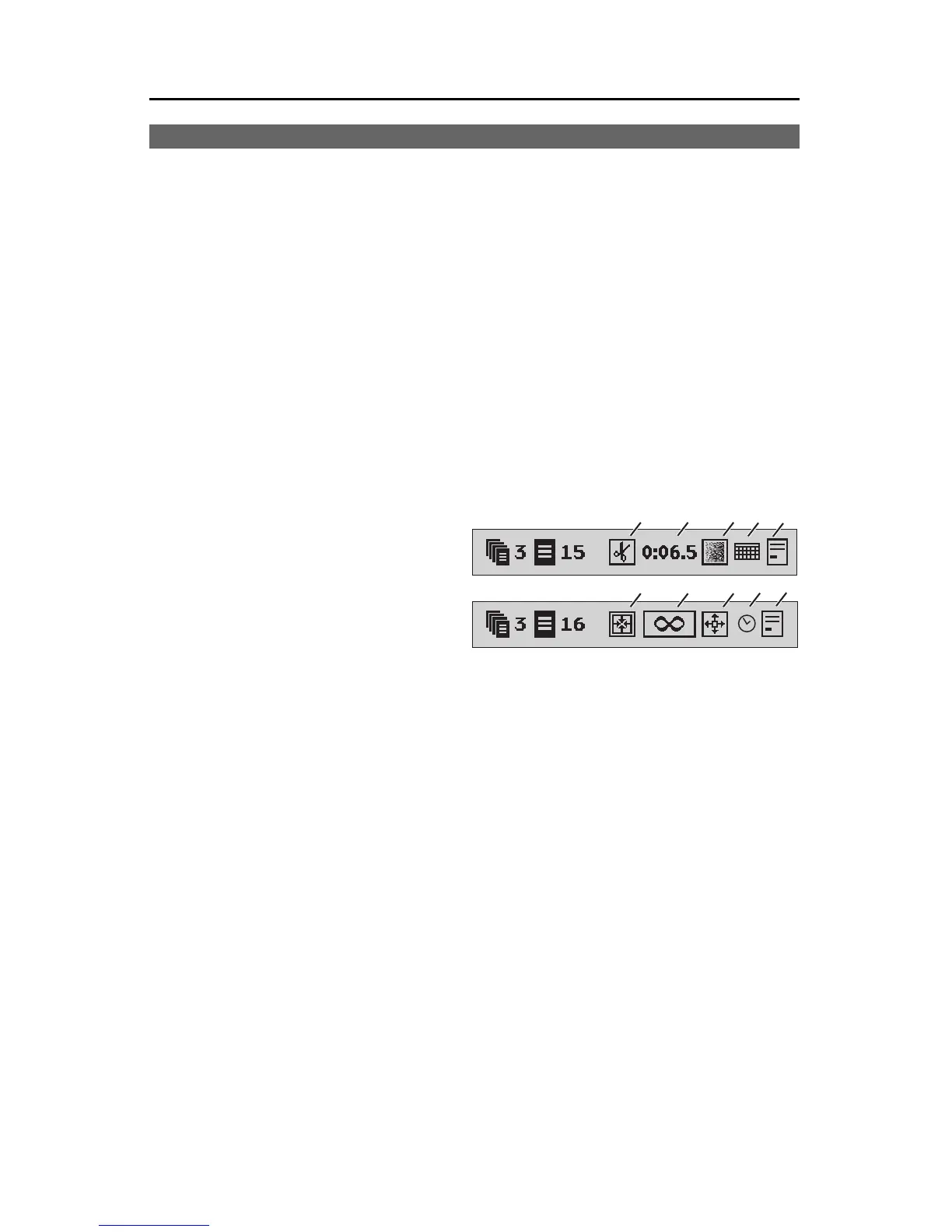
positioning of the text on the page. Additionally, page symbols tell you which
effects havebeen set to start andend the page, whether the pagewill scroll or
crawl, how long the page will be displayed between transitions, and whether
the time and/or date have been selected to display, and its horizontal posi-
tion on the page.
In the examples above, the first page (page bar A) starts with a cut (1),
remains on the screen for 6.5 seconds (2), ends with a fade (3), and displays
the current date (4), which is left-justified on the page (5).
The next page (page bar B) opens with an imploding wipe ( 6 ) (all four
edgessweep in tothe center),remains onthe screen untilPLAY ispressed (7),
ends with an exploding wipe (8) (the edges sweep from the center out to the
edges), and displays current time (9) which is left-justified on the page (10).
EffectsMenus
The Effects In menu contains three sub-menus. The first two are used to
determine which effect will be used to start the page, and the speed of the
effect. The third menu is used to determine how the title is displayed after the
in-effect is performed, including displaying the date and time.
The Effects Out menu is used to choose the effect that will remove the
page. It is identical to the EFFECTS IN menu (and works the same way) ex-
cept that the bottom sub-menu is omitted.
A
B
❻
❸❷❶
❼❽
❹
❺
❾
❿



 To Next Page