PAGE 14 VIDEONICS TITLEMAKER 3000
L
AB
C
D
VIDEO
IN
AUDIO
IN
VIDEO
OUT
AUDIO
OUT
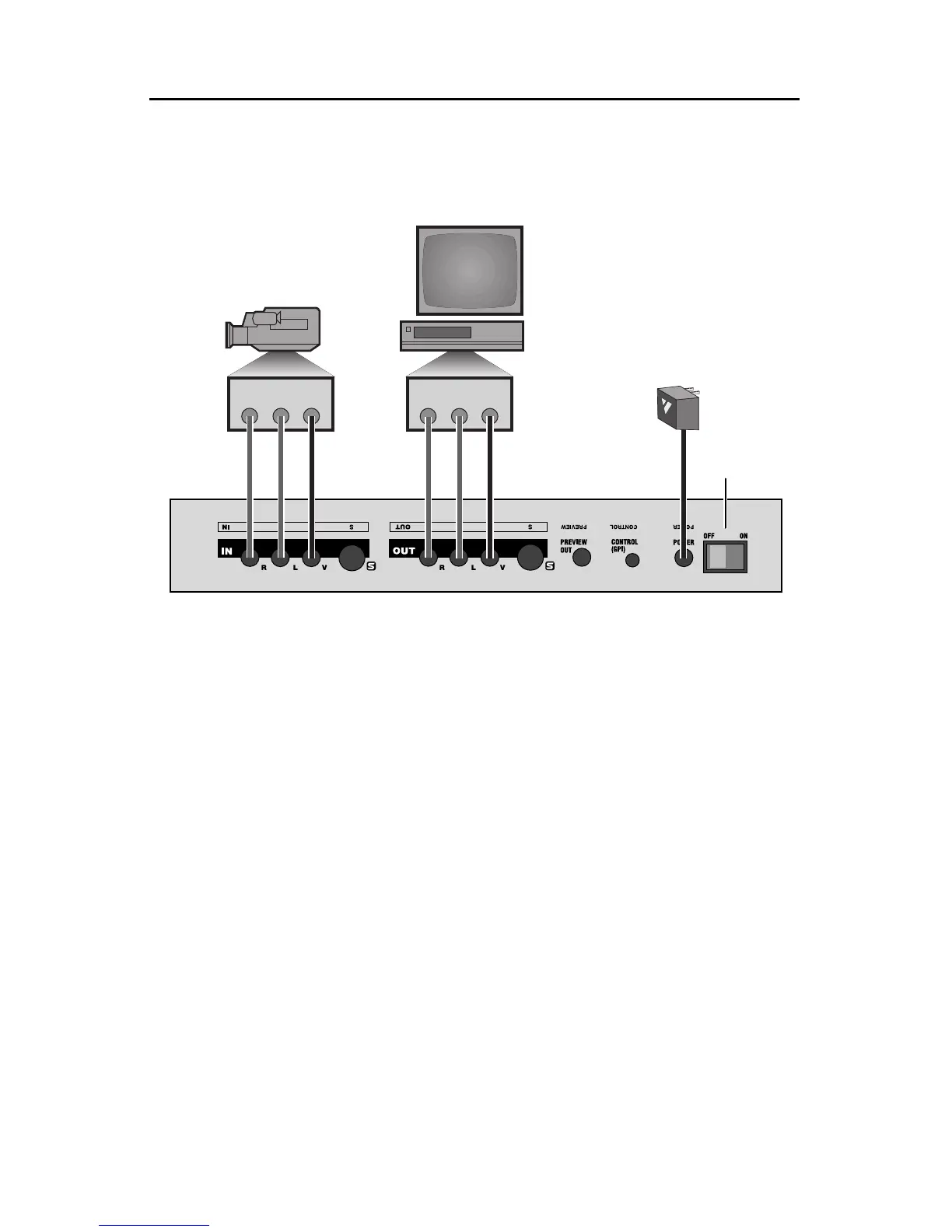
ConnectionDiagram
This diagram shows the connections for a typical titling setup. The sec-
tions that follow provide detailed instructions.
ConnectingPower
n Connect the power supply (C) to the POWER input and plug it into a work-
ing power outlet. Be sure to use the power supply that came with the unit.
Others,includingtheones suppliedwithotherVideonicsproducts, may
damagetheunit andvoid thewarranty.
Once the power supply is connected, turn on the power by pressing the
POWER SWITCH (D) on the rear panel. The power light on the front panel
will go on for a moment and then go out. Simultaneously, you should see
three lights on the keyboard (upper right hand corner) flash on and off.
Turning PowerOn andOffVideoPass-Through
andDataProtection
n To turn the unit on or off, press the POWER key (upper left hand corner of
the keyboard). The front panel light indicates that the power is on.
Notes:
• When the unit has been connected to the power supply for a while, it will
be warm to the touch. The power supply will also be warm. This is normal.



 To Next Page