PAGE 32 VIDEONICS TITLEMAKER 3000
DeletingaPage
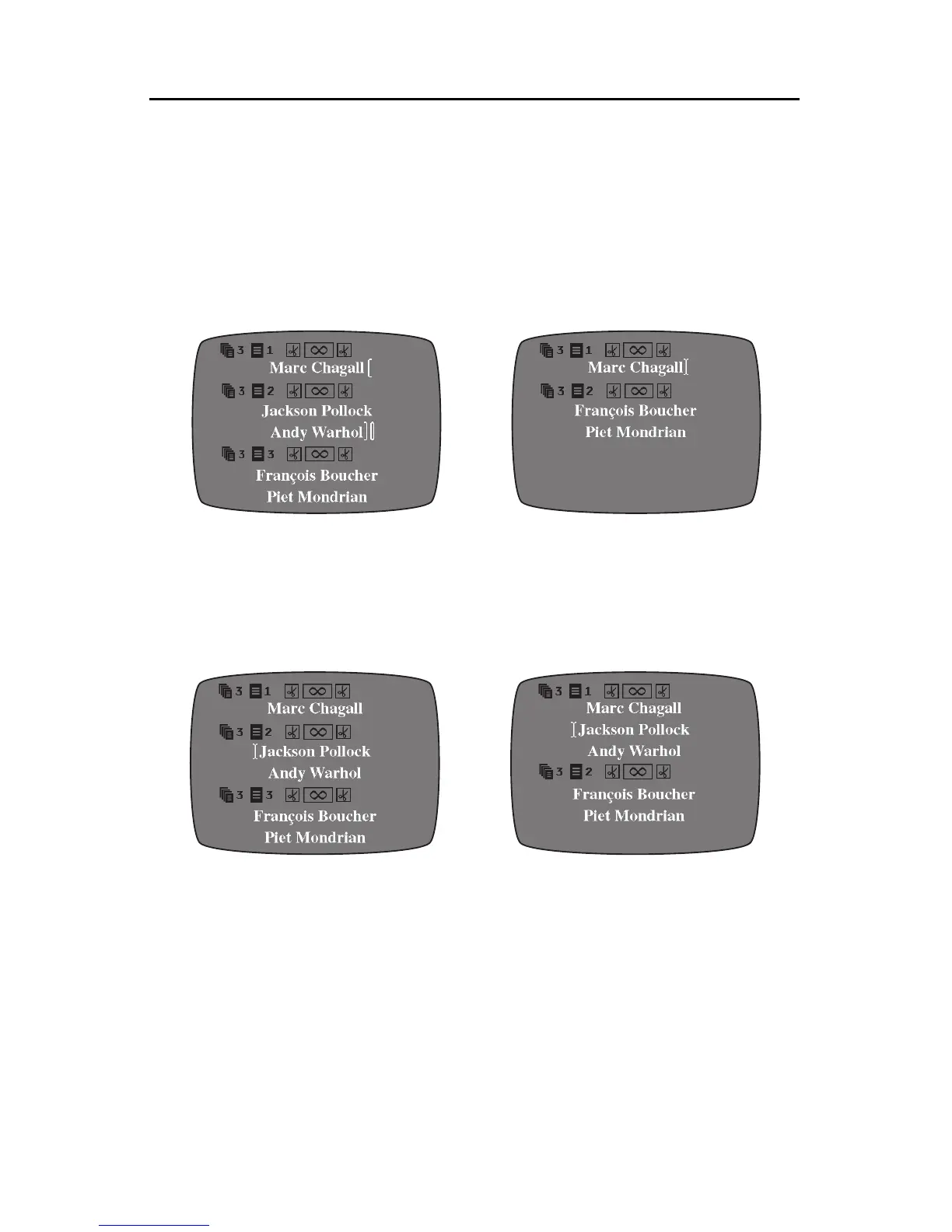
To delete an entire page and its contents, use the Editing Screen to locate
the page.Position the cursor after the very lastcharacter of the previous page
and press MARK START. Position the cursor after the last character of the
page you want to delete and press MARK END. (This marks the entire page,
including the page symbols at the page’s start.) Press DELETE. Remember
that as a safeguard, in order to delete marked text, thecursor mustbe located
just after one of the marks.
Ifanentirepageismarked,DELETEwillerasepageanditscontents.
To delete a set of page symbols (merging the two pages), don’t mark any
text. Position the cursor just before the first character after the page symbols
andpressDELETE. Thepagesymbols willbedeleted andthepages willmerge.
The pagecharacteristics (background color, effects,etc.) of the page thatpre-
ceded the symbols will be applied to the new combined page.
Ifnothingismarked,deletingjustthepagesymbollinewillmergethetwopages.
If you delete something accidentally, remember that UNDO restores the
last thing you deleted as long as it is pressed immediately after the deletion.
InsertingaPage
To add a new page, or divide a page into two pages, position the cursor at
the desired location and press NEW PAGE. A new set of page symbols will
appear at that point and the new page will inherit the characteristics of the
page before it.You can then change the characteristics of either page.



 To Next Page