WELCOME
9
THE VISIONEER STROBE 500 SCANNER
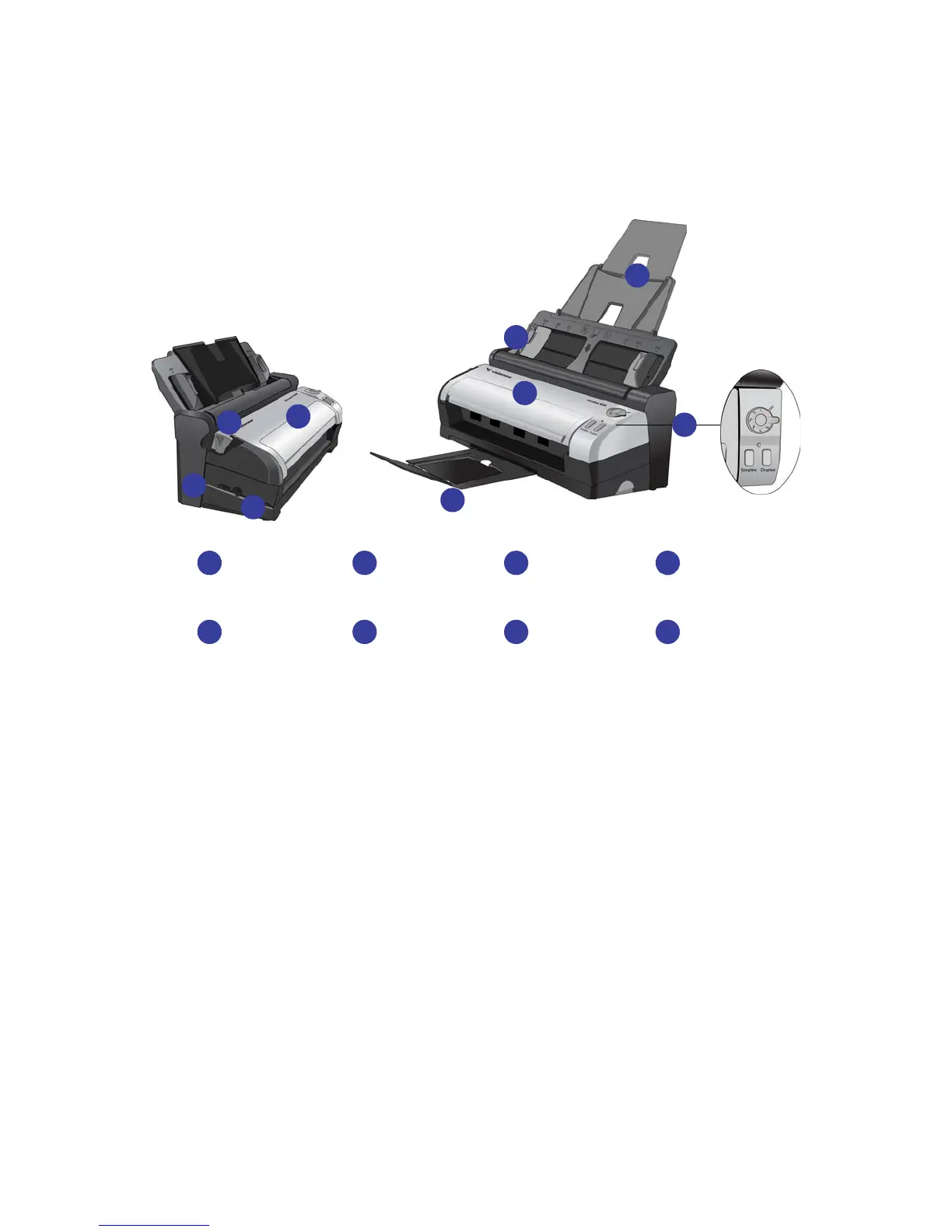
Universal Serial Bus (USB) port—Connects the scanner to the computer.
Power jack—Connects the power cord to the scanner.
Cover release—Opens the cover on the scanner.
Front Feed tray—Open to feed items through the front of the scanner.
Output tray—Holds documents after being scanned.
Paper Guides—Adjusts to fit document width.
Input tray—Holds a stack of documents in the scanner. Unfolds to support various paper lengths.
Control panel—Scanning controls.
• Power Switch & Scan Settings Dial—Turn the dial to the right to turn on the scanner power. Numbers 1-6
represent the 6 OneTouch scan settings.
• Status Light—Shows the scanner’s current status.
• OneTouch Scanner Buttons—Press the Simplex or Duplex button to initiate scanning using the scan
settings for the current dial number.
Power PortUSB Port Cover Release Front Feed Tray
3 41 2
Paper GuidesOutput Tray Input Tray Control Panel
7 85 6
1
2
3
4
4
5
6
7
8














 To Next Page